
 Pipeline & Proposals
 Project Management
 Resource Planning
 Time & Costs
 WIP & Invoicing
 Commercial Reporting
 Consulting Engineers
 Architects
 Town Planners
 Building Designers
Abtrac Alternative: A Clear Guide for Australian and NZ Firms

Ben Walker
Written for Drum

In This Article
Firms that move from Abtrac often tell Drum the same story. The software can be hard and slow to use. Staff use it less. Variations go untracked. Managers end up rebuilding reports in spreadsheets.
These are not four separate problems. They form a chain. When a system is hard to use, less data goes in. When data is missing, reports cannot be trusted. The spreadsheet then becomes the real system.
If you need an Abtrac alternative, this guide will help you test that chain. It gives you a fair look at Abtrac and Drum, plus five tasks to run before you switch.
Why Firms Start Looking for an Abtrac Alternative
Abtrac was built for firms such as engineers, architects and surveyors. It can track time, fees, WIP, job costs, invoices and proposals. It also has work plans and close to 100 ready-made reports. You can see the list on Abtrac’s feature page.
The issue raised by firms that have moved is not always whether a feature exists. It is whether busy staff can find it, learn it and use it each day.
It is hard to learn, so staff use it less. Some Capterra reviews call Abtrac dated, slow or hard to learn. Drum hears the same point from firms that have moved. Staff put off time entries and project updates when each task feels like work. Managers then make calls with old or missing data.
Slow pages make small jobs tedious. A short wait may not look bad in a demo. It feels different when ten people open jobs, save time and run reports all day. The delay breaks focus and turns simple admin into a chore. Some staff will wait until Friday. Others will keep notes somewhere else.
Variations can fall through the gaps. A variation is extra work outside the agreed fee. Abtrac can track one as a new task, a task group or an extra value on a task. Its own variation guide explains the three paths. Customers tell Drum that this choice can be too hard in day-to-day work. If a project manager does not record the change at once, new hours may land on the old budget. The firm can then miss the extra fee or find out too late to bill it.
Reports end up back in spreadsheets. One hundred reports do not help if staff cannot get the view they need. Firms tell Drum they export Abtrac data, change it in a sheet and use that sheet for WIP or job reviews. The sheet is out of date as soon as someone logs more time. It also makes it hard for a director, project manager and finance lead to work from the same figures.
What this looked like in one 45-person firm. Before moving to Drum, a civil engineering firm used Abtrac mainly as a project register and time tracker. Even time entry was not the same across every team.
Project budgets, progress claims and variations lived in spreadsheets. At the end of each month, project managers emailed their progress claims to the finance manager. Finance then processed them outside Abtrac. Month-end billing sat with one person instead of being shared across the team.
Tenders, enquiries and leads lived in another spreadsheet. No one could see sales, budgets, delivery, variations, WIP and invoices in one place.
Useful reporting was almost impossible. This was not because the firm did not want reports. Abtrac did not hold a full and current record of how the firm worked. A report built from part of the data could only show part of the truth.
Abtrac also does more than some older comparisons suggest. It tracks proposals, but it tracks them as jobs. A proposal in Abtrac is a job set up as a proposal, with a follow-up date, a win or loss reason and the chance of a win. It does not have a separate sales pipeline for enquiries and leads. It can send invoices, credit notes and contact data to Xero. It can also bring bill details and invoice payment updates back. Its Xero guide shows what moves each way.
That is why a fair review must test use, not just features. Do not switch because someone says your current tool is old. Switch when another tool makes an important job faster, easier or clearer for the people who do it.
What to Test in an Abtrac Alternative
A good demo should use one of your jobs. A tidy sample account can hide the work your team will face each day. Ask each vendor to let your staff run these five tests.
1. Test a new user. Give three staff a ten-minute tour. Then ask them to log time, fix a wrong entry and find the budget left on a job. Count how often they need help. Fast time entry is worth more than a long feature list.
2. Add a variation. Use a real change your clients ask for. Record the new scope, fee and hours without changing the first budget. Mark it as waiting for approval, then approved. Can the project manager see it in the budget, WIP, forecast and next invoice? Can they do this without help from finance?
3. Measure the wait. Use your normal office internet, not a video run by the vendor. Open five jobs, enter ten time rows and move between three reports. Use a timer. A two-second wait done once is small. The same wait, all day, for the whole team is not.
4. Run month-end with no email or export. Can the tool start a claim for every live job with WIP? Ask each job owner to check and finish their claim in the tool. Then ask a second finance team member to take over. Can they see what is ready to bill, which variations are missing and how much WIP the firm holds? If they need an email or spreadsheet to finish the work, the tool has failed the test.
5. Test the Xero fields. Send a draft invoice with your own tax rate, account code and tracking category. Mark it as paid in Xero and check what comes back. If you use credit notes or supplier bills, test those too. Write down what moves, which way it moves and what still needs a person to fix it.
These tests turn a broad claim such as “easy to use” into proof your team can trust. Let staff drive the screen. Do not let the salesperson do each task for them.
Drum vs Abtrac
Drum and Abtrac both serve professional service firms in Australia and New Zealand. Both cover the main work from a fee proposal to an invoice. The main gap is how each tool joins the steps and shows the data.
| Task | Abtrac | Drum |
|---|---|---|
| Sales work | No separate pipeline. Tracks a proposal as a job, with follow-ups, win/loss reasons and chance of a win | Sales pipeline with email lead capture |
| Fee proposals | Makes proposals from job data and Word templates | Makes proposals from sales data and exports them to Word |
| Job plans | Tasks, budgets, work plans and staff schedules | Stages, saved templates, budgets, tasks and staff plans |
| Variations | New tasks, task groups or extra-value fields | Variations linked with the job budget, WIP and invoices |
| Time entry | Web and mobile time entry | Web and mobile time entry with manager approval |
| WIP and job health | WIP screens, job reports and close to 100 ready-made reports | Live job view for budget, time, costs, billed work and unbilled WIP |
| Month-end progress claims | Invoices can be made from unbilled work | Starts a claim for every live project with WIP, ready for the project owner to finish |
| Sales and income forecast | Uses proposals, job chance, work plans and past data | Joins the sales pipeline with live jobs |
| Xero | Sends invoices, credit notes and contacts; receives bills and payment updates | Syncs invoices, contacts, payments, credit notes, tax rates, tracking categories and account codes |
| Setup help | Support and paid data move options | Guided setup, data move and training |
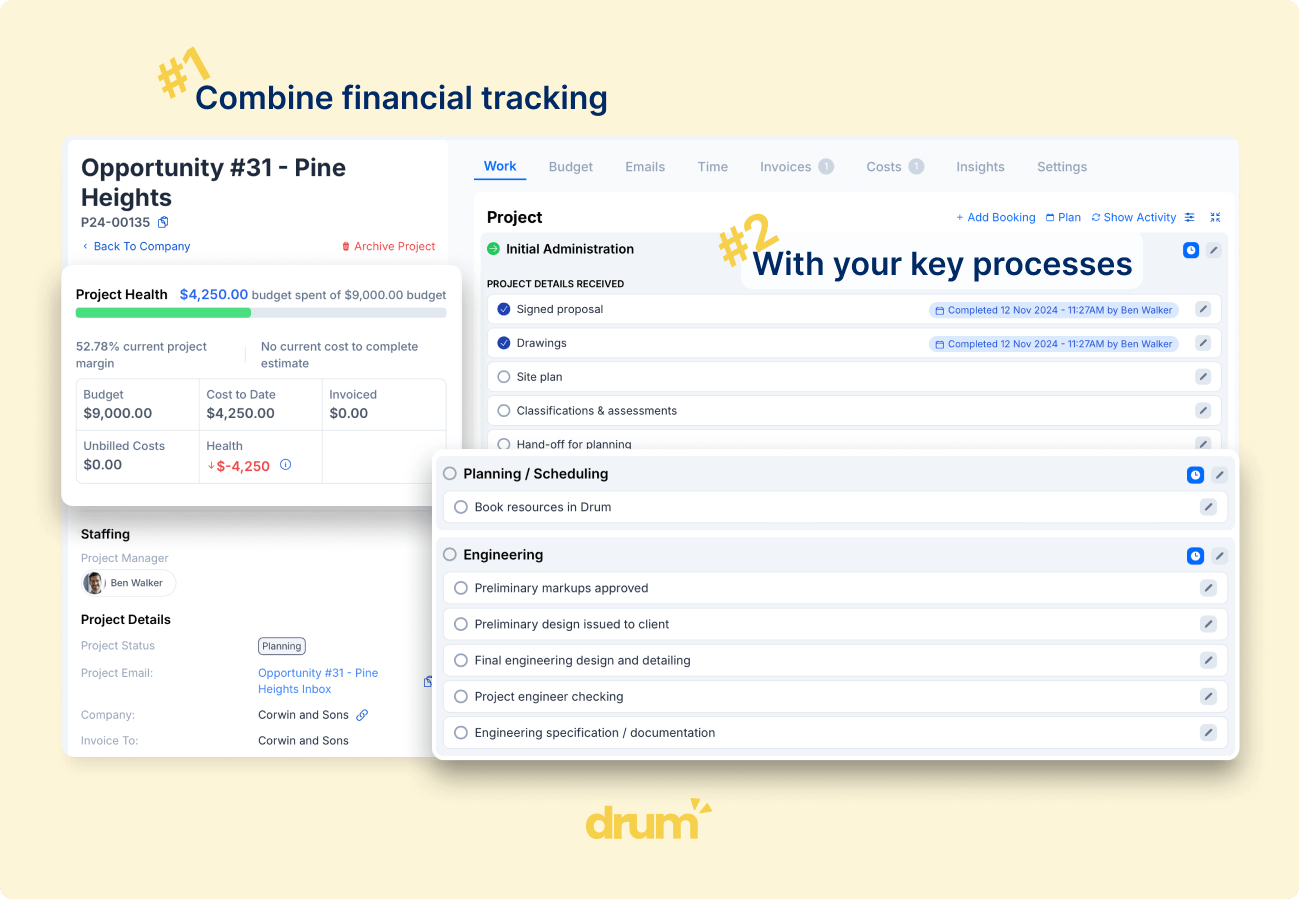
Drum’s month-end claim run solves the finance bottleneck in the example above. At month-end, Drum starts a claim for every live project with WIP. Each project owner checks and finishes their own claim. Finance can watch the invoicing run. They do not need to gather emails or build each claim by hand.
What about price? On published monthly fees, Abtrac is cheaper. It starts at $47 a month for one user, with lower per-user rates as the team grows, plus $20 a month for the Xero or MYOB link. Setup, training and data migration are quoted separately. Drum is $225 a month for your first five seats, then $45 per extra seat on Drum Complete, excluding GST and onboarding. Our Abtrac pricing and review works through the numbers for 10, 25 and 50 staff. The licence is only part of the cost, though. Time lost to slow screens and side spreadsheets counts too.
Do not treat the table as proof that Drum is easier or faster. Let a real project manager enter a variation while both vendors watch. Then ask that person which path they would use on a busy Tuesday.
Drum may be a better fit if your team avoids Abtrac, variations live in email, or reports must be fixed in a sheet. It also shows billed and unbilled WIP on each job, so month-end can start with a review instead of a hunt for data. Its sales pipeline can also turn a lead into a job without typing the same details twice.
Abtrac may still be the right fit if your staff know it well and its reports answer your key questions. Moving years of data takes time. If a new tool cannot show a clear gain in the tests above, staying put is a sound choice.
How to Switch Without a Month-End Mess
Start by naming the one result you need. It may be daily time entry, every variation being logged or a WIP report that needs no spreadsheet. Write down how you will measure it. For example: “A project manager can check job health in under one minute.”
Next, choose what must move. Most firms need clients, staff, open jobs, fees, rates and WIP. You may not need every old time entry in the new tool. Keep a safe copy of old records if your tax and audit rules call for it. Drum helps move client, job and staff data. Abtrac also offers data move help, and its onboarding guide says the time and fee depend on the amount of data.
Our guide to switching from Abtrac to Drum walks through the export, the Xero checks and a sample timeline.
Run both tools side by side for a short, set time. Pick a cut-off date for new time and invoices. Do not let staff choose which tool to use after that date. Two live sets of figures are worse than one old set.
Train people on their own work. Staff need to know how to enter and fix time. Managers need to see budget, WIP and bills. Finance needs to test Xero and month-end. Short lessons for each role are easier to use than one long tour.
For a New Zealand firm, test your own Xero file. Drum reads its tax rates, tracking categories and account codes. Test 15% GST, any zero-rated work you use, one client invoice and one supplier bill. Then check each item in both tools.
There is also a time gap to plan for. Drum’s support team works on Australian east coast time. New Zealand is two or three hours ahead, based on the time of year. If you need help at 8 am in New Zealand, ask how urgent work is handled before you move.
Is It Time to Choose a New Abtrac Alternative?
Keep Abtrac if your team can enter time with ease, see job health early and run month-end without side sheets. A move brings cost and risk. It should earn its place.
Look at Drum if you want easier daily work, clear variation tracking and reports that need no side sheet. Use a real job in the demo. Ask staff from sales, delivery and finance to do the five tests. Their work will tell you more than any sales pitch.
If Drum makes those jobs easier, it may be the right Abtrac alternative for your firm. If it does not, you have still gained a clear list of what your next tool must fix.
Frequently Asked Questions
How much does Abtrac cost? Abtrac’s published pricing starts at $47 a month for one user, then $22 per user for users 2 to 10, $12 for 11 to 25, $8 for 26 to 50 and $3.25 beyond that, plus GST. The Xero or MYOB link adds $20 a month. Setup, training and data migration are extra one-off costs, quoted after Abtrac reviews your data.
Is Abtrac cheaper than Drum? On monthly licence fees, yes. Drum is $225 a month for the first five seats and $45 for each extra seat on Drum Complete, excluding GST and onboarding. Compare the full first-year cost, including Abtrac’s setup and migration fees and the staff time each tool takes, before you decide.
How long does it take to switch from Abtrac to Drum? Most firms are live on Drum within 14 days. Drum’s team helps move client, job and staff data, and a short period running both systems, with a firm cut-off date for new time and invoices, keeps month-end clean.
Want to test Drum with a job your firm knows well?
We'll show you how Drum handles time, variations, WIP, reports and Xero.