
 Pipeline & Proposals
 Project Management
 Resource Planning
 Time & Costs
 WIP & Invoicing
 Commercial Reporting
 Consulting Engineers
 Architects
 Town Planners
 Building Designers
See the commercial health of your firm in one live view
Drum connects project budgets, time, costs, WIP, invoicing and utilisation so engineering firm directors can see what is happening commercially across the business.
Instead of waiting for manually prepared reports, spreadsheet exports or month-end clean-up, Drum gives directors, project managers and finance a shared view of project WIP, profitability and billable utilisation.
- Track project WIP, unbilled time and costs in real time.
- Monitor project profitability before the work is finished.
- Report on billable utilisation by staff, team or director.
- Sync invoices, payments and contacts with Xero, MYOB or QuickBooks.
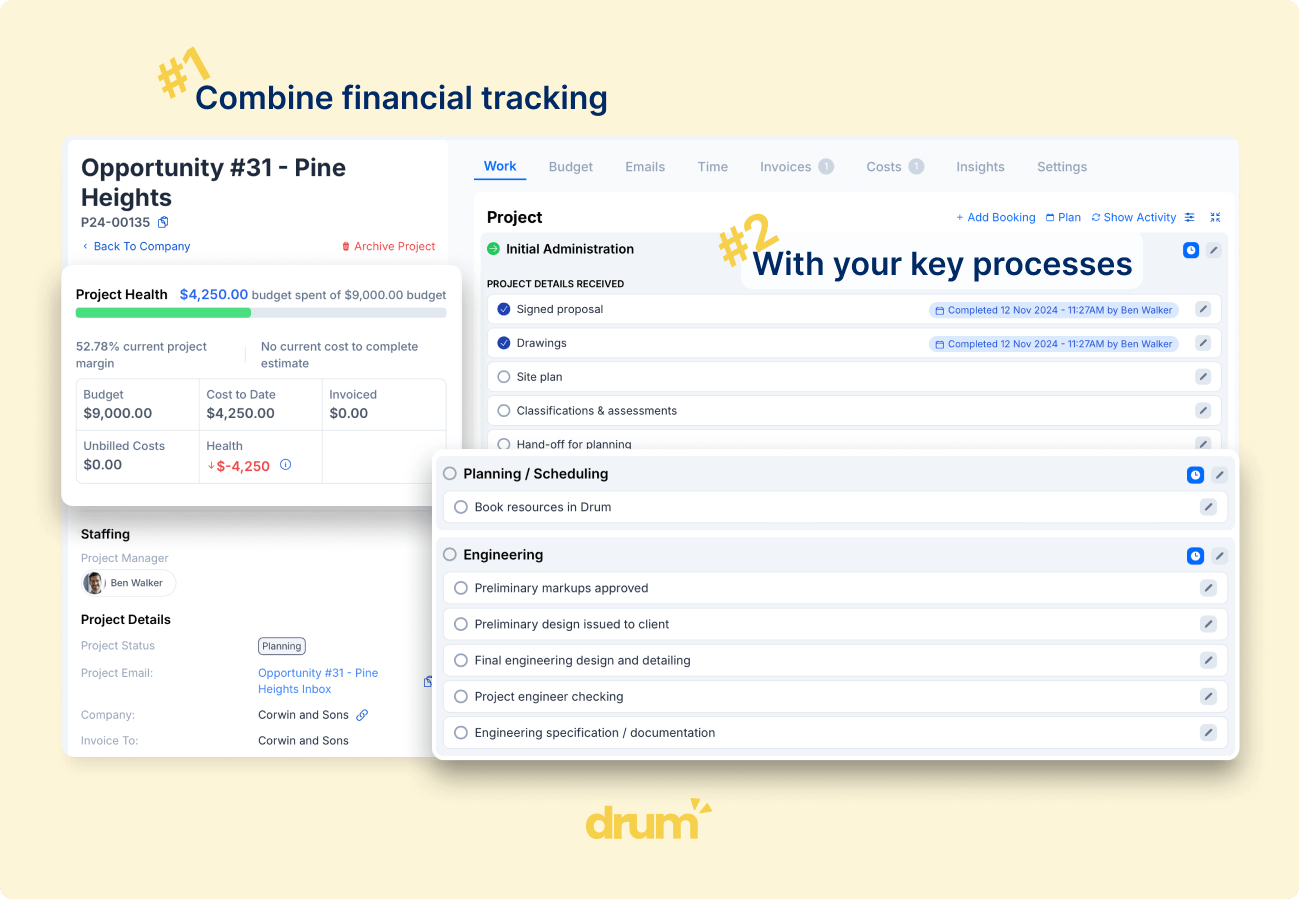
Most firms have reports. The problem is trusting them.
Engineering firm directors need to understand WIP, project profitability and staff utilisation without waiting for someone to manually assemble the numbers.
The problem is that commercial reporting is often spread across project software, Xero, spreadsheets, exported timesheets, manual WIP calculations and project manager updates. Leadership may have access to reports, but still lacks a reliable, live view of what is actually happening commercially across the firm.
- WIP is checked manually or adjusted in spreadsheets.
- Project profitability is only clear after invoices and costs are reviewed.
- Utilisation reports are delayed, incomplete or disconnected from project planning.
- Project managers and finance work from different numbers.
- Directors lack confidence in the commercial picture until month-end.
- Reporting depends too heavily on manual follow-up and interpretation.
One source of truth for WIP, profitability and utilisation
Drum gives engineering firms a connected commercial reporting workflow by bringing project budgets, timesheets, costs, WIP, invoicing and staff utilisation into one operating system.
That means directors, project managers and finance can work from the same live data instead of reconciling reports across multiple tools.
Track project WIP
See what work has been completed, what has been invoiced and what remains unbilled across projects.
Monitor project profitability
Compare budgets, contract values, time, costs and invoices to understand project margin and commercial performance.
Report on billable utilisation
Understand whether staff capacity is being converted into billable project work.
Connect reporting to operations
Reports run on live project, time, cost and invoice data, so the numbers reflect how the firm is actually operating.
Know what is sitting in WIP before month-end
Drum helps firms track project WIP as work is completed, time is entered, costs are recorded and invoices are raised.
Instead of waiting for finance to manually calculate unbilled work, directors and project managers can see where WIP is building, which projects need billing attention and whether invoicing is keeping pace with delivery.
- View WIP across active projects in one place.
- See unbilled time and costs as they accumulate.
- Compare invoiced amounts against budgets and contract values.
- Identify projects where billing is falling behind delivery.
- Reduce reliance on spreadsheet-based WIP reporting.
- Give finance and project managers the same view of what needs action.
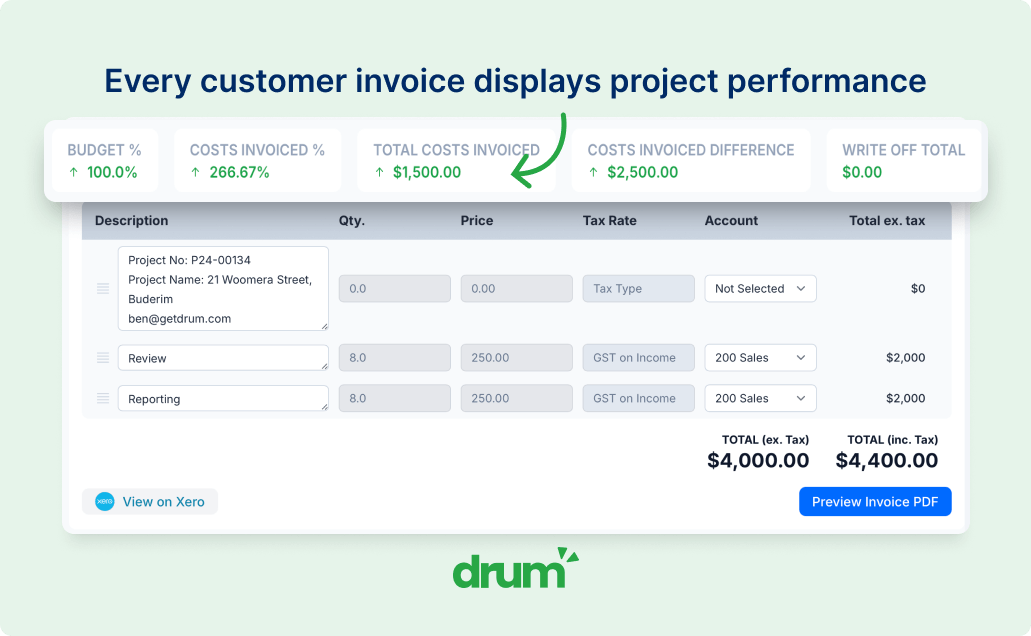
WIP should not be a month-end mystery.
Drum makes WIP visible throughout the month, so billing issues can be identified earlier and fewer commercial decisions are left until the books close.
See which projects are protecting margin and which ones are drifting
Drum connects budgets, time, costs, invoices and contract values so project profitability can be monitored as projects progress.
Project managers can see whether work is tracking within budget, finance can understand how invoicing relates to project performance, and directors can identify margin risk before it becomes a surprise.
Budget vs actuals
See how actual time and costs compare against the original project budget.
Contract value vs delivery effort
Understand whether the fee is being protected or eroded as the project progresses.
Project margin visibility
Monitor project profitability before the project is finished.
Commercial accountability
Give project managers clearer visibility over the financial impact of delivery decisions.
- Track actual time and costs against project budgets.
- See margin movement as work progresses.
- Identify projects at risk of over-servicing.
- Understand profitability by project, client, PM or director.
Understand whether staff capacity is turning into billable work
Staff utilisation is one of the clearest indicators of commercial health in an engineering firm.
Drum helps directors see how much staff time is being spent on billable project work, where utilisation is below expectations and whether available capacity is being converted into revenue-producing activity.
- Track billable utilisation by staff member, role or team.
- Compare utilisation across time periods and benchmarks.
- Identify underutilised capacity before it becomes a margin problem.
- Understand utilisation trends across the firm.
- Connect utilisation back to project workload and timesheets.
- Support better decisions around hiring, workload and resourcing.
A team can be busy without being commercially productive. Drum helps directors see the difference.
Give directors the commercial view they keep asking for
Directors need to know whether the firm is commercially healthy without chasing project managers, finance or spreadsheet reports.
Drum brings the key commercial signals together so leadership can quickly understand where attention is needed.
Project WIP
Unbilled work across active projects.
Unbilled time and costs
Spot work that has not yet been invoiced.
Project profitability
Margin and commercial performance by project.
Budget vs actuals
Compare planned budgets with real delivery effort.
Invoiced vs contract value
See how much of the fee has been billed.
Accounts receivable
Track outstanding and overdue invoices.
Billable utilisation
See how staff capacity converts into billable work.
Revenue by PM or director
Understand performance across responsibility areas.
Projects at margin risk
Surface projects where profitability is slipping.
Billing follow-up
See where invoicing has fallen behind delivery.
The goal is not more reports. The goal is fewer blind spots.
Help project managers manage the commercial side of delivery
Project managers are often responsible for delivery outcomes, but do not always have a clear view of the commercial position of their projects.
Drum gives project managers access to the information they need to manage budgets, time, costs, WIP and invoicing more proactively.
- See budget remaining before work continues.
- Understand whether project effort is exceeding the fee.
- Review unbilled work before invoicing.
- Track costs against project tasks or deliverables.
- Identify margin pressure earlier in the project.
- Reduce reliance on finance to explain project performance.
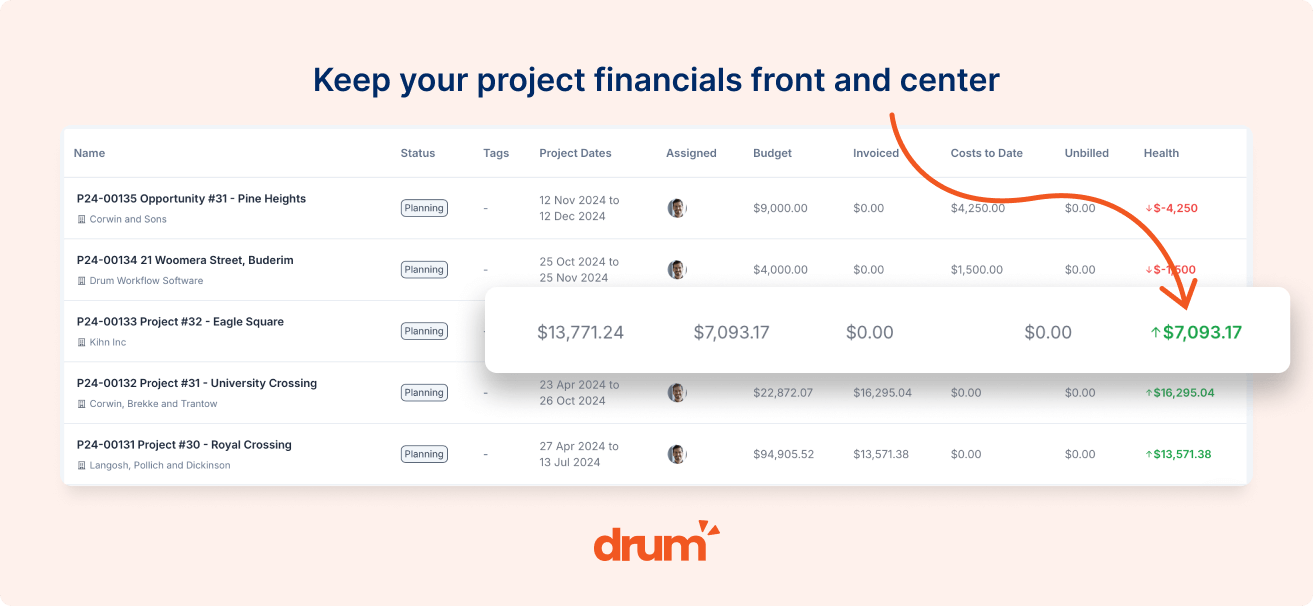
Commercial reporting should not live only with finance. Project managers need visibility while they can still influence the outcome.
Give finance cleaner project data before reporting starts
Finance teams often carry the burden of turning operational activity into commercial reporting.
Drum reduces that burden by keeping project budgets, timesheets, costs, invoices and WIP connected as work happens. That gives finance a clearer starting point for reporting, invoicing and month-end review.
Reduce manual WIP calculations
Improve visibility over unbilled time and costs.
Connect invoicing back to project budgets and delivery.
Track accounts receivable in project context.
Reduce spreadsheet clean-up before reporting.
Help finance and project teams work from the same numbers.
Keep accounting in Xero, with project context in Drum
Xero remains the accounting source of truth. Drum provides the project and operational context that accounting systems do not usually capture in enough detail.
Invoices, payments, contacts and financial data sync between Drum and Xero, while Drum keeps directors and project managers focused on project WIP, profitability, utilisation and delivery performance.
Sync invoices and payments
Two-way sync of invoices and payments between Drum and Xero.
Connect reporting to invoicing
Keep project reporting connected to the invoices being raised.
Payment status in context
View accounts receivable alongside the projects that produced them.
Project-level visibility
Maintain commercial visibility outside the accounting ledger.
Less double-entry
Reduce manual reconciliation between project and accounting data.
Australian-built
Drum is built in Australia for the Xero, MYOB and QuickBooks ecosystems firms here already use.
Commercial reports built around how engineering firms operate
Drum's reports are built around the commercial questions engineering firm directors, project managers and finance teams need answered.
Project WIP
See unbilled work across active projects.
Project profitability
Margin, budget position and commercial performance by project.
Billable utilisation
How much staff time is being converted into billable work.
Budget vs actuals
Compare project budgets against actual time and costs.
Invoiced vs contract value
See how much of the project fee has been invoiced.
Costs vs invoiced
Understand how project costs compare to recovered amounts.
Accounts receivable
Track unpaid and overdue invoices in project context.
Revenue by PM or director
Understand commercial performance across responsibility areas.
Less manual reporting. Better commercial decisions.
Engineering firms do not need more disconnected dashboards. They need reporting that reflects the live reality of project delivery, WIP, invoicing, utilisation and profitability.
Drum helps firms replace spreadsheet-heavy reporting processes with a connected commercial view that directors, project managers and finance can trust.
- Fewer spreadsheet-based reporting workarounds.
- Less manual preparation before management meetings.
- Better visibility over WIP and billing risk.
- Clearer accountability for project profitability.
- More confidence in billable utilisation reporting.
- Faster decisions from live operational data.
Drum helps built-environment firms bring project data, reporting and commercial visibility into one connected operating system.
Drums philosophy of being a 'single source of truth' has allowed us to manage project data simply and accurately. It has helped streamline our processes and reporting and should there be a missing piece of the puzzle, the team is efficient in responding to help bridge the gap. We have found Ben and the team to be accommodating in all regards and the switch to Drum has been rewarding.
Lauren Sutton
Accounts Manager, Projex Partners
Commercial reporting connects to the rest of the firm
Drum keeps project delivery, time, costs, resourcing, WIP, invoicing and reporting working from the same underlying data.
Project Management
Track project budgets, WIP and margin from the same live data that feeds commercial reporting.
Time & Costs
Capture labour and project costs against the work they belong to so reporting reflects reality.
WIP & Invoicing
Turn project activity into clearer WIP, faster invoicing and fewer month-end reconciliation steps.
Resource Planning
See utilisation, capacity and workload alongside project and firm-wide commercial performance.
Pipeline & Proposals
Connect forecast revenue and pipeline data to the same reporting view directors use for delivery.
Xero Integration
Keep finance connected with two-way sync of invoices, payments and contacts between Drum and Xero.
Frequently asked questions
Common questions about commercial reporting in Drum, including WIP, project profitability, billable utilisation, Xero integration and management reporting.
What is commercial reporting in Drum?
Commercial reporting in Drum gives engineering firms visibility over project WIP, project profitability, billable utilisation, budgets, invoicing, costs and accounts receivable from one connected system.
How does Drum help with project WIP?
Drum connects project budgets, timesheets, costs and invoices so firms can see what work has been completed, what has been invoiced and what remains unbilled. WIP is visible throughout the month, not just at month-end.
Can Drum report on project profitability?
Yes. Drum helps firms compare project budgets, actual time, costs, contract values and invoiced amounts so directors and project managers can understand project profitability as work progresses.
Can Drum track billable utilisation?
Yes. Drum uses timesheet data to help firms report on billable utilisation by staff member, role, team or time period, so directors can see how staff capacity is being converted into billable work.
Does Drum replace spreadsheets for reporting?
Drum helps reduce reliance on spreadsheet-based reporting by keeping project, time, cost, invoicing and WIP data connected in one system, so the numbers used in management reporting reflect live operational activity.
Does Drum integrate with Xero?
Yes. Drum integrates with Xero so invoices, payments, contacts and financial data stay connected, while project teams continue managing the operational and commercial context in Drum.
Who uses commercial reporting in Drum?
Directors use it to understand the health of the firm, project managers use it to manage project performance, and finance teams use it to support WIP, invoicing and reporting workflows.
Can Drum show budget vs actuals?
Yes. Drum allows firms to compare project budgets against actual time and costs, so teams can monitor whether work is tracking commercially as the project progresses.
Can Drum help with management reporting?
Yes. Drum gives leadership access to live commercial data across WIP, profitability, utilisation, invoicing and project performance, reducing the need to manually assemble reports before management meetings.
See how Drum gives engineering firms a clearer commercial picture
Book a personalised walkthrough and see how Drum connects project WIP, profitability, utilisation, invoicing, time, costs and Xero into one live reporting workflow.