
 Pipeline & Proposals
 Project Management
 Resource Planning
 Time & Costs
 WIP & Invoicing
 Commercial Reporting
 Consulting Engineers
 Architects
 Town Planners
 Building Designers
Manage engineering projects with live visibility into budget, WIP and margin
Drum helps engineering and built-environment firms manage project delivery, budgets, time, costs, WIP, invoicing and performance from one connected project view.
Give project managers, finance and directors the same live source of truth — so everyone can see where each project stands before budget, margin or invoicing problems become surprises.
- Track project budgets, time, costs and invoices in one place.
- See project health before margin starts leaking.
- Give finance live visibility into WIP and invoicing.
- Connect project delivery directly to Xero and reporting.
Commercial snapshot
Riverside Bridge — Feasibility
On track · Design development
- Contract value
- $248,000
- Budget
- $186,400
- Actual time
- $94,200
- Costs
- $12,850
- WIP
- $38,400
- Invoiced
- $124,000
- Remaining budget
- $79,350
- Margin risk
- Watch
Illustrative example — your projects show live data from Drum.
Project management is not just task management
Most project management tools can show what work needs to be done.
The harder problem for engineering firms is knowing whether the project is commercially on track.
- Are we burning too much budget?
- Is there unbilled WIP sitting on the job?
- Has the project been invoiced correctly?
- Are costs being captured?
- Is margin starting to leak?
- Does finance see the same picture as the project manager?
Drum connects the delivery, commercial and finance sides of each project so your team can manage the work and the numbers together.
- Project budgets are tracked separately from time, costs and invoices.
- Project managers rely on spreadsheets to understand budget burn.
- Finance needs to chase people to understand what can be invoiced.
- Directors only get a clear project picture after reports are manually prepared.
- Margin issues are discovered after too much time has already been written off.
- Project budgets, time, costs, WIP and invoicing stay connected.
- Project managers can see budget vs actuals while work is happening.
- Finance can understand WIP and invoicing from live project data.
- Directors can see project health without waiting for manual reports.
- The firm has one shared view of project performance.
Control every project from one live commercial view
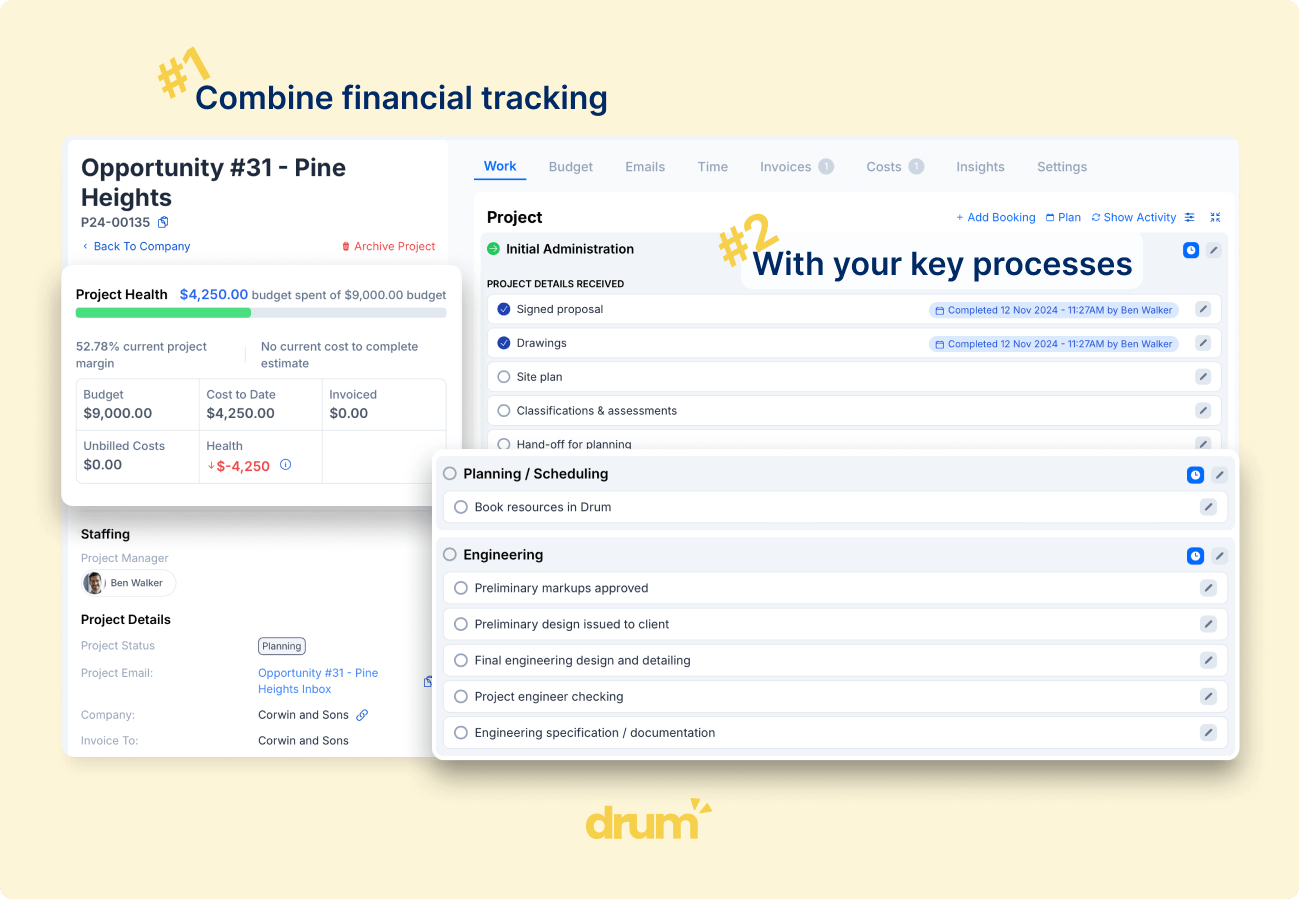
Drum gives each project a clear operating structure: client, scope, deliverables, tasks, budgets, time, costs, invoices, WIP and performance.
Instead of managing delivery in one system and financial control somewhere else, Drum brings the key project information together.
Project budgets
Set up project budgets around the way your firm delivers work, including phases, deliverables, tasks, roles and fees.
Budget vs actuals
Track actual time and costs against the project budget so project managers can see how the job is performing.
Project health
See the commercial status of each project at a glance, including budget burn, remaining budget, WIP, invoicing and margin risk.
Team accountability
Assign project directors, project managers and delivery staff so responsibilities are clear across the project.
Spot project risk before it becomes margin leakage
Engineering projects rarely go wrong all at once. Margin usually leaks through small overruns, delayed invoicing, missed costs, scope creep and unclear accountability.
Drum helps your team see those issues earlier.
- Compare actual time and costs against the project budget.
- Warn staff when work is nearing or exceeding budget.
- Keep the agreed fee and delivery budget visible.
- Identify project overruns before they become write-offs.
- Give project managers ownership of commercial performance, not just delivery progress.
Connect project delivery to WIP, invoicing and Xero
Project management does not stop when the work is done. The project data needs to flow into finance.
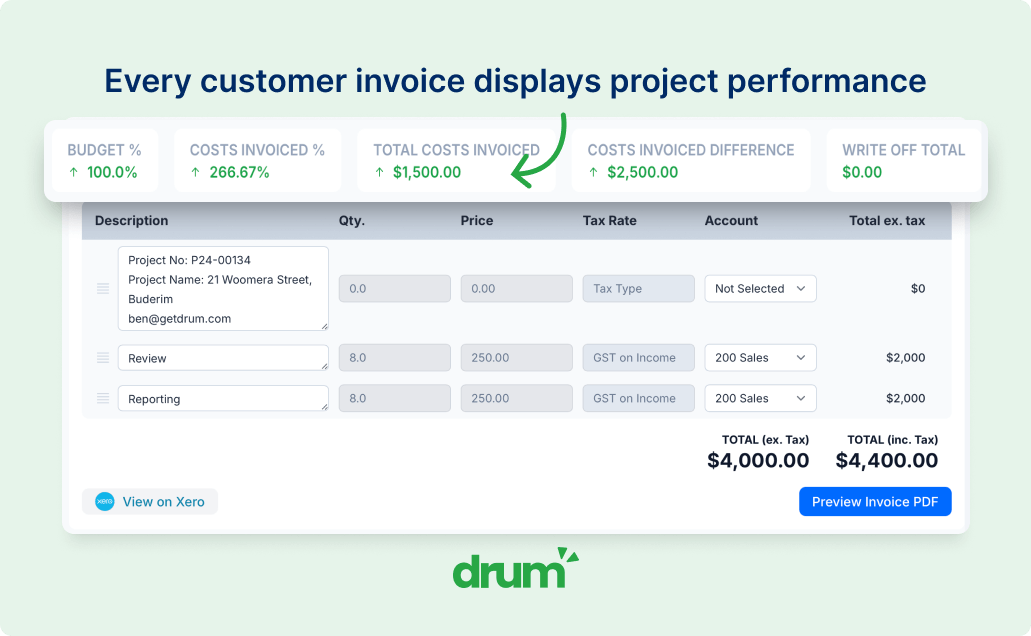
Drum connects project activity to WIP, invoicing and Xero so finance can work from the same operational data as the delivery team — without rebuilding the picture in spreadsheets.
WIP visibility
See unbilled time and costs sitting on each project.
Project invoicing
Create invoices from project data, including fixed-fee, time-and-materials or staged billing workflows.
Cost allocation
Capture subcontractor costs, disbursements and other expenses against the right project.
Xero integration
Push invoices and financial data into Xero from the same project record your team uses for delivery.
Make project ownership clear across directors, managers and delivery teams
In many firms, project accountability gets blurred. Directors hold commercial responsibility, project managers manage delivery, finance manages invoicing, and delivery staff log the time — but each group often sees a different version of the project.
Drum keeps the project structure visible to everyone involved, so responsibilities are clearer and project decisions are made from the same information.
- Assign project directors and project managers.
- Allocate staff to phases, deliverables or tasks.
- Give delivery teams visibility into budget limits.
- Give managers visibility into actual time and costs.
- Give finance visibility into WIP and invoicing status.
Keep project information out of inboxes and spreadsheets
When project decisions, client correspondence and internal notes are scattered across inboxes, it becomes harder to understand what happened and why.
Drum helps keep important project information connected to the project record.
Project email capture
Capture relevant client and stakeholder correspondence against the project.
Project notes and context
Keep project-specific information visible to the people who need it.
Cleaner handover
Give directors, project managers, delivery staff and finance a clearer view of the same project history.
Audit trail
Keep important project context attached to the job, not buried in individual inboxes.
Give directors a clearer view across all active projects
Directors do not just need to know whether tasks are complete. They need to understand which projects are healthy, which projects need attention and where commercial risk is building.
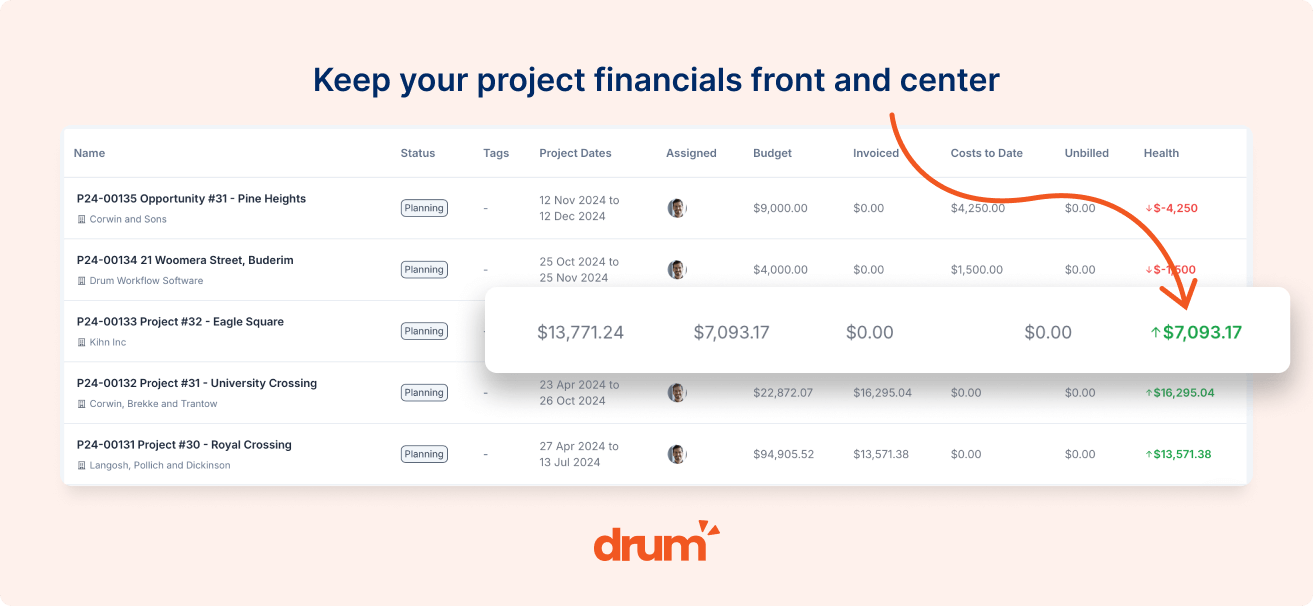
Drum gives leadership a live view across active projects, including budget performance, WIP, invoicing, costs and margin.
- See project performance live.
- Identify projects needing attention.
- Filter by project type, client, team or status.
- Reduce manual project reporting.
- Connect project performance to broader firm performance.
Built for firms that need clearer project visibility
Drum helps built environment firms bring project data, financial tracking and team workflows into one place — so project managers, finance and directors can work from the same source of truth.
Drum's philosophy of being a 'single source of truth' has allowed us to manage project data simply and accurately. It has helped streamline our processes and we have found the team to be accommodating in all regards.
Lauren Sutton
Accounts Manager, Projex Partners
Connect project management to the rest of the firm
Project management is only one part of Drum's operating system for engineering firms.
The information captured when work is sold should flow into delivery, finance and reporting without being rebuilt in spreadsheets or disconnected systems.
- Proposal
- Project Budget
- Time & Costs
- WIP
- Invoice
- Reporting
This gives directors, project managers and finance one connected view from first enquiry through to final invoice.
Project management is only one part of the operating system
Drum connects project delivery to the commercial workflows that happen before, during and after the project.
Pipeline & Proposals
Turn accepted proposals into structured project budgets and reduce the gap between sales and delivery.
Resource Planning
Understand who is working on what and where delivery capacity is being used.
Time & Costs
Capture the actual effort and costs required to deliver each project.
WIP & Invoicing
Turn project activity into clearer WIP, faster invoicing and fewer finance workarounds.
Commercial Reporting
Give directors a live view of project performance, utilisation, WIP, revenue and margin.
Xero Integration
Keep project invoicing and finance workflows connected to your accounting system.
Frequently asked questions
Common questions about commercial project management, budgets, WIP, invoicing and Xero in Drum.
Is Drum just task management software?
No. Drum includes project and task management, but the larger value is that project delivery is connected to budgets, time, costs, WIP, invoicing, reporting and Xero.
How does Drum help project managers?
Drum gives project managers a live view of project budgets, actual time and costs, remaining budget, WIP, invoicing status and project health. This helps them manage both delivery and commercial performance.
Can we track project budgets?
Yes. Projects can be structured around phases, deliverables, tasks, fees and budgets, allowing your team to compare planned budget against actual time and costs.
Does Drum show budget warnings?
Yes. Drum can warn users when work is approaching or exceeding budget, helping project managers identify issues before more time is logged.
Can finance see what can be invoiced?
Yes. Because time, costs and project activity are connected, finance can see WIP and invoicing information without relying on separate spreadsheets or constant manual follow-up.
Does Drum integrate with Xero?
Yes. Drum connects with Xero so invoicing and financial workflows can stay aligned with the project data your team uses day to day.
Can we capture project costs?
Yes. Drum can capture subcontractor costs, disbursements and other expenses against projects, giving a clearer view of true project performance.
Is Drum suitable for engineering firms already using project management software?
Yes. Drum is especially useful for firms that already have software but still rely on spreadsheets, exports and manual reporting to understand project performance, WIP, invoicing and margin.
Ready to see every project clearly?
Book a walkthrough and see how Drum connects project delivery, budgets, time, costs, WIP, invoicing, reporting and Xero into one live source of truth for your firm.