
 Pipeline & Proposals
 Project Management
 Resource Planning
 Time & Costs
 WIP & Invoicing
 Commercial Reporting
 Consulting Engineers
 Architects
 Town Planners
 Building Designers
Turn project work into accurate WIP, invoices and cash flow visibility
Drum connects project budgets, timesheets, costs, WIP, invoicing and your accounting system so engineering firms can see what has been earned, what has been billed, what is still sitting in WIP, and what needs action.
Instead of relying on exports, spreadsheets and manual invoice checks at month-end, project managers, finance and directors can work from the same live view of project commercial performance.
- See live WIP and unbilled work before month-end.
- Raise invoices straight from project budgets, time and costs.
- Sync invoices to Xero, MYOB or QuickBooks without leaving the project context.
- Give PMs, finance and directors one shared commercial picture.
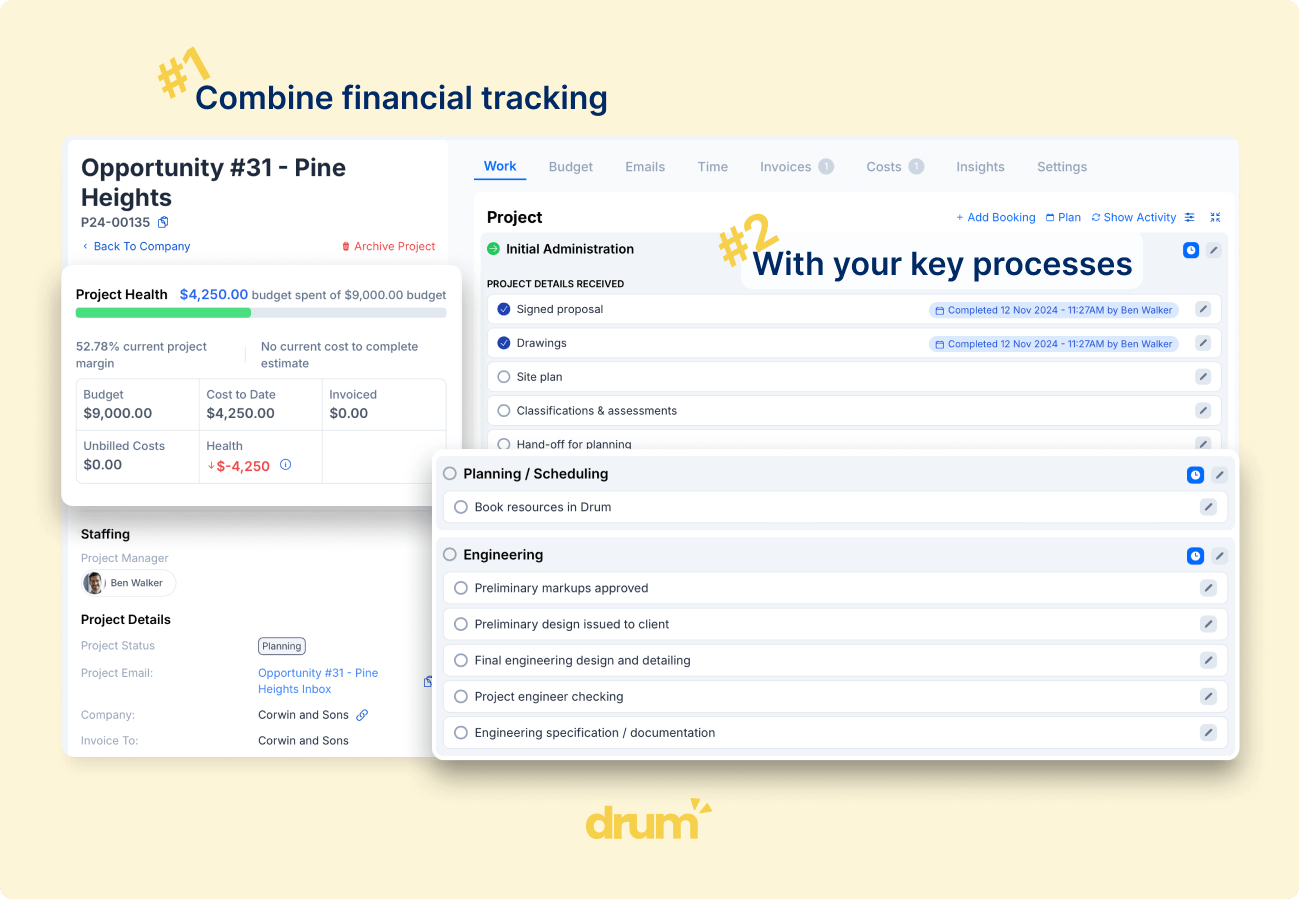
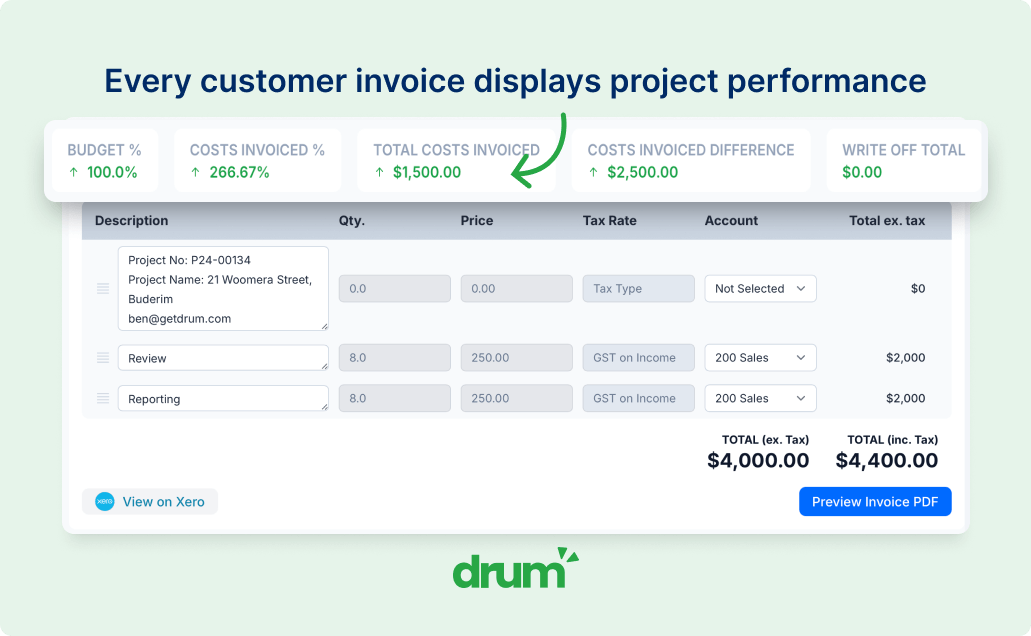
Live WIP, not month-end WIP
See what has been earned but not yet billed across projects as time and costs are entered, not weeks after the fact.
Invoices built from project data
Raise invoices straight from project budgets, time, supplier costs and travel costs rather than rebuilding the numbers in a spreadsheet.
Connected accounting
Push invoices to Xero, MYOB or QuickBooks with the right account codes, tax rates and tracking categories, then sync payment status back into Drum.
The invoicing problem usually starts before the invoice
For many engineering firms, invoicing is not difficult because the invoice itself is hard to create.
It is difficult because the information behind the invoice is scattered. Project managers need to check budgets, timesheets, deliverables, variations and progress. Finance needs to understand what can be billed, what should remain in WIP, and whether the invoice matches the commercial position of the project. Directors need confidence that revenue, margin and cash flow reports reflect what is actually happening.
When that information sits across project software, accounting, spreadsheets, exports and people's heads, month-end becomes slower, less reliable and harder to manage.
-
Unbilled time and costs are checked manually.
-
WIP reports are built or adjusted in spreadsheets.
-
Project managers and finance work from different views.
-
Invoice decisions rely on manual judgement and follow-up.
-
Directors only get visibility after the numbers have been cleaned up.
One connected workflow from project work to invoice
Drum gives engineering firms a connected workflow for managing the commercial path from project delivery through to invoicing.
Time, supplier costs, travel costs, project budgets, contract values, variations and invoices all sit against the same project structure. That means WIP and invoicing are not managed as a separate finance exercise. They are a natural extension of the work being delivered.
Capture billable work as it happens
Track time and costs against the right project, deliverable or task so the commercial record is built during delivery, not reconstructed later.
See live WIP before month-end
Understand what has been earned, what has already been invoiced and what remains unbilled across projects.
Raise invoices from the project record
Create invoices using the project's actual time, costs, budgets and billing structure instead of re-entering or reconciling data manually.
Keep finance connected
Push invoices to Xero, MYOB or QuickBooks while keeping project managers and directors working from Drum's operational and commercial view.
Know what is sitting in WIP before it becomes a month-end scramble
Drum helps firms track WIP continuously by comparing project work, costs, budgets and invoices as the project progresses.
That gives directors, project managers and finance a clearer view of what has been earned but not yet billed, where invoicing is falling behind delivery, and which projects need commercial attention.
- View unbilled time and costs by project.
- Compare invoiced amounts against project budgets and contract values.
- Identify projects with growing WIP exposure.
- Understand whether billing is keeping pace with delivery.
- Reduce the manual spreadsheet work usually required to prepare WIP reports.
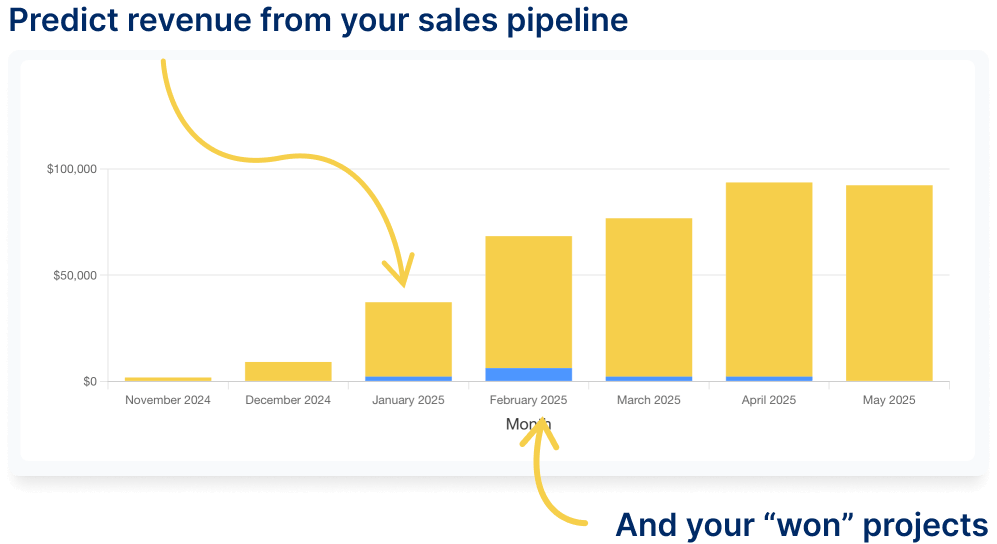
Give project managers and finance the same commercial picture
In many firms, project managers understand the delivery context, while finance controls the invoicing process. The problem is that both teams often need to chase each other for the same information every month.
Drum brings the operational and financial view together. Project managers can see the commercial position of their projects, while finance can raise invoices with better context around budgets, progress, costs and WIP.
- See what has been billed and what remains unbilled.
- Review time and costs before invoicing.
- Understand project budget position before approving invoice amounts.
- Reduce back-and-forth with finance.
- Access invoice-ready project data.
- Reduce manual checks and spreadsheet reconciliation.
- Push invoices into Xero, MYOB or QuickBooks.
- Track invoice status, payments and overdue accounts.
- See WIP, invoicing and project performance from one source of truth.
- Identify billing delays earlier.
- Improve confidence in revenue, cash flow and margin reporting.
- Reduce dependency on manually assembled reports.
Create invoices from the work, costs and budgets already in Drum
Drum makes invoicing faster because the information is already connected.
When it is time to invoice, your team can pull through the relevant project data, review unbilled time and costs, and create invoices that reflect the way the project is actually being billed.
Time and materials invoicing
Invoice billable time and costs captured against project tasks, deliverables or stages.
Fixed fee and progress claims
Raise fixed amount, percentage-based or progress claim invoices based on your fee agreement.
Supplier and travel costs
Track supplier, travel and other project costs so they can be reviewed, recovered or reported alongside labour.
Notes, tags and internal tracking
Add notes and tags to invoices so finance and project teams can track follow-up, overdue items and billing context.
Keep your accounting system clean, without losing the project context
Drum works with Xero, MYOB and QuickBooks so your accounting system remains the financial source of truth while your project teams retain the commercial context behind each invoice.
Create invoices in Drum from project data, then sync them across with the right account codes, tax rates and tracking categories. Payment statuses sync back, giving your team visibility over what has been paid, what is outstanding and what needs follow-up.
-
Sync invoices directly to your accounting system
Push invoices to Xero, MYOB or QuickBooks once they have been reviewed and approved in Drum.
-
Use account codes, tax rates and tracking categories
Apply your existing chart of accounts, GST or tax rates and tracking categories so invoices stay consistent with how finance reports.
-
Keep invoice templates in accounting
Invoices are created from project data in Drum and presented to clients through your accounting system's existing templates and delivery.
-
See paid, unpaid and overdue invoices in Drum
Payment statuses flow back so project managers and directors can track accounts receivable by project, client, director or tag without leaving the project view.
Turn invoicing data into commercial visibility
Because Drum connects project delivery, costs, WIP and invoices, reporting becomes more useful than a static month-end summary.
Directors can see how invoicing is tracking against delivery, where cash flow may be delayed, which projects are carrying unbilled work, and whether project performance is matching expectations.
WIP by project
See where unbilled work is sitting and which projects need attention.
Unbilled time and costs
Review billable hours and costs not yet invoiced across the firm.
Invoiced vs budget
Compare invoicing progress to project budgets and contract values.
Costs vs invoiced
Understand how project costs compare to what has been billed.
Accounts receivable
Track outstanding invoices by client, project or director.
Overdue invoices
Surface overdue accounts before they affect cash flow.
Project profitability
See how revenue, costs and margin are tracking on each project.
Revenue by PM or client
Slice revenue by project manager, director, client or tag.
This is the difference between knowing what was invoiced and understanding what should have been invoiced.
Less manual reporting. Fewer spreadsheet workarounds. Better commercial control.
Engineering firms do not just need another place to create invoices.
They need a reliable way to connect project delivery with financial outcomes.
Drum helps firms reduce the gap between what project teams know, what finance needs, and what directors see. Instead of waiting for manually prepared reports, leadership can make decisions from a live operating system that reflects the current state of the business.
- Fewer month-end bottlenecks.
- Less reliance on exported reports.
- Better alignment between PMs and finance.
- Clearer WIP and invoicing accountability.
- More confidence in cash flow and margin visibility.
Drum helps engineering and built-environment firms move away from disconnected reporting and towards a clearer, shared view of project performance.
We have found the team from Drum to be both responsive to our needs and open to changes and improvements. Implementing Drum has allowed us to significantly improve the visibility of our projects' performance to the team and is resulting in more timely and accurate management of our projects.
Daniel Berry
Managing Director, Projex Partners
WIP and invoicing connect to the rest of the firm
Drum keeps project delivery, time, costs, WIP, invoicing and accounting working from the same underlying data.
Project Management
Track project budgets, delivery and commercial performance against the same data used for invoicing.
Time & Costs
Capture labour, supplier costs and travel against project tasks so WIP and invoices reflect actual work.
Commercial Reporting
Give directors a live view of WIP, revenue, margin and project profitability.
Resource Planning
Connect resourcing and delivery plans to the commercial picture finance needs for billing.
Pipeline & Proposals
Carry proposal budgets into live projects so invoicing starts from the right commercial structure.
Xero Integration
Sync invoices, payments and contacts with Xero, MYOB or QuickBooks without leaving the project context.
Frequently asked questions
Common questions about WIP, invoicing, supplier costs and how Drum works with Xero, MYOB and QuickBooks.
How does Drum help with WIP?
Drum tracks project budgets, time, costs and invoices in one connected workflow, giving your team visibility over what has been earned, what has been invoiced and what remains unbilled across every project.
Can Drum show unbilled time and costs?
Yes. Drum shows unbilled time and costs against each project, making it easier for project managers and finance teams to review what should be invoiced before month-end.
Can Drum handle fixed fee and time-based invoicing?
Yes. Drum supports different billing models, including time and materials, fixed fee invoices, percentage-based invoices and progress claims, so you can match how each project is actually billed.
Does Drum integrate with Xero, MYOB and QuickBooks?
Yes. Invoices can be created in Drum and synced to Xero, MYOB or QuickBooks. Drum can use your existing account codes, tax rates and tracking categories, while payment statuses sync back into Drum so your team can stay on top of accounts receivable from the project view.
Can supplier and travel costs be tracked?
Yes. Drum allows project costs such as supplier, travel and other expenses to be tracked against project tasks so they can be reviewed alongside labour, WIP and invoicing.
Can directors see invoicing and WIP across the business?
Yes. Drum gives directors visibility across project WIP, invoicing, accounts receivable and project financial performance, helping reduce reliance on manually prepared spreadsheets and delayed month-end reports.
Does Drum replace Xero, MYOB or QuickBooks?
No. Drum works alongside your accounting system. Xero, MYOB or QuickBooks remain your accounting source of truth, while Drum manages the project, WIP, invoicing and operational context before invoices are pushed across.
See how Drum connects WIP, invoicing and project performance
Book a personalised walkthrough and see how Drum helps engineering firms manage the full commercial workflow from project budgets and timesheets through to WIP, invoicing, accounting and reporting.