
 Pipeline & Proposals
 Project Management
 Resource Planning
 Time & Costs
 WIP & Invoicing
 Commercial Reporting
 Consulting Engineers
 Architects
 Town Planners
 Building Designers
Time Tracking and Expense Software: A Practical Guide for Service Firms

Ben Walker
Written for Drum
In This Article
Professional service firms lose money in quiet, hard-to-spot ways. A consultant forgets to log a Friday afternoon client call. An architect eats two hours of design review because no one tracked it against the project budget. A project manager submits expenses three weeks late, and by the time they’re processed, the numbers are already stale. The right time tracking and expense software makes these problems disappear, not by adding bureaucracy, but by building capture and visibility into the way your team already works.
This guide covers what to look for, what to avoid, and how to pick a system that actually fits a growing professional services firm.
Why Time and Expenses Bleed Together
Most firms treat time tracking and expense management as separate problems. They’ll use one tool for timesheets, another for receipts, and a third for invoicing. That separation creates gaps, and gaps are where revenue leaks.
Consider what happens when a senior consultant travels to a client site. She logs her hours in a timesheet app, submits her flight and hotel receipts through an expense platform, and the project manager reconciles both against the project budget in a spreadsheet. Three systems, three points of failure, and nobody has a single view of what the project actually cost until month-end. By then, the invoice is already out the door and probably wrong.
The Global Business Travel Association (GBTA) found that processing a single expense report costs an average of $58 and takes 20 minutes. One in five reports contains errors, and correcting each one takes another 18 minutes. Multiply that across a firm submitting hundreds of reports a year, and you’re burning serious time and money on administration that adds no client value.
The smarter approach is treating time and expenses as two sides of the same coin. When both flow through a single system tied to projects, clients, and budgets, the data is cleaner, the invoices are more accurate, and your team spends less time on admin. That’s the core idea behind integrated time tracking paired with financial performance reporting.
What to Look for in Time Tracking and Expense Software
Not every feature on a vendor’s website matters equally. After working with dozens of professional service firms, here’s what actually moves the needle.
Project-level time and expense capture is the foundation. Your team should log hours and expenses against specific projects and phases, not into a generic bucket. When a landscape architect logs 4 hours to the “construction documents” phase of a hospital project, that entry should immediately update the project’s budget burn and feed into utilization reports. If your tool can’t do this, you’re collecting data without creating insight. Firms looking for phase-level tracking in specific industries can explore options like time tracking for architects or time tracking for agencies.
Accounting integration eliminates the most painful bottleneck. When approved time and expenses sync directly to Xero or QuickBooks, you cut out the re-keying that causes errors and delays. Double entry isn’t just slow; it’s a source of billing mistakes that erode client trust.
Real-time budget visibility catches problems before they become write-offs. The best systems show you budget burn as time is logged, not in a monthly report that arrives too late. If design development on a fit-out project has consumed 70% of its budget at the halfway mark, you want to know now.
Utilization and profitability reporting connects effort to outcomes. You should be able to see, at a glance, who’s overloaded, who has capacity, and which projects are making money. The 2025 PS Maturity Benchmark from SPI Research found that firms using professional services automation tools see billable utilization rates 10 percentage points higher than those without, and project margins 24% higher. That’s the difference between guessing and knowing where your firm stands.
Expense capture that doesn’t require a separate workflow is what separates integrated tools from bolted-together stacks. When your team can snap a receipt photo and tag it to a project in the same system where they log time, compliance goes up and complaints go down. Research from NetSuite shows that shifting from spreadsheets to automated expense management reduces processing costs by up to 50%.
One thing to watch out for: tools that look integrated but aren’t. Some platforms advertise “time and expense tracking” but really just bundle two disconnected modules under the same login. The test is simple. When someone logs an expense against a project, does it immediately show up in the project’s financial summary alongside the time costs? If not, you still have a data silo.
The Real Cost of Getting This Wrong
The numbers on revenue leakage in professional services are striking. A Chrometa survey of over 500 professionals found that employees ultimately billed for just 67% of their actual billable time. That means a third of the work your team does for clients goes unrecorded and unbilled. For a firm billing $3 million a year, even recovering half that gap puts $500,000 back on the table.
The problem compounds when expenses are involved. A 15-person engineering consultancy might have half a dozen people traveling to client sites each month. Without a system that ties those expenses to specific projects in real time, the firm either absorbs costs that should be billed to clients or invoices inaccurately and fields awkward conversations later. Neither outcome is good for margins or relationships.
Then there’s the operational cost. According to Harvest’s 2025 Professional Services Trends Report, only 20% of firms hit their profit margin targets almost every time, even though 57% have defined targets. The gap between intention and execution almost always traces back to visibility. Firms know what margins they want. They just can’t see, in real time, whether they’re tracking toward them.
A mid-size consulting firm we spoke with described the problem simply: they were profitable overall, but had no idea which projects were profitable until the engagement ended. By then, the only thing they could do was learn from the loss. With project-level time and expense tracking, they caught budget overruns during the engagement and adjusted scope or resources before margins eroded. That shift from reactive to proactive is where the real value lies.
Understanding your utilization rate and knowing how to calculate billable hours accurately are the building blocks. The software just makes both of those things automatic instead of manual.
How to Choose and Roll Out the Right System
Start with your non-negotiables, not a wish list. Three questions cut through the noise.
First, does the tool connect time, expenses, and project budgets in a single view? If you still need to export data and merge spreadsheets to see full project costs, you haven’t solved the problem. Second, does it integrate with your accounting software? If it doesn’t sync with Xero or QuickBooks, you’re signing up for double entry. Third, will your team actually use it? The most powerful system in the world is worthless if people avoid it because it’s clunky or intrusive.
On that last point, framing matters. Position time and expense tracking as a tool that protects your team’s work, not one that monitors it. “This ensures every hour you work gets billed and every expense gets reimbursed” lands differently than “we’re tracking what you do now.” The former gets buy-in. The latter gets resistance.
Most reputable platforms offer a free trial. Use it with a real project. Ask two or three team members to log their actual time and expenses for a week, then run a report. You’ll learn more from five days of real use than from any product demo.
When you’re ready to roll out firm-wide, start small. Pick one project team, work through the inevitable questions, and build internal champions before expanding. The firms that succeed with these tools are the ones that treat rollout as a change management exercise, not just a software installation.
For firms already tracking billable hours manually or across professional services teams, the transition to an integrated system typically pays for itself within two to three months through recovered revenue and reduced admin time.
Bringing It All Together
The firms that consistently hit their margin targets aren’t doing anything magical. They’ve just eliminated the gaps between tracking time, capturing expenses, and understanding project profitability. They bill more accurately, catch budget problems earlier, and spend less time on administration. That’s what good time tracking and expense software actually delivers: not a surveillance tool, but a financial operating system for your firm.
The SPI Research benchmark puts it in perspective. Nearly 90% of the highest-performing professional services firms have adopted integrated PSA tools. They’re 27% more likely to use one than the rest of the field. The correlation between tooling and performance isn’t coincidental. Visibility drives better decisions, and better decisions drive better margins.
If your firm is still stitching together spreadsheets, standalone timers, and separate expense apps, the cost of that fragmentation is real, even if it’s hard to see in any single month. The fix doesn’t have to be complicated. It just has to connect the pieces.
See how Drum connects time, expenses, and project profitability in one place.
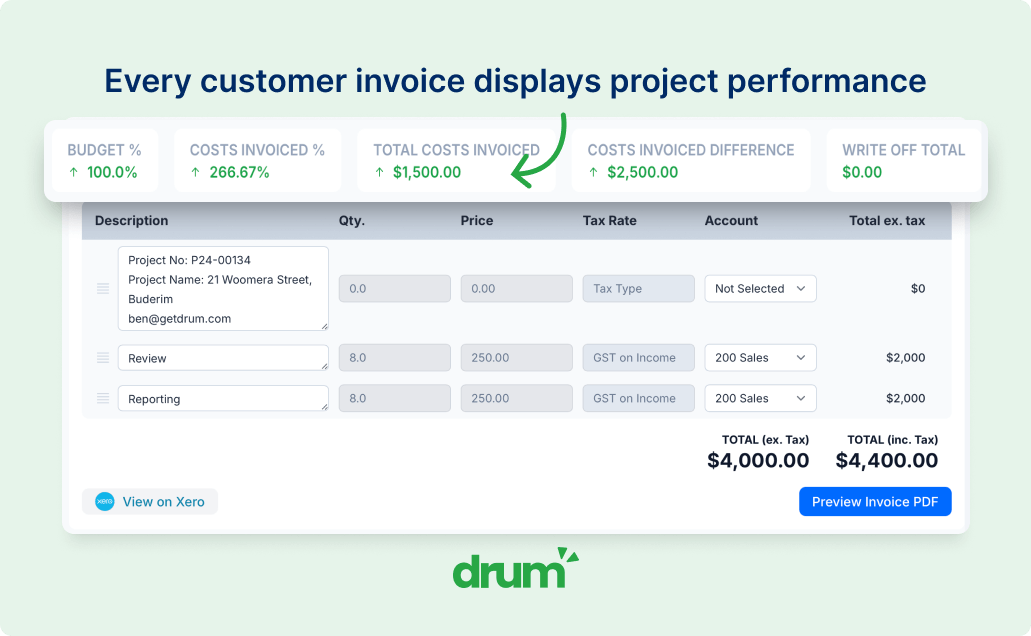
Every hour your team logs and every expense they capture feeds directly into real-time project budgets, utilization reports, and invoicing. No re-keying. No reconciliation spreadsheets.