
 Project management
 Sales & Proposals
 Time tracking
 Invoicing
 Financial Performance
 Consulting Engineers
 Architects
 Town Planners
 Building Designers
Document Workflow Software: How to Automate Approvals and Eliminate Bottlenecks

Ben Walker
Written for Drum
In This Article
Document Workflow Software That Works
Document workflow software is a system that automates the entire journey of your business documents, from the first draft and internal review all the way through to final approval, signing, and storage.
Think of it as a friendly digital air traffic controller for your most important files. It creates clear, predictable, and automated flight paths for your documents, making sure nothing gets lost on the tarmac or stuck in a holding pattern.
From Digital Chaos to Predictable Clarity
Trying to manage critical documents without a proper workflow system is like trying to send an important package with no tracking number. You just ship it off and cross your fingers, hoping it gets to the right person on time and in one piece.
This is exactly how many professional service firms still operate. They’re stuck in a tangled mess of emails, shared drives, and manual follow-ups that breed confusion and risk at every turn.
Sound familiar? This old-school approach leads to some painfully common headaches:
- Version control nightmares: Is
Proposal_v4_FINAL_approved.docxreally the final version? Or is it hiding in an email thread asProposal_v4_FINAL_approved_JohnsEdits.docx? When multiple versions are floating around, it’s only a matter of time before someone wastes hours working on an outdated file. - The endless chase for approvals: How many times have you typed out an email that starts with, “Hi, just following up on this contract…”? Without a clear system, documents just sit in someone’s inbox, bringing entire projects to a grinding halt while you wait for a simple sign-off.
- A total lack of visibility: Once a document is sent for review, where is it? Who has it? What’s the next step? This black hole makes it impossible to forecast timelines or spot a bottleneck before it derails a deadline.
An Automated GPS for Your Documents. Document workflow software cuts through this chaos by turning your manual, unpredictable processes into automated, trackable journeys. Instead of relying on a web of emails and reminders, you get to define a clear, step-by-step route for every type of document you handle.
For example, a new client contract can be set up to automatically move from the sales rep who drafted it, to a manager for review, then over to the legal team for a final check, and finally to the client for an e-signature. Each step triggers the next, and everyone involved gets a friendly nudge when it’s their turn to act.
This kind of software is much more than a digital filing cabinet. It’s an action engine that propels your business forward by ensuring the right person gets the right document at the right time, every single time. Research from VerdDocs’ document lifecycle statistics shows that 76% of businesses now use workflow automation to standardize daily operations, and McKinsey estimates that 60% of employees could save 30% of their time through this kind of automation.
This structured, automated approach is similar to how other business systems bring order to complex operations, a topic we dive into in our guide on what is PSA software. By defining the path from the start, you eliminate all the guesswork and manual prodding, freeing up your team to focus on high-value work instead of chasing paperwork.
The Core Features That Power Automation
To really get a feel for what document workflow software can do, you have to look under the hood. It’s not just one magic button; it’s a suite of connected features working together to bring order to the chaos of manual processes. Think of it like a high-performance engine where every single component has a specific, critical job to do.
Let’s break down the key pieces that make this all possible, and more importantly, how they solve the real-world headaches that plague professional service firms every single day.
This diagram shows the simple, clean lifecycle of a document when you let software handle the heavy lifting. It moves smoothly from creation to approval and finally to a secure, archived state.
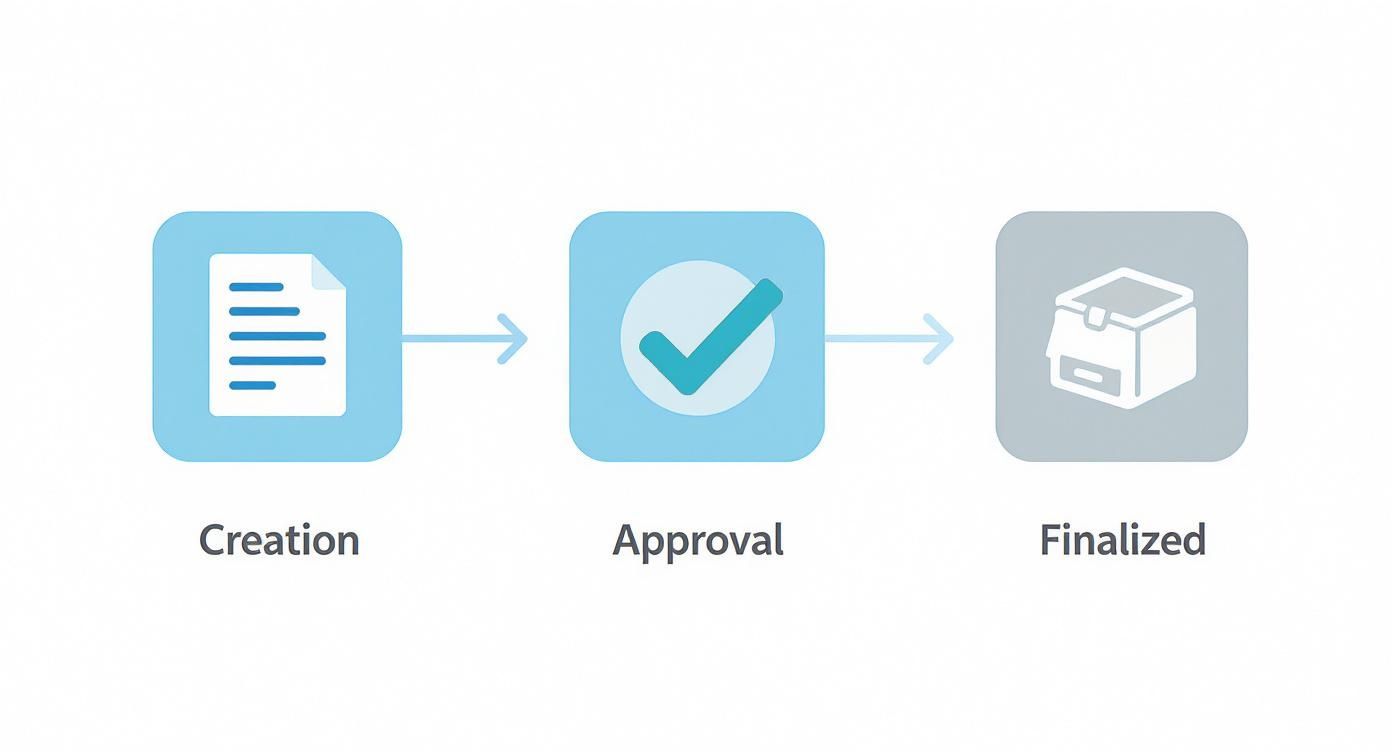
Each step here is a move away from manual follow-ups and towards a reliable, system-driven process that just works, letting your team focus on their actual jobs.
Automated Routing and Approval Workflows. Document workflow software is all about getting the right files to the right people in the right order, automatically. This feature maps out a clear, predictable path for every document, completely killing the “Who needs to see this next?” guessing game.
- Before: You draft a proposal, attach it to an email, and send it to your manager, hoping they notice it in their crowded inbox. Once they finally review it, you then have to remember to forward it to the legal team, creating a messy, untraceable email chain.
- After: The system instantly notifies your manager the moment you mark the proposal as “ready for review.” As soon as they hit “approve,” it zips over to the legal department’s queue. No extra emails, no manual follow-ups. You just get a notification when the whole process is complete.
This automated handoff makes sure nothing gets lost in an inbox or sits idle for days. It’s a fundamental part of the effective project management features that keep timelines from going off the rails.
Version Control That Ends the Confusion. How many hours has your team burned trying to hunt down the real “final” version of a document? Proper version control puts an end to the final_v3_approved_JS_edits_USE_THIS_ONE.docx nightmare for good.
Instead of creating dozens of copies with confusing file names, the software keeps one central file. Every single change, edit, and comment is tracked and logged, building a complete history of the document’s life. Let’s say your client asks to see the previous version of a contract clause. Instead of digging through old emails, you can pull it up in seconds. It’s just a click away.
This isn’t just about being tidy; it’s about maintaining the integrity of your work. With proper version control, you can be 100% confident that everyone is looking at the most current, approved version, preventing seriously costly mistakes.
Document Templates for Speed and Consistency. Starting every new document from scratch is a massive time sink and a recipe for inconsistency. Templates solve this by giving you pre-built, pre-approved frameworks for your most common documents: contracts, SOWs, proposals, or invoices.
Imagine you need to create a new Statement of Work. Instead of finding an old one and doing a “find and replace” for the client’s name (and hoping you don’t miss one!), you just select the “SOW Template.” It populates all the standard sections and legal language for you, so you can focus on defining the project scope.
This simple feature ensures every document that leaves your firm has a professional, consistent look and includes all the required branding and legal boilerplate.
Integrations and Centralized Security. No business runs on a single app. A smart document workflow platform doesn’t try to replace your favorite tools; it works with them. Strong integrations with your CRM, accounting software, or project management platform create a connected ecosystem where information flows freely.
For example, when a proposal is approved in your workflow system, it can automatically trigger the creation of a new project in your PM tool and a new client file in your CRM. No more manual data entry or toggling between tabs.
And of course, security is everything. These platforms are built to protect your most sensitive information with multiple layers of security controls:
- Access Controls: You can define exactly who can view, edit, comment on, or approve specific documents. Confidential information stays that way.
- Audit Trails: A complete, time-stamped log tracks every action taken on a document: who opened it, when they edited it, and who gave the final sign-off. This creates an unbreakable chain of custody for compliance and accountability.
- Encryption: Your data is shielded both when it’s being sent and when it’s stored, giving you and your clients total peace of mind.
To give you a quick snapshot, here’s how these features translate into direct business benefits.
Key Features and Their Business Impact
| Feature | Core Function | Solves This Problem |
|---|---|---|
| Automated Routing | Moves documents between people based on predefined rules. | Documents getting stuck in inboxes; confusion over who needs to act next. |
| Version Control | Tracks all changes to a single, central document. | Working on outdated versions; final_v2_final.docx chaos. |
| Templates | Provides pre-built, standardized document structures. | Inconsistent branding and formatting; time wasted creating documents from scratch. |
| Integrations | Connects with other business software (CRM, PM tools). | Manual data entry between systems; siloed information and inefficient processes. |
| Security & Audits | Controls access and logs all document activity. | Unauthorized access to sensitive data; lack of accountability and compliance risk. |
Taken together, these features build a secure, efficient, and dead-simple system for managing the entire lifecycle of your firm’s most critical documents.
Real-World Examples from Professional Services
All the theory in the world doesn’t mean much until you see how document workflow software actually performs in the wild. Sure, the core benefits (saving time, cutting down on errors, improving communication) all sound great on paper. But they only really click when you see them solve the day-to-day headaches that plague professional services firms.
So, let’s step away from the feature lists and walk through some real-world scenarios. We’ll follow a few critical documents on their journey through three different industries to see how a little automation can smooth out the friction that grinds a business to a halt.

These stories get to the human side of efficiency. We’re talking less stress, clear ownership, and more time for your team to do the actual work they were hired for.
The Consulting Firm Speeding Up Proposals. For any busy consulting firm, the proposal process is a high-stakes sprint. Every delay, every mistake, could mean watching a fat contract walk out the door.
Before automation, things were a mess. A consultant would draft a proposal in Word, then fire it off in an email to their manager. That manager, already juggling a dozen other priorities, might not even see it for a day. They’d add feedback with tracked changes, email it back, and suddenly you have two versions of the file floating around. The consultant then has to forward that draft to legal and finance in separate emails, praying they can wrangle all the feedback before the deadline hits.
This manual game of email tag was a recipe for disaster. It was painfully slow, impossible to track who had the latest version, and almost guaranteed someone would end up working from an outdated document.
After implementing document workflow software, the whole process is night and day.
- Creation: The consultant starts with a pre-approved proposal template right inside the system. No more hunting for the right file.
- Automated Review: When the draft is done, they just mark it “Ready for Manager Review.” The software instantly pings the manager and drops the task onto their dashboard.
- Sequential Approvals: The moment the manager gives the thumbs-up, the workflow automatically sends the same document to legal and finance for their input. No new files, no confusion.
- Centralized Feedback: Every comment and edit happens in one place, on the one true version of the proposal. Version chaos is eliminated.
- Final Delivery: Once everyone has signed off, the system generates a clean PDF and shoots it directly to the client for an e-signature.
The result? A faster, more buttoned-up process that lets consultants stop chasing attachments and start focusing on winning business.
The Architecture Firm Managing Blueprints. In architecture, precision is everything. One tiny mistake or an old set of blueprints can trigger expensive rework and throw a project timeline completely off the rails. Just trying to keep every stakeholder updated with the latest plans can feel like a monumental task.
Imagine a project manager emailing a revised blueprint PDF to the lead architect, the structural engineer, and the client. The next day, the engineer sends back feedback on that version, but they have no idea the architect requested another change an hour earlier. Now you’ve got multiple “latest” versions in circulation, and nobody knows which one is the right one.
This is where document workflow software becomes a firm’s single source of truth. When every stakeholder, from the drafter to the on-site contractor, is working from the same, centrally-managed file, the risk of miscommunication plummets.
With an automated system in place, revising a blueprint looks completely different:
- Version Control: The master blueprint lives in one spot. When a change is made, it creates a new version, but all the old ones are neatly archived, giving you a full audit trail.
- Controlled Access: Permissions are set so only authorized architects can upload new versions. Contractors in the field get view-only access on their tablets, so they can’t make accidental changes.
- Automated Notifications: As soon as a new version is approved and published, the system automatically alerts everyone involved. No more guessing if you have the latest plans.
This level of control is non-negotiable for complex projects. For a deeper dive, check out how modern software delivers end-to-end project and billing control for architecture practices.
The Marketing Agency Nailing Campaign Briefs. A creative campaign brief is the bedrock of any project for a marketing agency. It has to be airtight, comprehensive, and signed off by the client before a single piece of creative work gets started.
Without a system, it’s utter chaos. An account manager emails a brief to the creative team. The copywriter and designer start leaving comments in the document, but they’re also dropping feedback in the email thread and a separate Slack channel. When the client inevitably asks for changes, the account manager has to piece together feedback from three different places to create a new version.
This siloed communication is a breeding ground for missed details and wasted creative effort.
By bringing in document workflow software, the agency creates a transparent, collaborative hub. The brief now follows a clear, defined path:
- The account manager fills out a standardized brief template.
- The workflow zips it over to the creative director for internal approval.
- Once approved internally, a secure link is automatically sent to the client for feedback.
- All the client’s comments are logged right on the document itself, where the whole team can see them.
- After the client gives final approval with an e-signature, the workflow automatically creates and assigns tasks to the creative team in the project management tool.
This connected flow gets everyone on the same page from the start, ensures approvals are clearly documented, and lets projects kick off with the clarity they need to succeed.
Choosing the Right Document Workflow Partner
Picking a new software platform can feel like wading through a sea of options. You’re bombarded with flashy marketing, endless feature lists, and competing claims. It’s easy to get lost in the noise and lose sight of what your firm actually needs to get work done.
But choosing the right document workflow software doesn’t have to be a headache.
The secret is to go in with a plan. By focusing on four key pillars (usability, scalability, integrations, and security) you can cut through the clutter and make a decision you feel good about. Think of it as creating a scorecard to measure each potential partner against what really matters to your team.
This approach puts you in the driver’s seat, letting you ask the right questions and evaluate vendors based on your day-to-day reality, not just their sales pitch. Let’s break down what to look for.
Can Your Team Actually Use It. The most powerful, feature-packed software in the world is completely useless if your team finds it clunky or confusing. User adoption is the single biggest factor determining if your investment pays off. If the platform isn’t intuitive, people will fall back on old habits, emailing attachments and saving rogue files to their desktops.
When you’re evaluating a tool, you need to look past the polished demo. Dig a little deeper with some pointed questions:
- How long does it take to get a new team member up and running? A steep learning curve is a direct hit to productivity and a major source of frustration.
- Can we run a small pilot with our own people? This is the only way to get honest, real-world feedback on how the software actually performs.
- What does your support and training look like? Look for a partner that offers more than just an email address. You want live help, video tutorials, and a solid knowledge base.
The goal isn’t just to find software that can do the job; it’s to find software your team will want to use every single day. A clean, simple interface will always beat a complicated system, no matter how many features it has.
Will It Grow Alongside Your Business. The software you pick today has to support your firm’s ambitions for tomorrow. A platform that can’t scale will quickly become a bottleneck, forcing you into a costly and disruptive replacement process just a couple of years down the line. It’s not just about handling more documents; it’s about adapting as your business evolves.
This is especially critical as more firms embrace hybrid and remote work. The market is shifting dramatically toward cloud-based solutions for this very reason, with cloud platforms now accounting for 70% of the market share according to Mordor Intelligence’s analysis of the document management market. Meanwhile, SNS Insider research projects the overall document management market will reach USD 25.28 billion by 2033, fueled by the exact scalability and remote access your firm needs to thrive.
To get a feel for a platform’s scalability, ask vendors things like:
- What does your pricing look like as we add users and our document volume grows?
- How does the system handle more complex workflows as our internal processes mature?
- Can we easily customize features or add new modules as our services expand?
Does It Connect to Your Current Tools. Your document workflow software shouldn’t be its own little island. It has to connect smoothly with the other critical tools you depend on every day, like your CRM, project management platform, and accounting software. Without solid integrations, you’re just trading one manual task for another: endless data entry between disconnected systems.
Look for a platform with a well-documented API and, ideally, pre-built connectors for the tools you already love. A well-integrated ecosystem ensures information flows freely, creating a single source of truth for your entire operation. For example, when a proposal gets approved, it should automatically kick off a new project in your management tool without anyone having to lift a finger.
How Does It Protect Your Data. Last but certainly not least: security. Your firm is entrusted with sensitive client information, proprietary data, and confidential contracts. A data breach could be devastating to your reputation and your bottom line. Enterprise-grade security isn’t a “nice-to-have”; it’s a non-negotiable.
Don’t be afraid to drill down into the specifics of their security measures. Ask them directly:
- How do you control who can access sensitive documents?
- What compliance standards do you meet, like SOC 2 or ISO 27001?
- Can you provide a complete, unalterable audit trail for every action taken on a document?
Choosing a partner with a proven commitment to security means your data, and your clients’ trust, is always protected.
A Smooth Plan for Implementing Your New System
Bringing new software into the fold can feel like a mammoth task, but a successful rollout is often more about your team than the technology itself. With a smart, phased approach, you can introduce your new document workflow software with minimal friction and maximum buy-in. The key is to avoid a disruptive, all-at-once overhaul.
Instead, think of it as building momentum one small victory at a time. This friendly, step-by-step plan focuses on showing value quickly, which gets everyone on board and excited for what’s next.

Start Small with a High-Impact Workflow. The fastest way to show off your new system’s power is to solve a real, nagging problem. Don’t try to automate every single process on day one. Pick a single, high-impact workflow that everyone agrees is a slow, frustrating bottleneck.
Good candidates for that first project usually look something like this:
- Invoice Approvals: A classic process often bogged down by endless email chains and manual follow-ups. Automating this can directly speed up your cash flow.
- New Client Onboarding: This workflow pulls in multiple documents and departments, making it a perfect showcase for smooth, automated handoffs.
- Proposal Reviews: Speeding this up can shorten your sales cycle and help you close deals faster.
By zeroing in on one clear pain point, you can deliver a quick win that makes the benefits of the new software undeniable.
Assemble Your Pilot Team. Once you’ve picked your first workflow, you need a small, dedicated group to test it out. This pilot team shouldn’t just be managers; it has to include the people who will actually use the system every single day. Getting key team members involved early is the secret to getting their buy-in and genuinely useful feedback.
Their real-world experience will help you spot potential hiccups and fine-tune the workflow before you roll it out company-wide. This collaborative approach makes people feel like they’re part of the solution, not just having a new tool forced on them.
Map Out Your Data and Training. With your workflow chosen and team assembled, it’s time for the practical steps. First, figure out what existing documents need to be moved into the new system. A clean data migration plan ensures everyone starts with the files they need, right where they expect to find them.
A successful launch isn’t just about flipping a switch; it’s about empowering your team to use the new tools with confidence. A simple, straightforward training plan is non-negotiable.
Focus on the “why” as much as the “how.” Show them exactly how the new system makes their specific tasks easier, whether it’s through automated reminders or one-click approvals. Keep the training short, relevant, and hands-on.
This forward-thinking approach also sets the stage for adopting more advanced features down the line. As AI-powered tools become more common, your team will already be comfortable in an automated environment. This is especially relevant as Intelligent Document Processing (IDP) is set to become a $91 billion market by 2034, according to Fortune Business Insights, driven by its ability to automate complex data extraction with AI-powered tools. By starting with the basics, you’re building a foundation for future efficiency gains.
Stepping into automation always brings up a few questions. It’s smart to be curious about how a new system will handle your data, play nice with your existing tools, and what the rollout will actually look like. Let’s tackle some of the most common questions we hear about document workflow software to give you that clarity.
Think of this as your quick-start guide to the practical side of things, helping you move from thinking about it to taking confident action.
How Secure Is My Data in a Cloud-Based System? Handing over your firm’s sensitive information is a big deal, so security is rightly the number one concern. Modern cloud platforms are built with enterprise-grade security from the ground up, often far exceeding the protections you could realistically build and maintain in-house.
Your data is protected by multiple layers:
- Encryption: All your information is scrambled both in transit (as it moves across the internet) and at rest (while stored on servers). This makes it completely unreadable to anyone without authorization.
- Access Controls: You get granular control over who can see, edit, or approve specific documents. A junior designer can get access to project briefs, while only senior partners can view financial contracts. It’s all up to you.
- Compliance Certifications: Reputable providers meet tough international security standards like SOC 2 and ISO 27001, which are constantly verified by independent auditors.
In short, your documents are protected by the same level of security trusted by global banks and major tech companies. This isn’t just about storage; it’s about creating a secure, trackable vault for your most valuable assets.
Can It Integrate with the Tools We Already Use? Nobody wants another tool that creates more work by forcing them to jump between disconnected systems. The good news is that modern document workflow software is designed to be a team player, not a lone wolf. It’s built to connect with the tools your team already relies on every day.
This usually happens in two ways:
- Pre-Built Connectors: Most platforms offer out-of-the-box integrations for popular software like QuickBooks, Xero, Salesforce, and Slack. These are basically plug-and-play solutions that get you connected in minutes.
- APIs (Application Programming Interfaces): For more custom needs, a good API acts like a universal adapter, letting your systems talk to each other. For example, you could set up a custom link so that when a client signs a contract, a new project is automatically created in your project management tool.
The goal is a smooth flow of information, killing off the manual data entry that drains time and is a breeding ground for errors.
How Long Does Implementation Really Take? The thought of a long, disruptive setup process is enough to kill any new initiative before it starts. Thankfully, getting going with document workflow software is much faster than you might think. You don’t have to boil the ocean on day one.
A realistic timeline focuses on getting a quick, tangible win. Instead of trying to automate everything at once, the best approach is to start with a single, high-pain process.
For instance, you could automate your new client onboarding or your invoice approval workflow first. This is a focused project that can often be up and running in just a few weeks. By starting small, you prove the value of the system quickly, get the team excited, and build momentum for tackling other processes down the road.
Ready to see how a streamlined, secure, and integrated system can change your firm's operations?
Drum unifies your entire workflow from proposal to invoice.
Start your free 14-day trial and discover a better way to run your studio.