
- A Practical Guide to Using a Billable Hours Tracker
- Why a Billable Hours Tracker Is Your Firm’s Best Asset
- The True Cost of Inaccurate Time Tracking
- From Guesswork to Data-Driven Decisions
- Manual Spreadsheets vs Dedicated Billable Hours Tracker
- Creating a Time Tracking System That Actually Works
- Defining Your Billable and Non-Billable Categories
- A Practical Example From a Marketing Agency
- Standardizing Project Codes and Task Lists
- How to Choose and Set Up Your Ideal Tracker
- Identifying Your Must-Have Features
- Tailoring the Setup to Your Firm
- Making a Smart Choice for Your Team
- Making Time Tracking a Natural Part of Your Workflow
- Focus on “What’s in It for Them”
- Building Seamless Time Tracking Habits
- Streamlining Your Entire Proposal-to-Payment Cycle
- Turning Your Time Data Into Business Intelligence
- Key Metrics Every Firm Owner Should Watch
- From Historical Data to Future Profits
- Proactively Managing Projects and People
- Your Top Questions About Billable Hours Trackers, Answered
- How Often Should My Team Be Logging Their Hours?
- What’s a Good Billable Ratio for My Firm?
- How Do I Get My Team Onboard with a New System?
- Can a Billable Hours Tracker Really Improve Our Quotes?
A Practical Guide to Using a Billable Hours Tracker
A billable hours tracker is more than just a piece of software; it’s a smart system that automates how you record time spent on client projects, making sure your invoicing is spot-on and your firm is as profitable as it can be. Think of it as the leap from clunky manual spreadsheets to getting real-time, accurate data on every valuable minute your team puts in.
Why a Billable Hours Tracker Is Your Firm’s Best Asset

Let’s be honest, manual time tracking can be a real headache. It’s often a messy scramble of spreadsheets, half-remembered conversations, and notes scribbled on a pad. You’re left trying to piece together what you worked on last Tuesday, and it’s not just frustrating—it’s expensive.
These little inaccuracies and forgotten minutes can bleed revenue. A dedicated billable hours tracker completely changes the game. This isn’t just another admin task to check off; it’s the operational heart of a modern professional services firm, directly connecting your team’s effort to the bottom line.
The True Cost of Inaccurate Time Tracking
Just think about all those quick five-minute client calls or the 15 minutes spent crafting a detailed email. Do they always get logged? Probably not. On their own, they seem minor, but over a year, these small gaps can create a massive financial leak.
For firms in professional services—from consulting engineers to marketing agencies—where every minute is the product, this leakage is a serious problem. The numbers don’t lie. Data shows that teams using proper time tracking software capture up to 20-30% more billable hours than those relying on memory and manual entry. You can dig into more of these stats over at Hubstaff.com. This isn’t just about clawing back lost minutes; it’s about getting a real grip on your cash flow and resource planning.
A billable hours tracker turns time from an abstract concept into a tangible, measurable asset. It gives you the clarity to see where your firm’s most valuable resource—your team’s expertise—is truly going.
From Guesswork to Data-Driven Decisions
A solid tracker does way more than just log hours. It hands you the hard data you need to make smarter, more strategic business decisions. When you know exactly how long different types of tasks actually take, you can build project proposals that are more accurate, competitive, and—most importantly—profitable.
Let’s look at a practical example. Imagine you run a software development agency. A client asks for a quote to build a new feature.
- Before: You might guess it’ll take about 40 hours, based on a similar project from last year. But you’ve forgotten about the extra time spent on unexpected bug fixes and client feedback rounds. Your quote is too low, and your profit margin shrinks.
- After: With a billable hours tracker, you can pull a report on three similar projects. You see the average time was actually 52 hours, with 10 of those hours consistently spent on post-launch support. You can now build a precise quote that accounts for the full scope of work, setting clear expectations with the client and protecting your bottom line.
In the end, bringing in a modern billable hours tracker is about taking back control. It empowers your firm to shift from constantly putting out fires to proactively managing your projects and finances. You can finally ensure that every hour of hard work is recognized, billed, and valued correctly.
Manual Spreadsheets vs Dedicated Billable Hours Tracker
Still on the fence? Let’s break down the real-world differences between sticking with spreadsheets and moving to a purpose-built system.
| Feature | Manual Tracking (Spreadsheets) | Automated Tracker (Like Drum) |
|---|---|---|
| Accuracy | Prone to human error, forgotten entries, and guesstimates. | Real-time, precise capture of time, often with timers and integrations. |
| Efficiency | Time-consuming data entry and manual calculations for invoicing. | Automated workflows, one-click timers, and seamless invoice generation. |
| Project Budgeting | Budget tracking is disconnected, updated manually, and often lags behind actual work. | Live budget tracking against actual hours, with alerts for overruns. |
| Business Insights | Limited to basic summaries; deep analysis requires hours of manual work. | Instant, detailed reports on profitability, utilization, and project performance. |
| Team Adoption | Often seen as a chore, leading to inconsistent or late entries. | User-friendly interfaces make it a simple part of the daily workflow. |
The table makes it clear: while spreadsheets might seem “free,” the hidden costs in lost revenue, administrative overhead, and poor decision-making are significant. An automated tracker is an investment in accuracy and profitability.
Creating a Time Tracking System That Actually Works
Before anyone on your team logs a single minute, the real work begins. A billable hours tracker is only as good as the rules that govern it. Without a crystal-clear, shared understanding of what counts as billable time, you’re just tracking chaos more efficiently.
The goal here isn’t to create some rigid, bureaucratic nightmare. It’s about establishing a common language for time. When it’s done right, time tracking shifts from a dreaded chore into a simple, consistent habit. When everyone knows the playbook, the data you collect becomes accurate, reliable, and incredibly valuable for steering the business.
Defining Your Billable and Non-Billable Categories
First things first: you have to draw a clear line between the work that actually generates revenue and all the other stuff that keeps the business running. This distinction is the bedrock of your entire system.
-
Billable Work: This is pretty straightforward. It’s any task performed directly for a client that you can pop on an invoice. Think strategy sessions, design work, client calls, and the actual project execution that clients pay you for.
-
Non-Billable Work: This bucket covers all the essential activities that keep the lights on but aren’t tied to a specific client invoice. We’re talking about internal meetings, business development, admin tasks, and professional training.
Getting this right from the start prevents a ton of confusion down the road. It ensures you’re capturing every possible revenue-generating activity while also giving you a clear picture of your overhead and internal investments.
A well-defined system doesn’t just make billing more accurate; it gives you a transparent view of where your team’s efforts are really going. This clarity is gold for managing workloads, spotting operational drag, and making sure your internal investments are actually paying off.
A Practical Example From a Marketing Agency
Let’s make this tangible. Imagine a growing digital marketing agency, “Pixel & Quill,” is setting up their new billable hours tracker. They need categories that their team of strategists, designers, and copywriters will immediately get without a second thought.
After a quick team huddle, they land on a simple, logical structure. They decide to categorize every time entry by client, then by project, and finally by a specific task type.
Here’s a snapshot of the task categories they came up with:
| Category Type | Task Code | Description |
|---|---|---|
| Billable | CLI-STRAT | Client Strategy & Planning (e.g., campaign roadmaps, kickoff meetings) |
| Billable | CNT-PROD | Content Production (e.g., writing blog posts, designing graphics, editing videos) |
| Billable | CLI-COMM | Client Communication (e.g., scheduled calls, project update emails, presentations) |
| Non-Billable | BIZ-DEV | New Business Development (e.g., writing proposals, initial prospect calls, pitch meetings) |
| Non-Billable | INT-MTG | Internal Team Meetings (e.g., weekly syncs, departmental check-ins) |
| Overhead | ADMIN | General Administrative Work (e.g., organizing files, updating software) |
| Overhead | TRN-EDU | Training & Education (e.g., attending webinars, completing certification courses) |
This simple framework immediately brings clarity. A designer knows that the hour spent on a client’s new ad creative goes under CNT-PROD, while the 30 minutes on a sales pitch for a new lead falls under BIZ-DEV. No ambiguity, no guessing.
Standardizing Project Codes and Task Lists
Once your core categories are locked in, the next layer of organization is standardizing your project codes. Consistency here is absolutely critical for generating clean, useful reports down the line. A chaotic mix of project names like “Client X Project,” “ClientX,” and “Project for Client X” makes it impossible to analyze profitability with any accuracy.
You need a simple, repeatable naming convention. A great format is something like:
[Client Abbreviation]-[Year]-[Project Number]
For instance, a project for a client named “Apex Innovations” starting in 2024 would be coded as AI-24-001. A second project for the same client? AI-24-002. It’s that simple and keeps everything tidy.
This structure makes every project uniquely identifiable. When your team logs time, they just select the client, the standardized project code, and the relevant task category from your list. This simple act of standardization transforms messy, chaotic data into a powerful asset. It allows your billable hours tracker to give you precise insights into which clients, projects, and services are your true money-makers, helping you steer the firm toward more profitable work.
How to Choose and Set Up Your Ideal Tracker
With so many options out there, picking the right billable hours tracker can feel like a chore. Let’s cut through the noise. The best tool isn’t the one with the flashiest features; it’s the one that slips so easily into your team’s daily routine that they actually use it without a second thought.
Your firm’s unique needs have to be the guiding light here. For example, an architecture firm will need a tracker with a stellar mobile app for logging hours and snapping expense receipts from a muddy construction site. A digital agency, on the other hand, will care more about deep reporting features to figure out if that last-minute client campaign was actually profitable.
Identifying Your Must-Have Features
Before you even think about watching a demo, grab a coffee and make a list of your non-negotiables. This simple step keeps you focused and stops you from getting distracted by bells and whistles you’ll never use.
Most professional services firms I’ve worked with find these features absolutely essential:
- Real-Time Timers: The ability to click a button to start and stop a timer is the single biggest game-changer for accuracy. It puts an end to the “best guess” timesheets your team fills out at 5 PM on a Friday.
- Budget Alerts: You need a system that tracks project budgets against the hours being logged in real time. Getting an automatic heads-up when a project blows past 50%, 75%, or 90% of its budget is gold for preventing those awkward client conversations about overages.
- Accounting Integrations: Your tracker absolutely must play nice with your accounting software. A seamless connection to tools like QuickBooks or Xero eliminates hours of soul-crushing admin, slashes the risk of typos, and gets your invoices out the door faster.
Tailoring the Setup to Your Firm
Once you’ve picked your software, the setup phase is where you really make it yours. This isn’t just about uploading a list of users; it’s about tweaking the tool to match how your firm actually works. A smart setup is the difference between a tool that feels like a burden and one that feels like it was built just for you.
First, assign user roles and permissions. Who needs to see the big picture, and who just needs to log their hours and get on with their day? For instance, a project manager might need to review team-wide progress and approve timesheets, while a junior designer just needs access to the projects they’re assigned to.
Next up: billing rates. Most modern trackers give you the flexibility to set:
- Default firm-wide rates
- Client-specific rates
- Project-specific rates
- Role-based rates (e.g., Senior Consultant vs. Junior Analyst)
Getting this right from the start means every minute logged is automatically valued correctly, which is a massive win when it’s time to generate invoices.
Making a Smart Choice for Your Team
The right tracker is an investment that pays for itself over and over. For marketing and digital agencies juggling dozens of clients, these tools have become mission-critical. In fact, statistics show that automated tracking can boost realized billables by 15-25% by capturing time that used to slip through the cracks. A 2024 analysis of agency tools found that platforms allowing managers to approve timesheets and monitor project budgets in one place reduced financial surprises by flagging overruns before they became a problem. You can get more details on how agencies are leveraging these tools in this insightful SPP.co blog post.
This diagram lays out the three foundational steps you need to take to build a time tracking system that actually works.
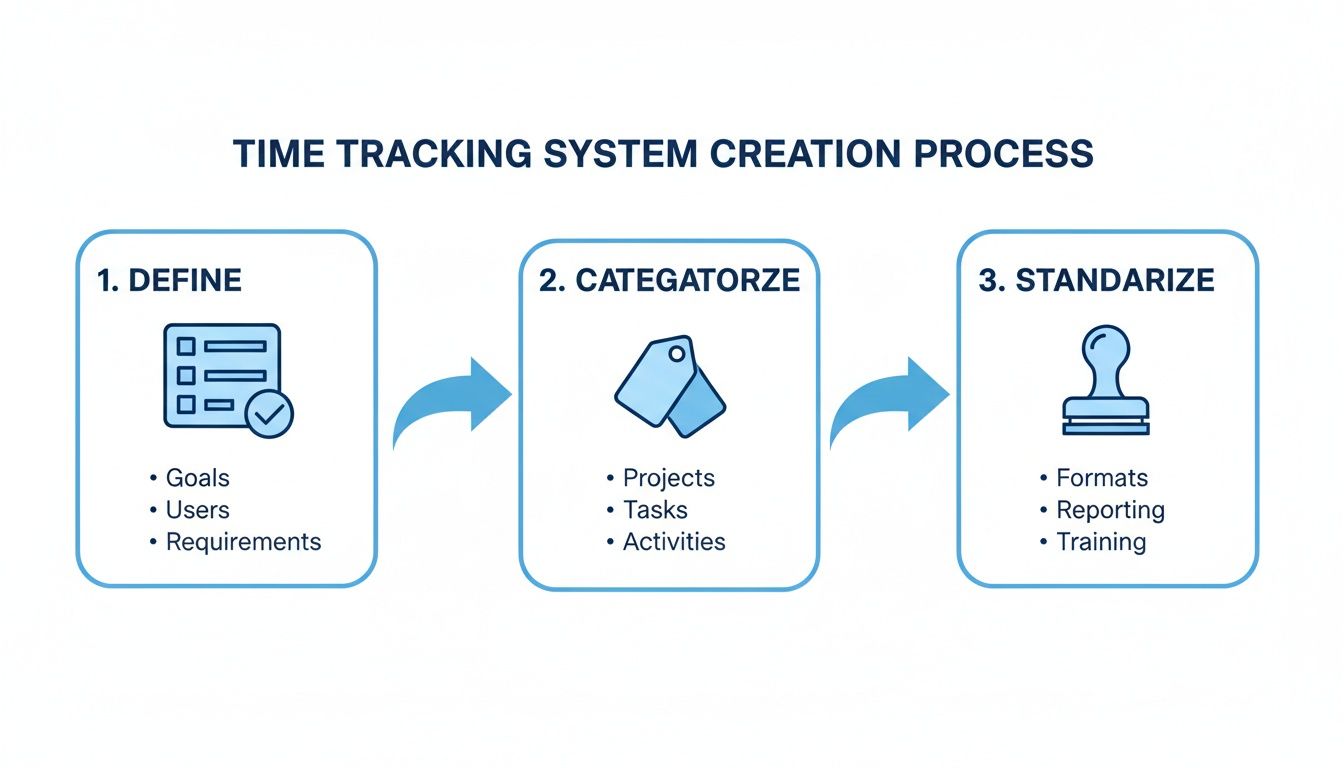
Moving from clear policies to standardized codes is what ensures the data you get from your new software is clean, consistent, and genuinely useful.
At the end of the day, the best billable hours tracker for your firm is one that makes life simpler, not more complicated. It has to deliver powerful insights to leadership while being dead simple for the team doing the work. A clean, intuitive interface isn’t a “nice-to-have”—it’s a requirement. If you’re looking for a platform that nails these essentials, it’s worth exploring a fully integrated time tracking feature like Drum’s. The goal is to find a tool that empowers your team, not one that adds friction to their day.
Remember, the software is only half the battle. How you roll it out is just as important. A smooth launch, clear communication about the “why,” and having leadership use it consistently will ensure your new tool becomes a true asset that drives both profitability and clarity.
Making Time Tracking a Natural Part of Your Workflow
You can pick the most powerful billable hours tracker on the planet, but it’s completely useless if your team doesn’t actually use it. This is where the real work begins—shifting from the technical setup to the human side of the equation.
Getting your team on board isn’t about strict enforcement. It’s about building habits that genuinely make everyone’s life easier. The trick is to frame time tracking not as a big-brother management tool, but as a personal productivity asset for each and every team member. It’s their shield to protect their focus, a record to justify their hard work, and a way to ensure workloads are balanced fairly across the team.
Focus on “What’s in It for Them”
To get people to actually use the software, you have to answer the question everyone is thinking: “How does this help me?” Forget top-down mandates. Let’s talk about the direct, personal benefits.
Here’s what that looks like in the real world:
- Fairer Workloads: When time is tracked properly, managers can finally see who’s drowning and who has room for more. This data stops the same handful of people from getting buried in work while others coast. The result? A more balanced, less stressful environment for everyone.
- Reduced Admin Hassle: A good tracker kills that painful Friday afternoon scramble trying to piece together your week. Logging time as you go takes seconds and saves hours of stressful guesswork later.
- Protection Against Scope Creep: There’s no better defense against a client’s “quick request” that snowballs into a multi-hour ordeal than an accurate time log. It gives you cold, hard data to take back to the client when you need to talk about adjusting budgets or timelines.
When you highlight these advantages, a billable hours tracker stops feeling like a chore and starts looking like a tool for professional self-management.
Building Seamless Time Tracking Habits
The difference between a successful rollout and a constant struggle often boils down to one simple thing: making the process as frictionless as possible. The goal is for logging hours to become an automatic, almost unconscious part of the daily workflow.
A big debate is always when to log time. You’ve got two camps: real-time tracking versus end-of-day summaries. While logging everything at the end of the day seems easier, study after study shows it’s wildly inaccurate. People always forget the small but critical tasks that add up.
Real-time tracking is the gold standard for a reason. Starting a timer when you begin a task and stopping it when you’re done is the single most effective way to capture every billable minute and eliminate guesswork.
Encourage your team to embrace the “start-stop” method. Modern trackers with browser extensions, desktop widgets, or mobile apps make this ridiculously simple. For example, an architect on a site visit can start a timer from their phone, and a consultant can log a client call with a single click without ever leaving their email.
Streamlining Your Entire Proposal-to-Payment Cycle
The real magic happens when you connect your billable hours tracker to the other tools you use every day. Integrating your tracker with your project management and invoicing software creates a seamless flow of data that completely eliminates double-entry and speeds up your entire operational cycle.
Picture this wonderfully simple workflow:
- A team member logs 8 hours on a client project in their time tracker.
- Those hours instantly sync to your project management tool, updating the project’s budget and progress in real-time. No manual data entry needed.
- At the end of the month, you go to generate an invoice in your accounting software. All the approved, unbilled time is pulled in automatically with just a few clicks. The invoice is ready to go in minutes, not hours.
This kind of integration saves a massive amount of admin time and practically eliminates the risk of human error. It means invoices go out faster, they’re more accurate, and as a result, you get paid faster. For a deeper look into how this impacts your firm’s profitability, you can learn more about time tracking for professional services and its effect on your bottom line.
A successful rollout isn’t just about launching a piece of software. It’s about thoughtfully weaving it into your firm’s culture and systems. When you focus on the human benefits and create a frictionless technical experience, time tracking becomes a natural—and valuable—part of everyone’s day.
Turning Your Time Data Into Business Intelligence

This is where all that diligent time logging starts to pay huge dividends. Consistent, accurate time tracking does way more than clean up your invoicing process. It turns a simple log of hours into the sharpest business intelligence tool you have.
You can finally stop running your firm on gut feelings and start making strategic moves backed by cold, hard data. With a modern billable hours tracker, your dashboard becomes a real-time health monitor for the business, showing you exactly where you’re thriving and where you’re bleeding.
Key Metrics Every Firm Owner Should Watch
It’s easy to get lost in a sea of data. The real skill is knowing which numbers tell the most important stories about your firm’s health and profitability.
Think of these as the three non-negotiable KPIs you need to have on your radar:
- Utilization Rate: This is the big one. It’s the percentage of a team member’s time spent on billable client work. It’s a direct measure of how productive and efficient your team is.
- Project Profitability: This metric cuts through the vanity of high-revenue projects. It shows you which clients and project types are actually making you money after you factor in the real cost of your team’s time.
- Budget Variance: This is your early warning system. It tracks the gap between your estimated budget and the actual hours being burned. Catching this early is the key to stopping scope creep in its tracks.
Keeping a close eye on these figures lets you spot trends, fix problems before they blow up, and double down on what’s actually working.
From Historical Data to Future Profits
One of the most valuable assets you’re building is a rich history of every project you’ve ever completed. This data is an absolute goldmine for making your future bids smarter and more competitive.
Imagine an engineering firm that tracks its time religiously. After a few months, they can look back and see that a certain type of structural analysis always takes 15% longer than they estimate. Armed with that concrete data, they can confidently adjust their proposals for the next one, ensuring they’re both profitable for the firm and fair to the client.
The same goes for a creative studio. By analyzing project profitability, the owner might discover that while their big-name client projects look great in their portfolio, it’s the smaller, quick-turnaround branding packages that deliver the highest profit margins. That’s a powerful insight that can completely reshape their business development strategy.
A reliable billable hours tracker stops you from just guessing how long a project will take. You’re building a data-driven model that makes every new proposal smarter and more profitable than the last.
Proactively Managing Projects and People
The insights go far beyond just the numbers. Your time data is a powerful tool for proactive project and resource management. With the right reporting, you can see a project trending over budget long before it becomes a crisis, giving you plenty of time to have a constructive chat with the client about scope or budget.
It’s also crucial for managing your team’s capacity. Watching utilization rates helps you spot who’s consistently overloaded and heading for burnout, and who has the bandwidth to jump on a new opportunity. This is how you build a balanced, sustainable workload for everyone. Understanding your team’s capacity is fundamental, and you can explore more about how this impacts your firm’s financial performance in our detailed guide.
The shift to cloud-based trackers has been a game-changer for workload management. Data shows that firms using these systems can achieve 90%+ accuracy in their time logging, a huge leap from the 70% typically seen with spreadsheets. As remote work continues to grow, the adoption of these tools is skyrocketing, with the market projected to grow from $3.38 billion in 2024 to over $11.48 billion by 2032. You can read more about these market trends and tool comparisons on Beebole. This accuracy gives you the visibility needed to confidently steer your firm toward its most profitable future.
Your Top Questions About Billable Hours Trackers, Answered
Even with the perfect system, you’re going to get questions. Rolling out a new billable hours tracker is as much about managing people and expectations as it is about the technology itself.
Let’s walk through some of the most common questions that pop up from both managers and the team on the ground. Think of this as your friendly FAQ for clearing up confusion and showing everyone how this change will make their lives easier, not harder.
How Often Should My Team Be Logging Their Hours?
Ideally? In real-time. The absolute gold standard is to start a timer the moment you kick off a task and stop it the second you switch gears. It completely takes the guesswork out of the equation and is wildly more accurate.
We’ve all been there—waiting until 5 PM to piece together the day. Or worse, trying to reconstruct an entire week on a Friday afternoon. It never works. You forget that quick 15-minute client call or the 25 minutes you spent reviewing a draft. Those little chunks of time add up fast.
A good billable hours tracker makes this second nature. With desktop widgets, browser extensions, or mobile apps, the friction is gone. It becomes a simple, reflexive click of “start” and “stop” as part of the daily workflow.
The daily timesheet is your minimum baseline, but real-time tracking is where you’ll see the biggest wins in accuracy and profitability.
What’s a Good Billable Ratio for My Firm?
This is a big one, and the answer is that it really varies by industry and even by role. However, for most professional services firms like consultancies, agencies, or architecture firms, a healthy target for a billable ratio is somewhere between 75% and 85%.
What does that actually mean? For a standard eight-hour day, it means your team is spending about six to seven hours on work that directly generates revenue. The rest of that time isn’t wasted—it’s essential for keeping the lights on. It covers things like internal training, business development, and all the admin that makes the client work possible.
A solid tracker makes it incredibly easy to monitor this KPI, so you can see where you stand and find ways to optimize.
How Do I Get My Team Onboard with a New System?
This is all about framing. You have to sell the benefits to them, not just the benefits to the company’s bottom line. Position the new billable hours tracker as a tool that protects them and makes their job easier.
Here are a few friendly angles that really work:
- It ensures a fairer workload. “When we have accurate data, we can see who’s truly swamped and who has capacity. This is the best way to prevent burnout and share the work evenly.”
- It’s your best defense against scope creep. “A detailed time log is undeniable proof when a client’s ‘quick question’ turns into a two-hour unplanned task. It gives us the data we need to have a positive conversation about the budget.”
- It kills the Friday afternoon scramble. “Honestly, nobody enjoys trying to remember what they did on Tuesday morning. This tool makes it easy to log time as you go, so you can just focus on your work.”
Getting your team involved in picking the tool can also create a sense of ownership. But above all, lead by example and choose software with a clean, intuitive interface that doesn’t feel like a chore to use.
Can a Billable Hours Tracker Really Improve Our Quotes?
Without a doubt. In fact, this is one of the biggest long-term payoffs. Once you’ve tracked a few similar projects, you’re no longer guessing. You’re sitting on a goldmine of historical data.
You’ll know precisely how long certain phases or deliverables actually take your team to complete. For instance, you might discover that “Phase 1: Discovery & Research” for a website project consistently takes 20 hours, not the 15 you’ve been quoting.
This data lets you shift from making educated guesses to building data-driven proposals. You can price your work more confidently, protect your margins, and avoid the classic trap of underbidding just to win the job. It also builds trust with clients because you’re setting realistic expectations from the get-go.
A robust billable hours tracker is the engine of a profitable professional services firm. It provides the clarity you need to manage projects, empower your team, and make smarter business decisions.
Drum unifies time tracking with project management and invoicing, giving you a single source of truth to run your entire operation..
Start your free 14-day trial and see how effortless it can be.