
 Project management
 Sales & Proposals
 Time tracking
 Invoicing
 Financial Performance
 Consulting Engineers
 Architects
 Town Planners
 Building Designers
Professional Services Time Tracking: How the Right System Pays for Itself

Ben Walker
Written for Drum
In This Article
Professional Services Time Tracking Guide
Let’s be honest: for many, time tracking feels like a chore. But what if we told you it’s the single most powerful tool you have for boosting your firm’s profitability? For modern professional services firms, smart professional services time tracking isn’t about micromanaging; it’s about gaining the crystal-clear insights you need to protect your bottom line and build a healthier, more sustainable business.
The Hidden Costs of Inaccurate Time Tracking
For so many professional services firms, uncaptured minutes are like a slow leak in a tire. It’s barely noticeable at first, but leave it long enough, and it can leave the business completely flat. These small, seemingly insignificant gaps in time tracking compound quickly, leading to major revenue loss, wildly inaccurate project quotes, and even team burnout. It’s a silent threat that steadily chips away at your hard-earned profits.
Imagine a marketing agency where a designer spends an extra 20 minutes on a client revision, a project manager takes a 15-minute unplanned client call, and an analyst spends an hour troubleshooting an unexpected issue. Individually, these moments feel too small to log. But multiply that across a team of ten professionals over an entire year, and you could be looking at tens of thousands of dollars in lost revenue. This isn’t just a hypothetical scenario; it’s a daily reality for many firms.
From manual spreadsheets to smart automation.
The way we track time has come a long way. What started as pen-and-paper timesheets evolved into spreadsheets, which brought their own set of headaches: manual entry, human error, and a total lack of real-time insight. Today, automated software has completely changed the game, transforming a tedious administrative task into a strategic business function.
Here’s a friendly look at how things have evolved:
The evolution of time tracking methods.
| Feature | Manual Tracking (Spreadsheets) | Automated Tracking (Software) |
|---|---|---|
| Data Entry | 100% manual, prone to errors and guesswork. | Automated timers, mobile apps, and integrations. |
| Accuracy | Low. Relies on memory, often rounded or forgotten. | High. Captures time in real-time as work happens. |
| Insights | Almost none. Requires manual data crunching for reports. | Real-time dashboards on profitability, utilization, and budgets. |
| Admin Effort | High. Chasing timesheets takes hours each week. | Low. Automated reminders and approval workflows. |
| Integration | Non-existent. Creates data silos from other systems. | Connects directly with project management and invoicing. |
The move from manual to automated isn’t just about convenience; it’s about plugging the leaks in your revenue and gaining the visibility you need to make smarter decisions.
Uncovering the true impact of lost time.
The financial drain from sloppy tracking habits is genuinely staggering. In fact, professional services firms with poor time tracking practices risk losing 15–25% of their billable hours every single year, simply due to work that was never recorded or logged improperly. The administrative headache is just as bad, with some firms wasting over 20 hours a week just chasing, collecting, and approving timesheets. For a 50-person firm billing $200/hour, that represents $780,000 to $1.3 million in lost annual revenue, according to BigTime’s analysis of revenue leakage in professional services.
This infographic perfectly visualizes the domino effect of those lost hours, showing how they cascade from direct revenue leakage all the way to administrative chaos and delayed payments.
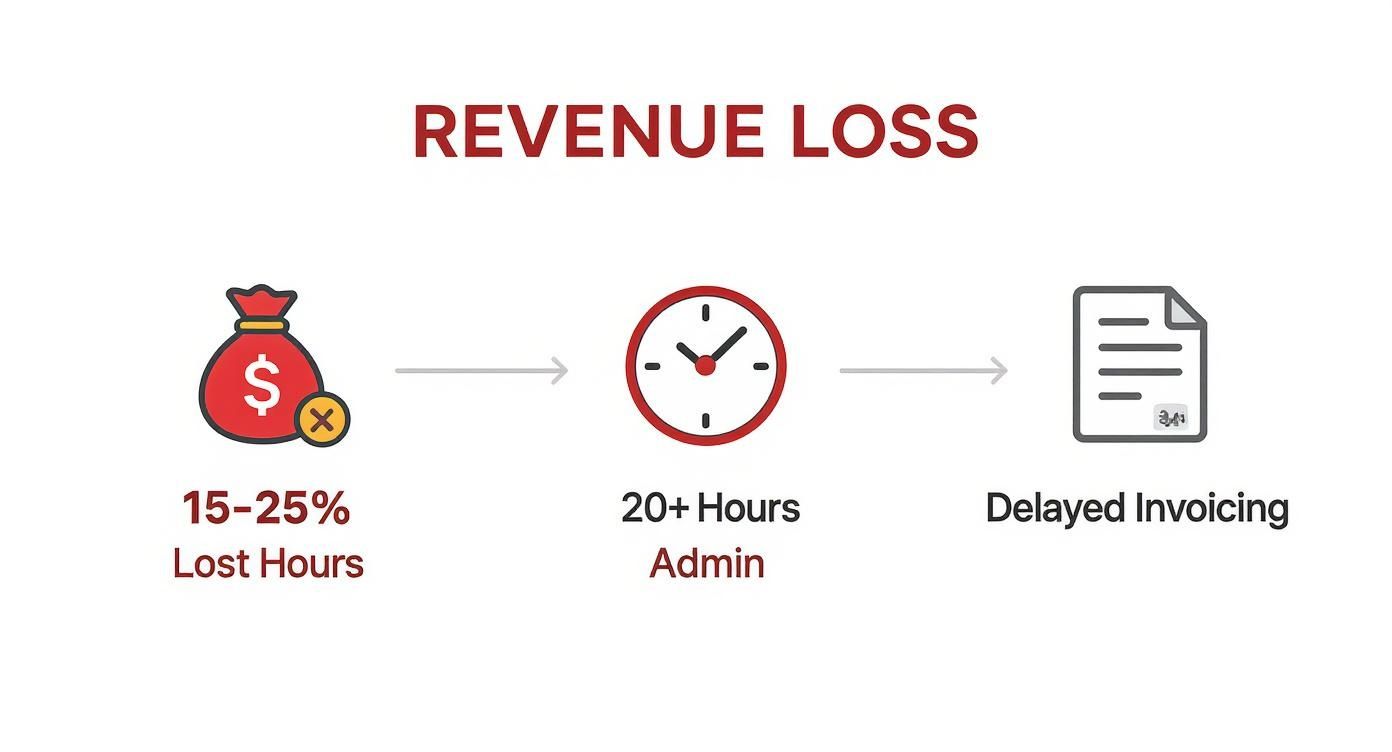
As the data clearly shows, this problem goes way beyond just lost money. It creates a ton of operational friction that disrupts your cash flow and tanks overall efficiency.
The real cost of inaccurate time tracking isn’t just the money you lose. It’s the strategic opportunities you miss because you don’t have a clear picture of where your most valuable resource, your team’s time, is actually going.
This fundamental lack of clarity creates several downstream problems that can cripple a growing firm:
- Inaccurate Project Quoting: When you don’t have precise historical data, every new project bid is just a shot in the dark. You might quote a website redesign for 80 hours based on a gut feeling, only to discover it actually took 120 hours, completely wiping out your profit margin.
- Resource Misallocation: You can’t possibly put the right people on the right tasks if you don’t have a clue how long different phases of a project actually take your team to complete.
- Strained Client Relationships: Nothing erodes trust faster than billing disputes that stem from vague or incorrect invoices. These arguments can permanently damage long-term partnerships you’ve worked hard to build.
Ultimately, solid professional services time tracking isn’t just an administrative task. It provides the foundational data you need to make smarter, more strategic business decisions, ensuring your firm doesn’t just survive, but truly thrives.
Unlock Your Firm’s True Profit Potential

Sure, accurate time tracking plugs the revenue leaks we talked about, but that’s just scratching the surface. Think of it less as a stopwatch and more as a compass for your entire firm.
It gives you the hard data needed to stop guessing and start knowing. This is where you find the confidence to make smarter, more profitable decisions. When you can see exactly where every hour goes, you gain a crystal-clear picture of your firm’s financial health.
This clarity moves you from assumption to certainty. Instead of feeling like a project was profitable, you can see the exact margin down to the dollar. This data-driven insight is where the real magic happens.
Identify your most valuable work.
Picture two of your clients at a law firm. Client A is high-maintenance, constantly calling with “quick questions” that chew up hours of your paralegals’ time. Client B gives you larger, more focused cases. On the surface, both seem like good business.
But what if your time tracking data told a different story?
It might reveal that Client B’s cases are completed so efficiently they yield a 40% higher profit margin. Meanwhile, Client A’s “death by a thousand cuts” approach is quietly bleeding you dry. Without that data, you’d likely keep giving both clients equal attention, completely unaware one is a goldmine and the other is a drain.
This is the kind of information that lets you:
- Focus business development efforts on finding more clients just like Client B.
- Rethink pricing or scope for clients like Client A to make the relationship truly profitable.
- Assign your A-team to the highest-value work where they can make the biggest impact.
By diligently tracking time, you’re essentially creating a profitability roadmap for your business. It shows you the highways to financial success and flags the costly detours that waste time and resources.
This kind of strategic vision is built one timesheet at a time. It’s the difference between running your business with a detailed map versus stumbling around in the dark.
Build unbreakable client trust.
Transparent billing is the bedrock of any strong client relationship. When you send an invoice backed by detailed, accurate time logs, you eliminate any room for doubt and head off potential disputes before they even start.
It completely changes the conversation from, “Why did this cost so much?” to “Look at all the incredible work your team delivered.”
For example, a detailed invoice for an IT consulting project could break down the work like this:
- 4 hours on initial system audit and strategy sessions.
- 10 hours of network configuration and software installation.
- 2.5 hours on user training and follow-up support calls.
This level of detail doesn’t just justify the cost; it showcases your value and proves your commitment. It builds a huge amount of trust, turning what could be a tense billing discussion into a chance to strengthen your partnership.
This whole process becomes even smoother when your systems for project management and accounting are in sync. Ravetree’s analysis of how PSA software stops profit leakage found that firms using integrated PSA tools see a 25 percentage point increase in average utilization rates. That kind of transparency makes clients see you as a true partner, not just another vendor.
How to Choose the Right Time Tracking Software
With so many tools flooding the market, picking the right time tracking software for your firm can feel like a mammoth task. It’s tempting to just go for the one with the most bells and whistles, but that’s a common mistake. The goal isn’t just to buy software; it’s to find a system that slots so perfectly into your team’s daily rhythm that they barely notice it’s there.
A great tool gives your team superpowers. The wrong one just adds another layer of soul-crushing admin work.
First things first: focus on what really matters. For any modern professional services firm, the absolute non-negotiable is tight integration. Your time tracking software can’t be an island. It has to talk to your project management and accounting systems, creating a single source of truth and finally killing off all that manual data entry.
Core features you cannot ignore.
Think of the perfect software as a reliable partner in your day-to-day grind. It should make life easier, not more complicated. For teams constantly on the move, meeting clients, or working from anywhere, a slick mobile app is essential for capturing time accurately, right as it happens.
Here are a few must-have capabilities to look for:
- Project and Task-Level Tracking: You need to be able to log hours against specific projects, phases, and even down to individual tasks. This is the only way to get a true picture of your profitability.
- Simple Timer and Manual Entry: Flexibility is key. A one-click start/stop timer is brilliant for tracking in the moment, but the option for quick manual entries is just as vital for those times you forget.
- Approval Workflows: Automated approval processes are a manager’s best friend. They cut out hours of chasing down timesheets and ensure everything is double-checked before an invoice goes out the door.
- Real-Time Reporting: Forget waiting for month-end reports. You need instant access to dashboards showing project budgets, team utilization, and billable hours whenever you want them.
Feature checklist for time tracking software.
To help you sift through the options, we’ve put together a quick checklist. Use it to weigh what’s absolutely essential for your firm versus the features that are just nice to have. This will help you focus on the tools that truly solve your problems without getting distracted by shiny objects.
| Feature Category | Essential Features | Advanced (Nice-to-Have) Features |
|---|---|---|
| Core Time Entry | - One-click start/stop timer - Manual time entry - Mobile app with offline support - Timesheet submission and approval workflows |
- Automated time tracking (AI) - Calendar integrations (e.g., Outlook, Google) - Minimum billable increments |
| Project & Billing | - Tracking against projects, phases, and tasks - Billable vs. non-billable hour tracking - Basic invoicing from timesheets |
- Custom billable rates per project/role - Integration with expense tracking - Advanced budget vs. actuals analysis |
| Reporting & Analytics | - Real-time dashboards - Project budget tracking - Team utilization reports |
- Profitability analysis per project/client - Forecasting and resource planning - Customizable report builder |
| Integrations | - Accounting software (Xero, QuickBooks) - Project management tools (Drum, Asana, Jira) |
- CRM integrations (Salesforce, HubSpot) - Payroll system integration - Single Sign-On (SSO) |
| User Experience | - Intuitive, clean interface - Minimal training required - Reliable and fast performance |
- Personalized dashboards - In-app notifications and reminders - Bulk time entry options |
Remember, the “right” tool is the one that ticks your essential boxes first and foremost. The advanced features are just a bonus if they align with your long-term goals.
The human element is everything.
Here’s the brutal truth: a tool is completely useless if your team won’t use it. You could have the most powerful software on the planet, but if the interface is clunky, confusing, or slow, it’s destined to fail. When you’re looking at different options, always put ease of use at the top of your list. A clean, intuitive design that requires almost no training will always beat a complex system, no matter how many features it boasts.
A tool’s true value isn’t measured by its feature list, but by its adoption rate. If your team finds it intuitive and helpful, you’ll get the accurate data you need. If they find it a burden, you’ll be right back to guessing.
The global time tracking software market is absolutely exploding. It’s expected to hit $11.48 billion by 2032, according to Mosaic’s analysis of utilization rate statistics. This isn’t just a random trend. It’s being driven by the massive shift to remote work and the critical need for precise data to manage distributed teams. The 2025 SPI Professional Services Maturity Benchmark tells a sobering story: average billable utilization has dropped to 68.9% while EBITDA margins have hit a five-year low of 9.8%, making the case for better tracking tools more urgent than ever.
This growth isn’t just noise; it’s a clear signal that investing in the right technology is no longer a luxury but a competitive necessity for any firm that wants to stay in the game.
When you’re ready to make a decision, think about tools that pull double or even triple duty. Exploring solutions that combine powerful features for time tracking with project management and invoicing can massively simplify your tech stack and make your whole operation run smoother. The ultimate goal is to find a platform that feels like a natural extension of your team’s workflow, not another hurdle they have to jump over.
Implementing a System Your Team Will Actually Use
Here’s the hard truth: the best time tracking software in the world is totally worthless if your team doesn’t embrace it. Rolling out a new tool isn’t just about flipping a switch; it’s about shifting the culture. The secret is to position time tracking not as a surveillance tool, but as a system that brings transparency, fairness, and sanity to everyone’s workday.
When you get pushback, it’s almost never about the software itself. It’s usually a fear of being micromanaged or a simple misunderstanding of why you’re making the change. Your first job is to sell the “why” with genuine enthusiasm. Show them what’s in it for them: less guesswork, fairer workloads, and better project planning that stops burnout in its tracks.
Setting clear and simple guidelines.
Confusion is the enemy of adoption. Nothing frustrates a team faster than having vague, fuzzy rules about what’s billable and what’s not. From day one, you need simple, crystal-clear guidelines that don’t require a second thought.
Create a friendly one-page guide that answers the most common questions. For instance:
- Initial client discovery calls? Billable.
- Internal project kick-off meetings? Non-billable. Track it under “Internal Project Admin.”
- Travel time to a client’s office? Billable, as per the client agreement.
- Time spent writing proposals for new business? Non-billable. Log it to “Business Development.”
This kind of clarity removes the mental gymnastics of trying to categorize every 15-minute chunk of the day. When the rules are simple and the process is easy, logging time becomes a natural habit, not a daily chore.
The goal isn’t just to track hours. It’s to build a shared understanding of how the team’s effort directly translates into the firm’s success and stability. When everyone sees how their work fits into the bigger picture, buy-in is a natural next step.
Training that empowers your team.
Good training is more than a quick software demo. It’s your chance to prove this new system will actually make everyone’s life easier. Focus your sessions on how it benefits them, not just how it helps management.
Here’s a simple playbook for a smooth rollout:
- Lead with the Benefits: Kick things off by explaining how accurate data leads to better project estimates, preventing those last-minute crunches everyone hates. Frame it as a tool to protect their work-life balance.
- Show, Don’t Just Tell: Walk through real-world scenarios. For example, show a consultant how to log time for a multi-phase project, how a designer can submit an expense for stock photos, and how anyone can check their own utilization data. Keep it practical and relatable.
- Create Champions: Pick a few tech-savvy or enthusiastic team members to be your “power users.” Give them extra training and let them help their colleagues. Peer-to-peer support is often way more effective than a top-down mandate.
- Offer Ongoing Support: Make it clear that questions are not just welcome, they’re expected. Set up an open channel for feedback in the first few weeks and be ready to tweak your guidelines based on what you learn.
A successful rollout comes down to empathy and clear communication. For a closer look at platforms designed with this in mind, you might want to explore some of the best time tracking software for consultants that put ease of use first. By showing your team you’ve picked a tool to support them, not to scrutinize them, you build a culture where accurate time tracking becomes an effortless—and valuable—part of the job.
Getting Past Common Time Tracking Roadblocks

Let’s be real—rolling out any new system is going to have a few bumps in the road. Even with the best software and intentions, you’re bound to hit some common hurdles. The good news? These challenges are completely predictable, which means you can get out ahead of them.
One of the biggest issues is just plain forgetfulness. People get deep into their work, jumping from one urgent task to the next, and remembering to start a timer or log hours at the end of the day simply falls off the radar. This isn’t a sign of carelessness; it’s a symptom of a busy, productive team.
Another classic roadblock is pushback, especially from your creative or technical folks. They might feel that punching a clock stifles their creative process or that their messy, non-linear problem-solving doesn’t fit neatly into 15-minute blocks. This resistance usually comes from a genuine place of wanting to protect the quality of their work.
Practical solutions for real-world problems.
Anticipating these issues is half the battle. Instead of waiting for problems to pop up, you can build solutions right into your rollout plan that make professional services time tracking feel like a natural part of the workflow, not another piece of admin.
Here are a few simple, actionable ways to tackle these challenges head-on:
- For the Forgetful: Set up automated reminders. Most modern time tracking tools can send gentle nudges at the end of the day or week to complete timesheets. Just frame them as helpful pings, not nagging demands. A friendly Slack notification is much better than a stern email.
- For the Creative Staff: Push the use of timer-based tracking. A simple start-stop button is far less disruptive than trying to manually reconstruct your day. It captures time accurately as it happens, keeping them in their flow state.
- For Non-Linear Work: Show your team how to track “deep work” or “problem-solving” as its own task under a project. This validates the time spent thinking and strategizing, giving them a way to log it without feeling boxed in.
The most successful time tracking systems are the ones that adapt to your team’s existing habits, not the other way around. Flexibility and empathy are your most powerful tools for ensuring long-term adoption and success.
Ultimately, getting past these roadblocks comes down to listening to your team and giving them the right support. When you address their specific pain points with practical solutions, you can build a culture where time tracking is seen as a helpful tool for everyone, not just a mandate from management.
Even with the best strategy in place, adopting a new system will always spark a few questions. That’s perfectly normal. Getting solid answers builds confidence and gets everyone pulling in the same direction.
Here are a few of the most common questions we hear about time tracking in professional services, along with some straight-shooting, practical answers to clear up any lingering doubts.
How should we track essential non-billable work?
This is a fantastic question because it cuts right to the heart of understanding your firm’s true operational costs. Not every valuable minute is billable, but every single minute still costs you money.
The good news is that any decent time tracking software will let you create specific categories for all those essential, non-billable activities. This is absolutely critical for getting a complete picture of where your team’s effort is actually going.
Here are a few practical examples of non-billable categories you should absolutely be tracking:
- Internal Meetings: Think weekly team syncs or project post-mortems.
- Business Development: This includes time spent writing proposals or attending networking events.
- Professional Development: Covering training sessions, webinars, and certification courses.
- Administrative Tasks: Little things like organizing files or updating your internal systems add up.
By tracking this time, you can finally get a real grip on your overhead and understand your team’s true capacity beyond just client work. It gives you the hard data needed for smarter resource planning and shines a light on all the hidden costs of running your firm.
Will time tracking make employees feel micromanaged?
This is probably the biggest concern we see from leaders, and it’s a completely valid one. Nobody wants to feel like Big Brother is watching over their shoulder. The key to avoiding this is all about communication and how you frame the purpose of tracking time.
If your team thinks it’s a tool to watch their every move, they will naturally resist. But if they understand it’s a tool for the team’s collective success, they’re far more likely to get on board.
Time tracking data should be used to improve processes, not to punish people. When your team sees it as a way to ensure fair workloads and quote projects accurately, the fear of micromanagement fades away.
Frame it as a benefit for everyone. Explain that accurate tracking protects the firm’s financial health, which in turn provides job security and resources for the whole team. Show them how the data helps prevent burnout by revealing when someone is consistently overloaded, allowing you to rebalance workloads before it becomes a problem.
What is the best way to handle forgetful employees?
Consistency can be tough, especially when you’re just getting started. When someone consistently forgets to track their time, it’s often a sign that the process is clunky, not that the person is lazy.
Your first move should always be to make the process as frictionless as possible. Gentle in-app reminders can help, as can ensuring your team has easy-to-use mobile apps and integrations that slot right into their existing workflow.
If the problem continues even after you’ve made things simple, a friendly one-on-one conversation is the next step. Approach it with curiosity, not criticism. Ask them what the specific roadblocks are—maybe they’re unsure how to categorize certain tasks or just find the tool disruptive. Once you understand the root cause, you can offer targeted support and gently reinforce why tracking is so important for accurate client billing and overall project profitability.
Ready to transform your firm's profitability with a system that unifies everything from proposals to invoicing?
Drum provides a single source of truth to manage projects, track time, and gain real-time insights, all in one intuitive platform.
Start your free 14-day trial and see how it works.