
 Pipeline & Proposals
 Project Management
 Resource Planning
 Time & Costs
 WIP & Invoicing
 Commercial Reporting
 Consulting Engineers
 Architects
 Town Planners
 Building Designers
Time Tracking Software for Consultants: What Actually Moves the Needle on Profitability

Ben Walker
Written for Drum

In This Article
Time Tracking Software for Consultants
Think about your consulting firm’s profitability for a moment. If it were a leaky bucket, where would you find the holes? For most of us, it’s the uncaptured minutes and tiny administrative slip-ups that silently drain profits over time. Consulting time tracking software is the tool you use to plug those leaks for good.
It’s not just about logging hours. It’s about transforming raw time data into a strategic asset, one you can use for smarter project bids, better resource planning, and building bulletproof client transparency. Let’s walk through how.
Why Time Tracking Transforms Consulting Profitability
In consulting, time isn’t just a resource. It’s the very product you sell. Trying to manage that product with spreadsheets or scattered notebooks isn’t just a headache; it’s a magnet for costly errors. Imagine you wrap up a 15-minute client call or spend an extra 20 minutes refining a presentation. These moments might seem small, but they add up. Fast.
Over a year, that slow drip of lost time can turn into a flood of lost revenue.
This is exactly where dedicated software makes a world of difference. It goes way beyond a simple clock-in, clock-out function to give you a crystal-clear, accurate record of where every single minute is spent. You move from guesswork to evidence, which is the foundation of any healthy and thriving consulting practice.
From administrative burden to strategic asset. The best modern time tracking tools are built to feel almost invisible, blending right into your workflow. With friendly features like one-click timers, consultants can log hours the moment they happen, whether they’re on-site with a client or catching up on work between meetings. Capturing data in real-time is the secret sauce for accuracy.
But here’s where it gets really powerful. That detailed time data feeds into the bigger picture of your operations, unlocking benefits that go far beyond just sending an accurate bill:
- Smarter Project Bidding: You can build new proposals based on hard data from similar projects you’ve already completed. This means your quotes are not only competitive but, more importantly, genuinely profitable.
- Better Resource Planning: Get an instant, friendly view of who’s swamped and who has capacity. This helps you balance workloads effectively and head off team burnout before it ever becomes a problem.
- Stronger Client Trust: Hand your clients detailed, easy-to-read reports that justify every line item on your invoice. When they see exactly how their investment is being put to work, you build rock-solid trust and partnership.
This shift isn’t just a hunch; it’s a major industry trend. The global time tracking software market is on track to explode from USD 8.36 billion in 2025 to USD 29.88 billion by 2033. This growth is fueled by professional services firms realizing just how crucial precise time management is. Discover more insights about this market growth on Straits Research.
By automating the tedious task of logging hours, you free up your team’s most valuable asset: their time and brainpower. That time can then be reinvested into high-value, billable client work. It’s not about watching the clock; it’s about making every second count toward your firm’s bottom line.
What to Look for in Your Time Tracking Software
Let’s be honest, not all time tracking tools are built the same, especially when you’re talking about the unique pressures of a consulting firm. Choosing the right consulting time tracking software isn’t about finding a glorified start-stop timer. You need a specific set of features engineered to protect your firm’s profitability and keep operations running smoothly and happily.
Think of these features less as “nice-to-haves” and more as the absolute non-negotiables in your operational toolkit. They represent the leap from a tool that just logs hours to one that actively powers your business forward.
Essential features of consulting time tracking software. Before getting into the details, it helps to see the big picture. The table below breaks down the must-have features, why they’re so critical for consultants, and how they play out in the real world with some friendly examples.
| Feature | Why It’s Critical for Consultants | Example in Action |
|---|---|---|
| Project & Task Tracking | Connects every minute of work to a specific client and project, providing the raw data needed for profitability analysis. | Time is logged against “Client A - Phase 2 - Stakeholder Interviews,” allowing the project lead to see if that specific phase is consuming more hours than budgeted. |
| Reporting & Analytics | Transforms raw time data into actionable business intelligence, revealing utilization rates, budget health, and scope creep. | A director pulls a report showing that non-billable administrative work has increased by 15%, prompting a friendly team chat about tightening up internal processes. |
| Integrated Invoicing | Directly links tracked time to your invoicing system, cutting down on administrative overhead and preventing billing errors. | At month-end, the finance team generates invoices for all “Time & Materials” projects in three clicks, pulling all approved timesheets directly into the accounting software. It’s that easy! |
These core features work together to create a supportive operational backbone for your firm, ensuring that time, your most valuable asset, is captured, analyzed, and billed with precision.
Project and task tracking. For any consulting firm, time is never tracked in a vacuum. Every minute is tied to a client, a project, and a specific task. Your software has to make this hierarchy intuitive and easy to manage. But this isn’t just about staying organized; it’s the foundation of profitability analysis.
When you assign every hour to a specific project and task, you unlock the ability to run reports that tell you which clients are your most profitable, or which project phases consistently blow their budget. This data is pure gold for quoting future work and planning your resources. You can explore a powerful approach to time tracking for professional services that connects every logged minute to a tangible project outcome.
The ability to break down time by project isn’t just an organizational feature. It’s your primary tool for understanding project profitability and identifying scope creep before it derails your budget.
Detailed reporting and analytics. Just collecting time data isn’t the endgame. The real value is unlocked by what you do with it. Your software must have a strong reporting engine that can turn those raw hours into business intelligence you can actually use.
Look for the ability to generate reports that instantly show you:
- Billable vs. Non-Billable Hours: Finally get a clear picture of your team’s true utilization rate and the real internal cost of non-client work.
- Project Budget vs. Actuals: Get real-time alerts when a project is eating through its budgeted hours, giving you the chance to manage client expectations proactively. For example, you can say, “Hey team, we’re at 80% of our budget for Phase 1. Let’s regroup and ensure we’re on track.”
- Team Productivity: See how time is spread across your team and projects to ensure workloads are balanced and you’re deploying your talent effectively.
Invoicing integration. The final, and arguably most critical, step in this whole process is getting paid for your wonderful work. A top-tier time tracking tool makes this part painless by integrating directly with your invoicing or accounting software.
Instead of the soul-crushing task of re-typing hours from a spreadsheet into an invoice, the software should let you generate an accurate, professional invoice from tracked time in just a few clicks. This doesn’t just save a mountain of administrative time; it kills costly data entry errors and ensures you bill for every second of your valuable work.
Unlock Hidden Profitability with Smart Time Tracking
Let’s be honest, time tracking is about so much more than just sending invoices. It’s a goldmine of business intelligence just waiting to be tapped. Many consulting firms see it as a chore, completely overlooking the strategic advantages hiding inside their time data. Viewing your consulting time tracking software as a strategic asset can completely change how you approach profitability, project management, and even your client relationships.
Think about your project proposals, for instance. Instead of relying on educated guesses, you can pull historical time data from similar projects to scope new work with incredible precision. For example, you can see that your last three “Market Analysis” projects for similar clients each took between 80-95 hours. Now you can bid for the next one with confidence. This isn’t just about winning more bids; it’s about creating competitive, profitable proposals that set crystal-clear expectations from day one, effectively stopping scope creep before it even gets a chance to start.
Drive strategic decisions with data. Accurate time data is the bedrock of smart business decisions. It shifts your firm from just reacting to problems to proactively shaping better outcomes. The insights you gain from tracking every hour let you optimize your most valuable asset: your team’s expertise.
This data-first approach delivers a few huge wins:
- Smarter Resource Allocation: Instantly see which consultants are nearing capacity and who has room for more work. This isn’t about micromanagement. It’s about preventing burnout and making sure the right person is on the right task, which improves both project outcomes and team morale.
- Stronger Client Trust: Hand your clients transparent, detailed reports showing exactly where their investment is going. This level of openness builds unshakable trust and turns tough conversations about scope into collaborative planning sessions.
- Pinpoint Financial Forecasting: With a clear view of billable hours and project progress, you can predict revenue and cash flow far more reliably. That kind of stability is crucial for making confident calls on hiring, investment, and firm growth. To see how this works, you can learn more about improving your firm’s financial performance and forecasting.
When you track time intelligently, you’re not just logging hours. You’re building a historical record of your firm’s effort, which becomes the blueprint for future success and profitability. It answers the critical question: “Where is our time really going?”
This strategic shift is becoming non-negotiable, especially as remote and hybrid work models become the new standard. The need for consultants to accurately record billable hours and manage projects from anywhere has fueled a massive surge in software adoption. The time tracking software market, valued at USD 3.38 billion in 2024, is expected to explode to USD 18.17 billion by 2035. You can read the full research about this market’s growth on Market Research Future. By embracing these tools, you’re not just keeping up; you’re building a more resilient, transparent, and profitable firm.
How to Choose the Right Software for Your Firm
Picking a new tool for your firm can feel like a massive, high-stakes decision. The good news? It doesn’t have to be. The secret is to start with your actual needs, not a flashy features list. The best consulting time tracking software isn’t the one with the most bells and whistles; it’s the one your team will actually use and love, day in and day out.
Think about your firm’s DNA for a minute. Are you a solo consultant who just needs a dead-simple way to log hours and fire off invoices? Or are you a growing agency juggling multiple projects, needing deep project management and resource planning? Answering that one question will slice your list of options in half and stop you from paying for features you’ll never touch.
Define your core requirements. Before you even think about watching a demo, grab a notepad (or open a doc) and map out your must-haves. This simple act is your friendly defense against a slick sales pitch. Your list of needs becomes your compass, pointing you toward the right fit.
Kick things off by asking yourself and your team a few direct questions:
- What’s our biggest time-tracking headache right now? Are we bleeding billable hours? Drowning in messy spreadsheets? Spending way too long getting invoices out the door?
- What other tools does this need to play nice with? Do you live and breathe in QuickBooks or Xero? Does it need to sync with your current project management platform?
This isn’t just busywork. The quality of the data coming out of your time tracker directly impacts your firm’s ability to put together competitive bids and, just as importantly, avoid the dreaded scope creep.
As this decision tree shows, it all starts with accurate data.
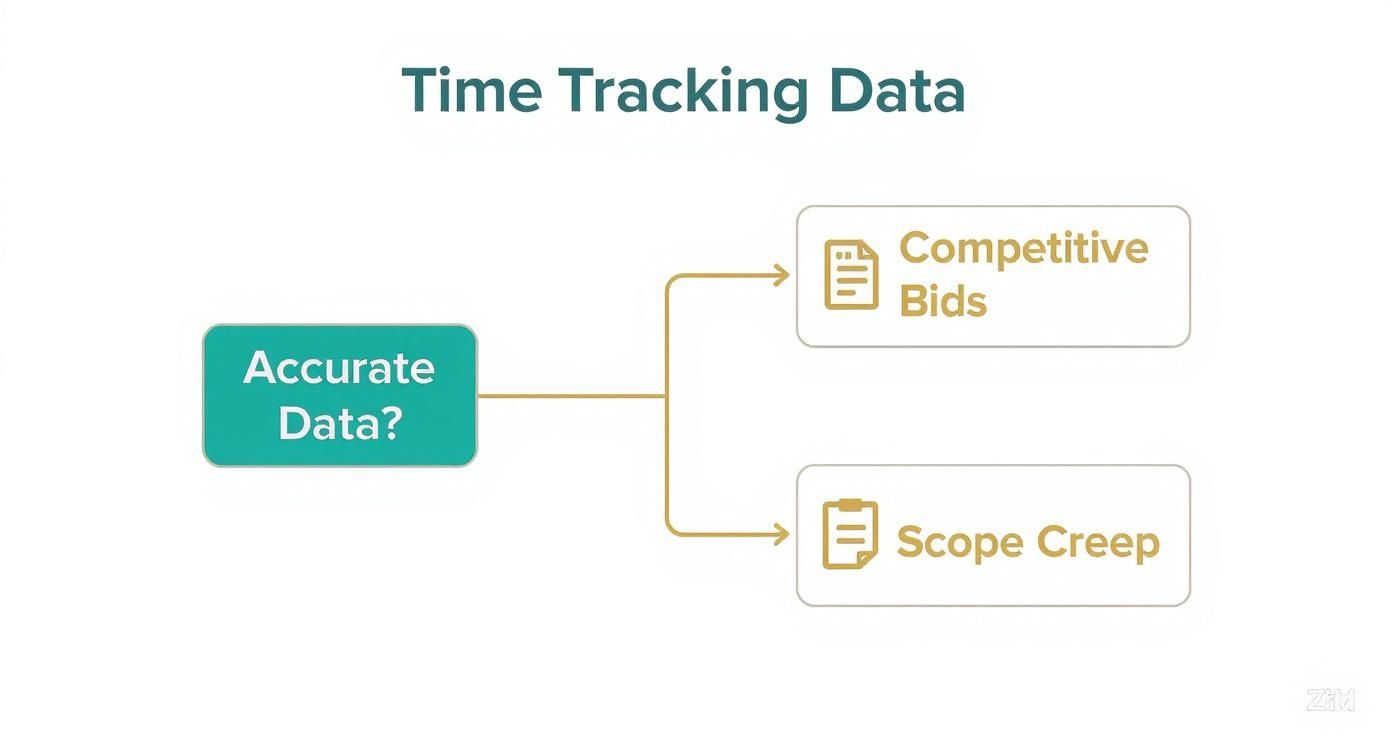
You can see how the path to healthy, profitable projects begins with reliable time tracking. This is why choosing the right tool is so foundational to your success.
Comparing time tracking software types for consultants. Not all time tracking tools are created equal. They generally fall into a few different camps, each built for a different kind of team or workflow. Understanding these categories helps you quickly filter out the noise and focus on what’s genuinely a good fit for your consulting firm.
| Software Type | Best For | Key Strengths | Potential Drawbacks |
|---|---|---|---|
| Standalone Timers | Solo consultants or small teams with very basic needs. | Simple, focused on one job: logging time. Often inexpensive or free. | Lacks project management, budgeting, and invoicing features. Creates data silos. |
| Project Management Tools with Time Tracking | Teams that need to connect time entries directly to tasks and project progress. | Good for task-level visibility and keeping time tracking within the project workflow. | Time tracking features can be basic. Often weak on invoicing and financial reporting. |
| Accounting Software Add-Ons | Firms that prioritize syncing billable hours directly with their invoicing and accounting system. | Simplifies the billing process significantly. | Time tracking interface can be an afterthought. Poor user experience for daily tracking. |
| Professional Services Automation (PSA) | Growing and established consulting firms that need an all-in-one solution. | Combines time tracking, project management, resource planning, and financials in one place. | Can be more expensive and may have a steeper learning curve. |
While a simple timer might work for a freelancer, a growing consulting firm quickly finds that tracking time in isolation from project budgets and invoicing creates more problems than it solves. This is why integrated platforms like PSAs have become the standard for firms looking to scale efficiently and happily.
Test drive before you commit. Never, ever buy software without kicking the tires first. Take full advantage of the free trial. It’s your chance to see how the tool feels in a real-world scenario. Don’t just click around the interface. Set up a real (or a realistic sample) project and get one or two team members to track their time with it for a few days.
A beautiful interface is meaningless if logging time feels like a chore. The user experience is paramount; if it’s clunky or confusing, your team’s adoption rate will plummet, and you’ll be right back where you started.
While you’re testing, send a question to their support team. A quick, helpful, and friendly response during a trial is a fantastic sign of the service you’ll get once you’re a paying customer.
And think about the future. Does the software have a growth path that matches your firm’s ambitions? A tool that’s perfect today might feel restrictive in two years if it can’t scale with you. Many firms ultimately look for tools that combine time tracking with other core functions, a topic we cover in our guide to consulting project management software.
The shift toward these integrated, cloud-based tools is driving massive market growth. The global time tracking market was valued at USD 3.8 billion in 2025 and is projected to skyrocket to USD 16.1 billion by 2035. This explosion shows just how essential these platforms have become for any modern professional services firm. (Read the full research about market projections on Fact.MR).
Implementing Your New Software for Team Success

You’ve done the hard work and picked the perfect consulting time tracking software. High five! But the real work (and the biggest payoff) is just getting started. The true test is getting your team to actually use and embrace the new tool, and this is where so many firms stumble.
A smooth rollout isn’t about just blasting out a new login link. It’s a strategic play that requires thoughtful planning and great, warm communication. The goal is to show everyone this is a massive step forward for the whole team, not just another management mandate.
Done right, time tracking software stops feeling like surveillance and starts feeling like a helpful tool that makes everyone’s day easier. It’s about ditching clunky spreadsheets for something that actually helps the team work smarter.
Your simple implementation checklist. A killer launch comes down to preparation and clarity. Don’t drown your team in a sea of new processes. Instead, break the rollout into a few easy, digestible steps. This friendly approach ensures everyone feels supported and understands the “why” from day one.
Here’s a simple checklist to get you there:
- Communicate the Vision Early: Before a single person logs in, explain why the firm is making the change. Talk about the real-world benefits for them: fairer workloads, less time spent on tedious admin, and better project data to prevent burnout.
- Migrate Key Data: Nobody wants to start from a blank slate. Work with your software provider to import existing client lists, projects, and any useful historical data. This makes the new platform feel familiar right out of the gate.
- Establish Clear Project Codes: Set up a standardized, simple way to name and categorize projects and tasks. It might seem small, but this consistency is the secret to getting clean, reliable reports down the line. Think
ClientName - ProjectName - Task. - Conduct Hands-On Training: Run a training session that’s less about features and more about solving real problems. Show your team exactly how the tool fixes old frustrations. A great example?
The goal of implementation isn’t just to install software; it’s to build new, positive habits. The easier you make it for your team to see the personal benefits, the faster they will embrace the new way of working.
Gaining buy-in from your team. Even the best plan can hit a wall of resistance. The fastest way to break it down? Directly answer that age-old question: “What’s in it for me?” Stop talking about firm-level metrics like profitability and start highlighting the direct wins for each consultant.
For the consultant who dreads filling out their timesheet at the end of the month, show them how the new software can generate their report in 30 seconds with just a couple of clicks.
For the project manager constantly battling scope creep, show them how real-time budget tracking gives them the hard data they need for confident, collaborative client conversations.
When your people see the software as a tool that saves them time and kills their biggest headaches, getting them on board is the easy part.
Even when all the benefits are clear as day, bringing in a new piece of technology is going to stir up some questions. That’s a good thing! It’s smart to get these concerns out in the open so your whole team can move forward on the same page, together. We’ve pulled together some of the most common questions we hear from consulting firms about consulting time tracking software. Our goal is to give you straight, practical, and friendly answers to clear up any doubts.
“Will my team feel micromanaged?”
This is the big one, isn’t it? It’s probably the most common—and most important—concern we hear. No one wants to feel like Big Brother is watching over their shoulder.
The secret to avoiding this feeling has everything to do with how you introduce and use the software. You have to make it crystal clear that the goal is insight, not oversight.
Frame the tool as what it truly is: a resource to help dial in project accuracy, make sure everyone gets paid for all their hard work, and kill off those administrative headaches. Show them how the data helps leadership see workloads clearly, which is the best defense against burnout.
When your team sees that the data is being used to make their work lives better, not to second-guess every move they make, they’ll see it as the helpful asset it is.
“How does this thing talk to our other tools?” A great time tracking tool shouldn’t be another island of data you have to swim to. It should be a bridge that connects your entire workflow. Most modern platforms are built specifically to integrate, plugging right into the accounting tools you’re already using.
You’ll want to look for native integrations with the platforms your firm lives in every day, like:
- Accounting: QuickBooks and Xero for ridiculously smooth invoicing.
When these systems are connected, data flows automatically. Turning tracked hours into a client invoice or tying time to a project task happens without a single line of manual data entry. This doesn’t just save a ton of time; it pretty much eliminates the risk of costly mistakes.
“What’s the best way to handle non-billable time?” This is a fantastic question because tracking non-billable time is just as vital as tracking billable hours. It’s the only way to get a true, honest picture of your firm’s operational health. This is all the important internal stuff: business development, proposal writing, admin tasks, and professional development.
The best way to handle this is to create specific projects or tasks for these categories inside your software, just like you would for client work. You might set up internal projects like “Business Development,” “Internal Admin,” or “Team Training.”
When you track this time, you uncover the real overhead cost of running your business and the true effort it takes to land a new client. That data is gold for strategic planning and spotting ways to tighten up internal processes, which ultimately boosts your bottom line.
Ready to stop guessing and start knowing exactly where your time is going?
Drum brings together time tracking, project management, and invoicing in one simple, friendly platform, giving your consulting firm the clarity it needs to grow.
Start your free 14-day trial and see how it works.