- A Proven Guide to Financial and Project Management
- Why Disconnected Teams Are Killing Your Bottom Line
- The Real Cost of Siloed Operations
- Building Your Integrated Project Workflow
- From Contract to Kickoff
- Capturing Time and Expenses Accurately
- Automating Approvals and Invoicing
- Choosing Your Financial and Project Tech Stack
- Understanding the Key Players: PSA, ERP, and Accounting
- Comparison of Key Integration Software Types
- A Practical Checklist for Evaluating Software
- Configuration Tips for Immediate Impact
- Mastering Project Budgeting and Billing
- Creating Budgets That Reflect Reality
- Choosing the Right Billing Model
- The Power of Proactive Health Checks
- Using KPIs and Reports for Better Decisions
- Focusing on What Truly Matters
- Essential KPIs for Integrated Management
- Building Your Project and Financial Health Dashboard
- Acting on the Insights You Uncover
- Getting Your Team On Board with Change
- Leading the Transition Effectively
- Embedding Change into Your Culture
- Got Questions? We’ve Got Answers
- We’re a Small Firm and This Feels Overwhelming. Where Do We Start?
- How Do We Handle Scope Creep Without It Turning into Chaos?
A Proven Guide to Financial and Project Management
Let’s be honest—the gap between project delivery and financial oversight is a constant headache for most professional services firms. True financial and project management integration isn’t about just sharing spreadsheets; it’s about creating a single source of truth where every decision is informed by both operational progress and its financial impact. This guide is your playbook for making that happen.
Why Disconnected Teams Are Killing Your Bottom Line
Have you ever had this happen? Your agency is crushing project deadlines and clients are thrilled, but you’re blindsided by shrinking profit margins at the end of the quarter. It’s an incredibly common story, and a frustrating one at that. It’s what happens when project managers are laser-focused on client happiness while the finance team is tracking the numbers in a completely separate world.
This operational divide creates a ton of friction and, frankly, it springs leaks in your revenue. For example, a project team, flying blind without real-time budget visibility, might approve a small “while you’re in there” scope change from the client or throw extra design hours at a problem, not realizing they’ve just wiped out the project’s profit margin.
Meanwhile, the finance team is trying to forecast revenue with one hand tied behind their back. They have no clear line of sight into project progress or potential delays. The result? A painful cycle of reactive fire-fighting instead of proactive, predictable growth.

The Real Cost of Siloed Operations
When project and finance teams operate in their own bubbles, the consequences ripple across the entire firm, hitting everything from profitability to team morale. The core issue isn’t a lack of effort; it’s a lack of shared data and common goals.
This disconnect almost always leads to a few key problems:
- Inaccurate Forecasting: Without a direct link to project milestones and resource plans, financial forecasts become educated guesses at best. You might think you have a great quarter ahead, but half those projects are already behind schedule.
- Profit Margin Erosion: Scope creep goes unchecked and unexpected costs—like that surprise software subscription—aren’t flagged until it’s far too late, slowly bleeding projects dry.
- Delayed Invoicing: Finance has to chase down project managers for timesheet approvals and milestone updates, slowing down the entire billing cycle and strangling cash flow.
- Poor Resource Planning: You end up making hiring decisions without knowing the real future project pipeline or current team utilization, leading to burnout for some and expensive downtime for others.
By creating a single source of truth, you turn financial data into a powerful tool for project teams. This ensures every project isn’t just a creative win, but a financial one, too.
Ultimately, integrating your financial and project management is about much more than just adopting new software. It’s about a fundamental shift in your organizational mindset. It’s about empowering your project leaders with the financial insights they need to make smarter, more profitable decisions on the fly. This guide will walk you through the practical steps to build that system, turning your operational data into your firm’s most valuable asset.
Building Your Integrated Project Workflow
True financial and project management integration isn’t some abstract business school concept. It’s a real, tangible workflow that connects every single stage of a project, right from the initial handshake on a proposal to the final invoice getting paid.
Think of this process as the operational backbone of your firm. It’s what turns a signed contract into a profitable outcome, and when you design it thoughtfully, it cuts out a ton of manual work and gives your team the financial clarity they need to knock it out of the park.
The whole system really hinges on a smooth handoff from your sales or business development folks to the project delivery team. This is where so many firms stumble. A weak handoff means project managers are starting on the back foot, stuck guessing about budgets, timelines, and who they actually need on the project.
You have to structure this transition. For instance, the moment a contract is signed in your CRM, it should kick off a clear, predictable sequence of events: a project shell gets created in your system, a PM is assigned, and—most importantly—the contract’s terms are translated into a detailed, no-fluff project budget.
From Contract to Kickoff
This initial project setup phase is your first real chance to embed financial discipline into the project’s DNA. You’re turning the promises made during the sales cycle into a concrete, executable plan with clear financial guardrails. Don’t mistake this for simple admin work; it’s the very foundation of project profitability.
A solid setup process always includes these key pieces:
- Budget Allocation: Break that total project fee down into phases, tasks, or specific deliverables. For a website build, this could mean allocating $5k for Discovery, $15k for Design & Development, and $3k for Launch. This granular budget becomes the PM’s go-to tool for tracking the project’s financial pulse.
- Resource Planning: Get specific. Assign team members and forecast their hours. When you link people directly to tasks, you’re connecting your budget to your single biggest cost—your team’s time.
- Billing Milestones: Clearly define what triggers an invoice. Are you billing monthly? When a phase is complete? On specific dates? Nailing this down ensures your cash flow is predictable.
This visual shows how different tasks and their dependencies get organized into a clear sequence. It’s a great example of what a well-defined workflow looks like.
The key takeaway here is structure. A well-defined workflow links your financial checkpoints to your operational tasks, making sure nothing falls through the cracks.
Capturing Time and Expenses Accurately
Once a project is up and running, your success boils down to how well you capture real-world effort against the plan. Accurate time and expense tracking is the lifeblood of any services firm, but let’s be honest, it’s often the hardest part to get right. This is the raw data that shows you your budget burn rate in real time.
For this to actually work, the process has to be dead simple for your team. If logging hours feels like a chore, people will put it off, and the data you get will be spotty at best. The goal is to make time tracking a seamless part of the daily routine, not some administrative monster they have to battle at 5 PM on a Friday.
An integrated system where team members can log hours and expenses directly against their assigned project tasks is non-negotiable. This immediate feedback loop gives project managers a live view of performance against the budget, allowing them to spot potential overruns before they become five-alarm fires.
Automating Approvals and Invoicing
With accurate data flowing into the system, you can start automating the financial machinery of project delivery. Smart approval chains are the perfect place to start. For instance, you could set up a rule where a PM must approve all timesheets for their project before they even land in finance’s lap for invoicing. This distributes accountability and just makes the whole process faster.
But the real magic happens when you connect project progress directly to your billing cycle. Imagine a workflow where completing the “Design Phase” milestone automatically generates a draft invoice for finance to review and send out. This completely eliminates the manual back-and-forth and ensures you get paid faster for the work you’ve already done. This seamless, automated link between delivery and billing is what great financial and project management is all about.
Choosing Your Financial and Project Tech Stack
Your integrated workflow is only as strong as the technology holding it all together. Let’s be honest, getting your financial and project management tech stack right isn’t about finding one magical tool. It’s about building a smart ecosystem where data flows freely between platforms, finally killing off the soul-crushing task of double-entry and giving everyone a real-time picture of your firm’s health.
The goal here is simple: create a seamless connection from the moment a project kicks off to the second the final invoice gets paid. This is the core financial journey every single one of your projects takes.
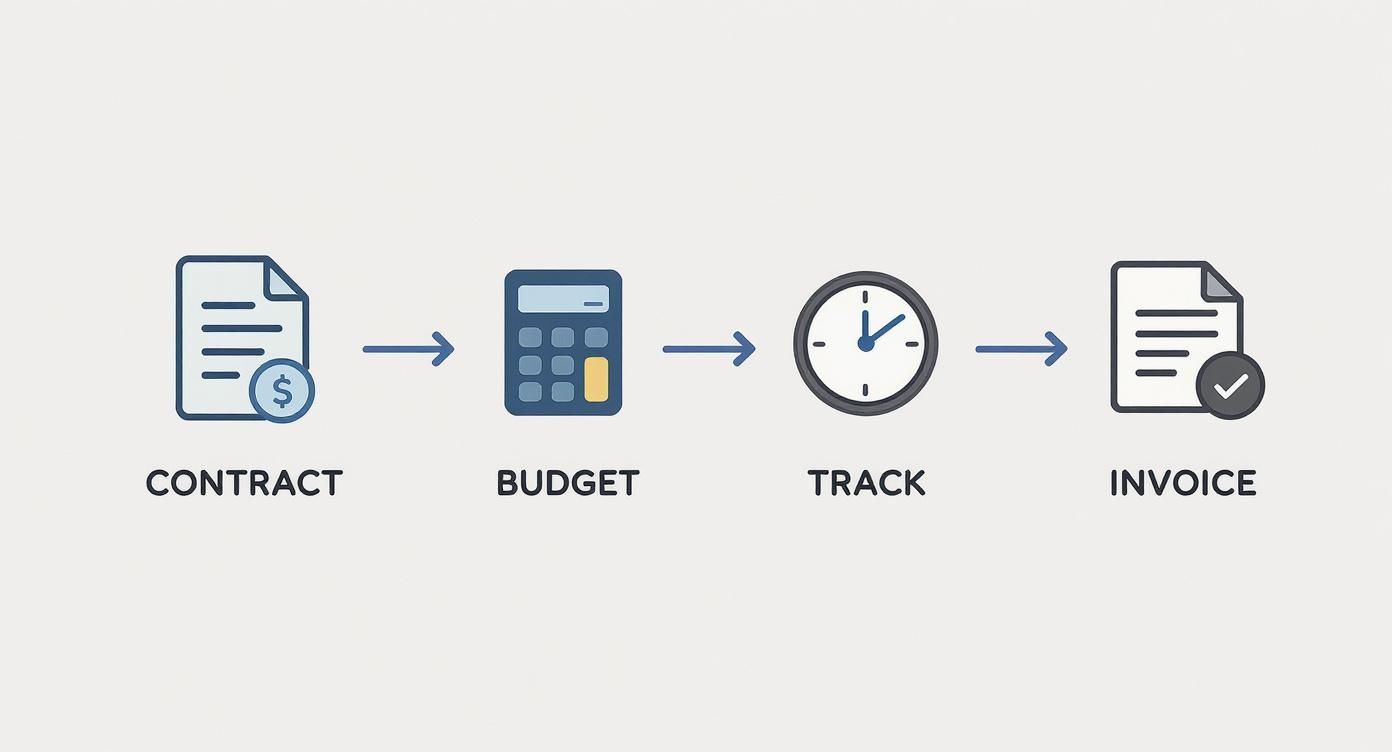
Each of these stages represents a critical handoff of information. The right technology ensures nothing gets dropped or lost in translation between your teams.
Understanding the Key Players: PSA, ERP, and Accounting
To build a stack that actually works for a professional services firm, you first need to know the main types of software you’ll be dealing with. Each has a distinct role, and confusing them is a recipe for disaster.
-
Professional Services Automation (PSA): This is your team’s daily driver for project delivery. PSA software is purpose-built to manage the entire project lifecycle—from resource planning and time tracking to project budgeting and progress monitoring. Think of it as the operational heart of your firm.
-
Enterprise Resource Planning (ERP): ERPs are the heavyweights. They’re designed to manage core business processes across an entire organization, connecting finance, HR, supply chain, and more into one massive system. For most services firms, a full-blown ERP is overkill unless you have incredibly complex, enterprise-level needs.
-
Accounting Software: This is your financial engine. It handles everything from accounts payable and receivable to payroll and financial reporting. Tools like QuickBooks or Xero are masters of the general ledger, but they aren’t built to manage the nitty-gritty of project budgets and timelines.
The sweet spot for most professional services firms is a powerful PSA that integrates natively with a dedicated accounting platform. This combination gives you the best of both worlds—specialized project control and robust financial management.
If you’re trying to get your head around the specifics, you can learn more about what PSA software is and see exactly how it slots into this puzzle.
The table below breaks down these software types, highlighting their primary functions and how they contribute to an integrated system.
Comparison of Key Integration Software Types
| Software Type | Primary Function | Key Integration Benefit | Example Tools | | :— | :— | :— | :— | | PSA | Manages project lifecycle (resourcing, time, budget) | Pushes project data (timesheets, expenses) to accounting for accurate billing and profitability analysis. | Drum, Kantata | | ERP | Manages core business processes company-wide | Provides a single, unified system but can be overly complex and expensive for service-based firms. | NetSuite, SAP | | Accounting | Manages general ledger, payroll, and financials | Receives project data from a PSA to handle invoicing, payments, and financial reporting accurately. | QuickBooks, Xero |
By understanding these roles, you can select tools that complement each other rather than creating redundant, disconnected data silos.
A Practical Checklist for Evaluating Software
It’s easy to get distracted by flashy features when you’re comparing tools. My advice? Zero in on the core functions that will directly impact your workflow and, more importantly, your profitability. You’re looking for a solution that truly bridges the gap between the operational and financial sides of your business.
Use this checklist to keep your evaluation grounded:
- Native Accounting Integration: Does it sync seamlessly with your accounting software (e.g., QuickBooks, Xero)? This is completely non-negotiable. Look for a two-way sync that automatically pushes timesheets, expenses, and invoices over to your accounting system.
- Real-Time Dashboards: Can you see project profitability, budget vs. actuals, and team utilization at a glance? You need instant visibility to make proactive decisions, not just review historical reports weeks later.
- Flexible Billing Options: Does the tool support the way your firm actually bills? Whether you use time and materials, fixed-fee, or recurring retainers, the software has to generate accurate invoices without clunky manual workarounds.
- Resource Forecasting and Management: Can you see who is working on what and who has availability coming up? Effective resource planning is what stops your team from burning out and ensures you actually have the capacity to take on new projects.
Configuration Tips for Immediate Impact
Once you’ve picked your tools, how you set them up makes all the difference. For example, stop creating projects from scratch every single time. A huge win is to use project templates that have your standard financial rules, budget structures, and billing schedules already baked in. This automates a huge chunk of the setup and ensures consistency across your entire portfolio.
This intense focus on getting technology right isn’t unique to our industry. In the financial sector, banks spent around $35 billion on AI in 2023, a figure expected to hit $97 billion by 2027. Yet despite this massive investment, a staggering 94% of banking modernization projects run past their original deadlines. This just goes to show how challenging successful tech implementation is for everyone. Building a connected tech stack is your key to avoiding these pitfalls and achieving real operational efficiency.
Mastering Project Budgeting and Billing
Solid financial and project management hinges on one thing: how well you can budget for your work, track it, and get paid for it. This goes way beyond just crunching numbers. It’s about building a financial guardrail around your projects so they can actually succeed.
Let’s dig into the practical techniques that give you genuine control over your project financials.
For those bigger, multi-month projects, a single, monolithic budget is a recipe for disaster. This is where phased budgeting becomes your best friend. Instead of one giant number hanging over your head, you break the project’s financial plan into distinct stages that line up with your key milestones.
Imagine a six-month software build. You could easily slice that budget into three phases: Discovery & Design, Development & Testing, and finally, Launch & Post-Launch Support. This gives you clear financial checkpoints, making it a hell of a lot easier to see where the money is going and spot problems within a specific part of the project.
Creating Budgets That Reflect Reality
Want to take it a step further? Build a resource-loaded budget. This is a powerful move that ties every single dollar directly to a team member’s time or a specific line-item expense. You’re not just throwing funds at a project; you’re mapping out exactly how your team’s effort—your most valuable asset—is being spent.
Suddenly, your budget transforms from a static spreadsheet into a living, breathing management tool. When you see the design phase trending over budget, you can instantly tell if it’s because your lead designer is logging more hours than planned, or if some unexpected software costs popped up. That kind of clarity lets you make quick, targeted decisions.
A well-crafted budget isn’t a restrictive document; it’s a strategic roadmap. It empowers project managers to make informed decisions that protect profitability without stifling creativity or quality.
Choosing the Right Billing Model
How you bill your clients is just as critical as how you budget internally. The model you pick has to match the nature of the project, the client relationship you’re building, and your firm’s own cash flow needs.
There are three classic models to start with:
- Fixed-Fee: This is your go-to for projects with a crystal-clear scope and predictable deliverables, like designing a company logo. The client loves the cost certainty, but it puts the risk squarely on your firm if scope creep rears its ugly head.
- Time & Materials (T&M): Perfect for projects where the scope is a bit fuzzy or likely to evolve, like an ongoing consulting gig. It’s flexible and ensures you’re paid for every hour worked, but clients can get nervous about costs spiraling out of control.
- Retainer: A great fit for long-term partnerships that need ongoing support, like monthly SEO services. Retainers give you predictable revenue and guarantee the client has access to your team.
And don’t be afraid to mix and match. For a large website build, you might use a fixed fee for the initial design phase and then flip to T&M for development and content work. This kind of hybrid approach balances predictability with flexibility—a true win-win.
The Power of Proactive Health Checks
A budget you only look at when the project’s over is completely useless. The real key to keeping your projects in the black is running regular, proactive health checks. That means constantly comparing your budget against your actuals—weekly, if you can manage it—to spot variances before they become five-alarm fires.
The global financial system is always in motion. Between 2019 and 2024, intermediated funds in the global banking system swelled by an incredible $122 trillion. That’s a roughly 40% increase, pushing banking revenues to a record $5.5 trillion in 2024. As detailed in a global banking review on mcksey.com, this shows just how much capital is flowing through the economy, reinforcing why vigilant financial oversight on every single project is non-negotiable.
A simple ‘Project Financial Health Check’ template can empower your managers to monitor key metrics like budget burn rate, gross margin, and billable utilization without needing an accounting degree. If you’re looking for more guidance, check out our detailed article on the intersection of project management and accounting. This regular review cycle turns financial management from a stressful, reactive chore into a proactive, strategic advantage.
Using KPIs and Reports for Better Decisions
You can’t fix what you can’t see. When it comes to tying your financials and project management together, good data isn’t just a nice-to-have—it’s everything. But I’m not talking about just any data. We need to zero in on the Key Performance Indicators (KPIs) that draw a straight line from your project delivery to your bottom line.
This is about getting past vanity metrics and focusing on the numbers that tell the real story of your firm’s health.
The right KPIs are what turn gut feelings into confident, data-backed decisions. Think of them as your early-warning system, flagging potential blowouts with budgets, resources, or timelines long before they become a real problem. It’s all about giving your team the power to be proactive, not just reactive.
Focusing on What Truly Matters
Let’s cut right to the chase and talk about the KPIs that actually move the needle for a professional services firm. These are the metrics that should be the bedrock of your reporting and plastered all over your project dashboards.
Here are three non-negotiables:
- Gross Project Margin: This is the unfiltered truth about a project’s profitability. The math is simple:
(Total Billed - Total Project Costs) / Total Billed. A strong margin tells you your pricing is on point and your delivery is sharp. - Billable Utilization Rate: This shows how much of your team’s paid time is actually making the company money. It’s calculated as
(Total Billable Hours / Total Available Hours) x 100. High utilization is fantastic, but watch out for rates that are too high—that’s a classic sign of burnout waiting to happen. - Earned Value Management (EVM): This one’s a bit more advanced, but it’s powerful. EVM compares the work you planned to do against the work you’ve actually done. It helps answer the critical question: “Are we on track and getting the value we expected at this stage?”
When you consistently track these core metrics, you create a shared language between your project and finance teams. Suddenly, everyone is working from the same playbook, with the same definitions of success.
To really connect the dots between your projects and your profit, you need a balanced set of KPIs. The table below breaks down some of the most essential indicators that every services firm should be watching.
Essential KPIs for Integrated Management
| KPI | What It Measures | Why It Matters | Ideal Target | | :— | :— | :— | :— | | Gross Project Margin | The direct profitability of individual projects. | A direct indicator of pricing effectiveness and delivery efficiency. | >30-50%, depending on the industry. | | Billable Utilization | The percentage of an employee’s time spent on revenue-generating work. | Maximizes revenue potential from your largest cost center—your people. | 75-85% for most billable staff. | | Schedule Performance Index (SPI) | The efficiency of your team’s progress against the project schedule. | Flags timeline risks before they derail a project. A score <1.0 means you’re behind. | 1.0 or higher. | | Cost Performance Index (CPI) | The efficiency of budget utilization based on work completed. | Your best defense against budget overruns. A score <1.0 means you’re over budget. | 1.0 or higher. | | Days Sales Outstanding (DSO) | The average number of days it takes to collect payment after an invoice is sent. | A critical measure of cash flow health. | <45 days. |
These KPIs give you a comprehensive health check, blending project execution with financial reality. They ensure you’re not just busy, but profitably busy.
Building Your Project and Financial Health Dashboard
The end goal is to pull all these numbers into a single, intuitive dashboard. This isn’t just a report for the leadership team; it’s a tool that empowers everyone, from the CEO right down to the project manager running the show. A great dashboard gives you the operational and financial pulse of your firm at a glance.
A truly useful dashboard should be visual, clear, and most importantly, actionable. For example, a good one might include:
- A Profitability Snapshot chart tracking Gross Project Margin for your top 5-10 projects.
- A Utilization Tracker showing billable rates by team or even by individual.
- A Budget vs. Actuals comparison for all active projects, flagging any at-risk budgets in red.
- A simple Cash Flow Forecast that projects upcoming invoices and expected payments.
With modern tools, you can easily monitor your firm’s financial performance using dashboards that bring these crucial data points together, turning a sea of numbers into clear, strategic insights.
Acting on the Insights You Uncover
Just tracking KPIs isn’t enough—the magic happens when you act on what the data tells you. When you see a project’s gross margin start to dip, that’s your cue to dig in. Is it scope creep? An inefficient process? Or was the project underbid from the very start? The numbers show you the what so you can go investigate the why.
This focus on actionable financial data isn’t just a business trend. Globally, the percentage of adults with a financial account jumped from 51% in 2011 to 79% by 2024, thanks largely to digital banking. But as data from visa.com shows, simply having access to financial tools doesn’t guarantee better financial health.
That’s a powerful lesson for any business. Having access to the data is just the first step. Real success comes from turning that information into smarter decisions that drive tangible, positive change.
Getting Your Team On Board with Change
A new integrated system is completely worthless if your team doesn’t use it correctly—or worse, doesn’t use it at all. Let’s be honest: the biggest hurdle in any financial and project management overhaul isn’t the technology; it’s the people. Getting this new way of working embedded in your firm requires a thoughtful, human-centric approach.
This journey kicks off by establishing crystal-clear governance. You need to define who owns what, leaving absolutely no room for confusion. This isn’t about micromanagement; it’s about empowerment and clarity. When everyone knows their lane, decisions happen faster and with way more confidence.
For instance, a project manager should own their project’s budget and be the one approving timesheets against it. A department head, on the other hand, might be responsible for the overall billable utilization targets for their team. Clear lines of ownership stop tasks from falling through the cracks and build a genuine culture of accountability.
Leading the Transition Effectively
Once your governance framework is in place, you need a solid change management roadmap to get everyone genuinely on board with the shift. Just sending out a memo announcing a “new process” is a surefire recipe for resistance and eye-rolls. You have to sell the vision and clearly explain the “why” behind it all.
Focus your communication on the direct, tangible benefits for each role:
- For Project Managers: Talk about how real-time budget data will help them steer projects to success and kill those painful end-of-month admin headaches. “No more chasing timesheets on a Friday!” is a great selling point.
- For Team Members: Highlight how much easier their day-to-day will be with streamlined time and expense reporting, freeing them up to do the actual work they enjoy.
- For Leadership: Showcase the unified reporting, explaining how it provides the strategic insights needed to grow the business with confidence.
One of the most powerful things you can do is find and empower internal ‘champions.’ These are the respected team members who are genuinely enthusiastic about the new system. They can advocate for the process, answer their peers’ questions, and provide invaluable, on-the-ground feedback.
Embedding Change into Your Culture
Training is obviously a critical piece of the puzzle, but it has to be targeted. A one-size-fits-all session just won’t cut it. Your PMs need a deep dive into budget tracking and profitability reports, while your creative team just needs a quick, simple guide on logging their time against the right task.
Finally, make sure you create open channels for feedback. This could be a dedicated Slack channel, regular “office hours,” or even anonymous surveys. When you listen to your team’s concerns and suggestions, it shows this isn’t some top-down mandate but a collaborative effort to improve how everyone works.
The goal isn’t just to install a new process—it’s to weave it into the very fabric of your company culture. That’s how you make it stick.
Got Questions? We’ve Got Answers
Even with a solid plan, linking your project and financial data can feel like a big step. It’s natural to have questions. We hear a lot of the same ones from firms making this transition, so let’s tackle the most common ones right now—no jargon, just straight-up advice from our experience.
We’re a Small Firm and This Feels Overwhelming. Where Do We Start?
If you’re feeling the pressure, don’t try to boil the ocean. Seriously. The single most powerful thing you can do right now is standardize and enforce consistent time tracking. Forget the fancy software for a minute. This is the bedrock.
Time tracking is the foundational data that fuels everything else—from figuring out if a project is actually profitable to sending accurate invoices and even forecasting your next hire.
Before you go down the rabbit hole of new tools, just get your team in the simple, non-negotiable habit of logging all their hours against the right project and task. Every single day. That one discipline gives you the raw material you need to finally see where your most valuable asset—your team’s time—is actually going.
How Do We Handle Scope Creep Without It Turning into Chaos?
Ah, scope creep. The quiet killer of project margins. The best defense is a formal change order process that’s hardwired into both your project plan and your project budget. It’s not about being difficult; it’s about being clear.
When a client asks for something outside the original scope, it stops being a casual chat and becomes a documented event.
Here’s how that should play out in the real world:
- The project manager documents the new request immediately.
- They work up a quick estimate of the extra hours and costs. For example, “This change will require 10 extra development hours at $150/hour, for a total of $1,500.”
- A formal change order is generated, clearly showing the knock-on effect on the timeline and budget.
- The client has to sign off on this document before any new work kicks off.
This process builds transparency and protects your profitability. Once that change order gets the green light, it should instantly update the project’s financial baseline in your system. That way, your budget vs. actuals reports stay dead-on accurate.
Let’s be clear: the goal isn’t to turn your project managers into accountants. It’s about giving them the financial guardrails they need—like budget burn rate and gross margin—so they can steer their projects to a profitable finish. This clarity empowers them to act like true business owners for their projects, making smarter calls that protect the firm’s bottom line.
Ready to finally close the gap between project delivery and financial reality?
Drum gives you one intuitive platform to run your whole firm, from the first client call to the final payment.
Start your free 14-day trial and discover a better way to run your studio.