- Mastering Project Workflow Management for Modern Firms
- Why a Workflow Is Your Firm’s Blueprint for Success
- Orchestrating Success Like a Symphony
- The Power of a Unified System
- The Four Pillars of a High-Performing Workflow
- Standardized Processes
- Clear Communication Channels
- Resource Allocation
- Performance Tracking
- Navigating the Project Lifecycle from Proposal to Payment
- Phase 1: Proposal and Quoting
- Phase 2: Kick-Off and Planning
- Phase 3: Execution and Time Tracking
- Phase 4: Monitoring and Financial Reporting
- Phase 5: Invoicing and Closing
- Manual Workflow vs Integrated Drum Workflow
- The Real-World Benefits of Automating Your Workflow
- Boost Profitability and Plug Revenue Leaks
- Enhance Client Satisfaction and Trust
- Improve Team Morale and Prevent Burnout
- A Practical Example of Data-Driven Strategy
- 1. Audit Your Current Processes
- 2. Define Clear Goals
- 3. Choose the Right Tools
- 4. Onboard Your Team Thoughtfully
- 5. Measure and Refine
- How to Measure Success with the Right KPIs
- Financial Health and Profitability Metrics
- Team Efficiency and Capacity Metrics
- Client Satisfaction and Delivery Metrics
- Common Questions About Project Workflow Management
- How Is This Different from Standard Project Management Software?
- What Is the Biggest Challenge When Adopting a New Workflow?
- How Quickly Can We Expect to See a Return on Investment?
Mastering Project Workflow Management for Modern Firms
Project workflow management is the strategic blueprint that guides a project from its initial proposal all the way to the final invoice. It’s much more than just a to-do list; it’s a repeatable system for orchestrating tasks, people, and data to deliver projects on time, on budget, and with wonderfully predictable results.
Why a Workflow Is Your Firm’s Blueprint for Success

Imagine trying to build a house without a blueprint. You’d have contractors guessing at measurements, materials showing up at the wrong times, and a foundation that might not even support the final design. It would be total chaos.
Running a consulting, engineering, or architecture firm without defined project workflows is exactly like that—unpredictable, messy, and incredibly risky.
This isn’t just about basic task management, which usually stops at individual to-do lists. A proper workflow gives you a holistic view of the entire project lifecycle, connecting every critical phase to ensure a smooth handoff from one stage to the next.
Orchestrating Success Like a Symphony
Think of your project team as a symphony orchestra. Each person is a talented expert, but without a conductor, their individual efforts would create noise, not music. A well-designed workflow is that conductor. It makes sure every team member plays their part at the right time and in harmony with everyone else.
This kind of orchestration is non-negotiable for professional services firms that are constantly juggling multiple complex projects. It creates a single source of truth that cuts through the confusion of data silos, scattered spreadsheets, and endless email chains.
A great workflow transforms reactive problem-solving into proactive project delivery. It’s the difference between hoping a project stays on track and knowing it will.
The Power of a Unified System
A unified system like Drum provides this essential orchestration, creating a central hub for every project-related activity. This is quickly becoming a major competitive advantage. The global workflow management system market is exploding, which tells you businesses are scrambling to get their operations in order.
Projections show the market is set to hit $17.7 billion by 2025, climbing to a massive $45.5 billion by 2030. You can discover more insights about this growing market.
By bringing everything together—from the initial proposal and time tracking to invoicing and financial reporting—a unified platform delivers huge benefits:
- Greater Predictability: Standardized processes mean you can forecast timelines and budgets with much higher accuracy. No more guesswork!
- Improved Profitability: With real-time visibility into project health, you can catch budget overruns before they spiral out of control.
- Enhanced Collaboration: When everyone is working from the same playbook, communication gets clearer, and mistakes are far less common.
Ultimately, effective project workflow management isn’t just an operational tactic. It’s a core business strategy that empowers your firm to operate with more efficiency, clarity, and control.
The Four Pillars of a High-Performing Workflow
A truly effective project workflow is much more than a glorified to-do list. It’s a powerful, predictable system for delivering high-quality work, time and time again. Think of it like the four sturdy legs of a table—if one is weak or missing, the whole thing gets wobbly and unreliable. To build a system that supports consistent growth, you need to focus on these four essential pillars.
When all four work together, they have the power to turn chaotic processes into a well-oiled machine. This combination is the foundation of successful project workflow management. Let’s break down what each one looks like in the real world.
Standardized Processes
Standardization is all about creating a repeatable, consistent path for similar types of projects. This isn’t about stifling creativity. It’s about eliminating the guesswork for common tasks so your team can focus its brainpower on high-value problem-solving. It answers the question, “What are the exact steps we follow every single time we kick off this type of project?”
For a marketing agency, a standardized process for a new social media campaign might look something like this:
- Step 1: Client onboarding and creative brief submission.
- Step 2: Internal kickoff and concept brainstorming session.
- Step 3: Draft content calendar and initial creative assets.
- Step 4: Client review and feedback round one.
- Step 5: Final revisions and campaign scheduling.
This simple checklist ensures every campaign, regardless of which project manager is leading it, meets a baseline quality standard and follows a predictable timeline. No more reinventing the wheel.
Clear Communication Channels
Miscommunication is one of the biggest project killers out there. It’s absolutely crucial to establish clear and centralized communication channels to keep everyone—from your internal team to the client—on the same page. This pillar addresses how and where information gets shared, preventing critical details from getting lost in overflowing inboxes or siloed private messages.
A great workflow ensures the right information gets to the right people at the right time. It creates a single source of truth, so there’s never confusion about project status, feedback, or next steps.
For example, an engineering firm working on a massive, multi-phase construction project might designate a central project portal for all communications. All client feedback on blueprints, questions from subcontractors, and internal team updates must be logged in that one place. This creates a transparent, searchable record of every project decision, which is a lifesaver when you need to find a specific comment months later.
Resource Allocation
Effective resource allocation is the art and science of assigning the right people to the right tasks at the right time. Nail this, and you’ll prevent two huge problems: overloading your top performers to the point of burnout and underutilizing other team members, which tanks both efficiency and profitability.
This pillar is all about understanding your team’s capacity, skills, and current workload. With clear visibility, you can make smarter assignments that balance project demands with team well-being. A platform that offers robust project management features can provide the real-time data you need to make these calls.
Performance Tracking
You can’t improve what you don’t measure. Simple as that. Performance tracking involves monitoring key metrics throughout the project lifecycle to make sure you’re on track to hit your goals for budget, timeline, and profitability. This isn’t about micromanaging; it’s about using real-time data to make informed decisions and steer projects away from potential disaster.
Take an architecture firm, for instance. They can track billable hours against the project budget in real time. If they see that the design phase has already eaten up 60% of the total hours just 30% of the way through the project timeline, they know they have a problem. This early warning lets them tackle scope creep or inefficiency before it completely demolishes the project’s profit margin.
Navigating the Project Lifecycle from Proposal to Payment
A project’s journey is rarely a neat, straight line. It’s more of a living, breathing adventure with multiple phases, critical handoffs, and plenty of potential detours. Without a solid workflow management plan, that adventure can quickly turn into a chaotic mess of missed details, stressed teams, and busted budgets.
Let’s walk through the real-world lifecycle of a project, phase by phase, to see how a connected, integrated workflow turns potential bottlenecks into genuine strengths.
It’s no surprise that 82% of companies are now using project and workflow management software to get a handle on things. This shift is happening as hybrid work models are becoming the norm (now at 31.5%), which is a perfect fit for multi-phase engineering or consulting projects that demand flexibility.
The whole point is to connect four key pillars: your processes, your communication, your resources, and your tracking. When these are working in harmony, you have a solid foundation for every project.
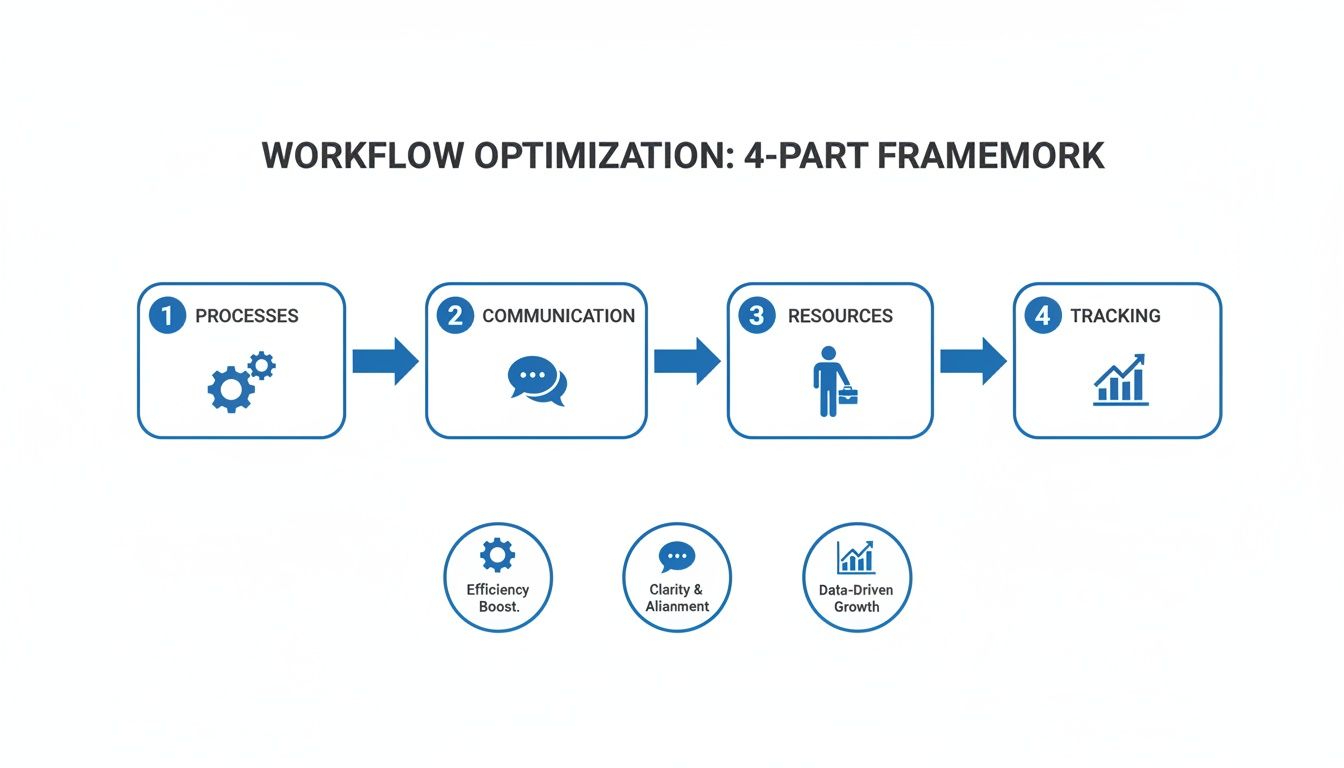
Think of it like a continuous loop. Each part feeds the next, ensuring every project is built on consistency, collaboration, and smart, data-driven decisions.
Phase 1: Proposal and Quoting
The project doesn’t start with the first task—it starts with the proposal. In a disjointed system, this is just painful. You’re building a quote in one tool, writing the proposal in another, and then, if you’re lucky enough to win, you have to manually punch all that same information into your project management software. It’s a recipe for mistakes and wasted hours.
An integrated system changes the game entirely.
When you build your proposal inside a platform like Drum, you’re not just making a sales document; you’re actually laying the foundation for the entire project. Every service, every estimated hour, and every budget line item is already captured. This initial step is your chance to create winning sales proposals that flow seamlessly into live projects, setting the stage for a profitable engagement from day one.
Phase 2: Kick-Off and Planning
Once the client gives the green light, the real work begins. The old-school approach means more manual setup. You create a new project from scratch, build out a task list, and start assigning people based on who you think is free. That gap between winning the business and actually starting the work is where momentum goes to die.
With an integrated workflow, the transition is instant.
With one click, an accepted proposal automatically becomes a live project. The proposed services are converted into tasks, budgets are pre-loaded, and timelines are established based on the original quote.
This completely eliminates the administrative lag. More importantly, it ensures nothing gets lost in translation between the sales team and the delivery team. Everyone starts on the same page, with the exact same information.
Phase 3: Execution and Time Tracking
As the team dives in, tracking their time accurately is everything. Without a central system, your team is probably logging hours in random spreadsheets or clunky, separate apps. This makes it almost impossible for a project manager to get a real-time view of how the budget is tracking.
A connected workflow builds time tracking directly into the project plan itself. Team members log hours against the specific tasks they’re working on, giving you instant visibility.
This has two huge benefits:
- For the Team: It simplifies their day-to-day admin, letting them focus on what they were hired to do.
- For Managers: It provides live data, showing which tasks are taking longer than expected and allowing for proactive course correction before things go off the rails.
Phase 4: Monitoring and Financial Reporting
How do you really know if a project is healthy? In a manual world, you’d have to pull data from time logs, expense reports, and budget spreadsheets, then try to stitch it all together into a report that’s already out of date by the time you’ve finished.
An integrated platform gives you real-time dashboards that show key project vitals at a glance. You can see your team’s billable utilization, track expenses as they come in, and monitor the project’s profitability margin without waiting for some month-end scramble. This kind of data-driven oversight lets you make confident decisions to keep projects on track.
Phase 5: Invoicing and Closing
Getting paid should be the easy part. But for many firms, it’s a frantic rush to gather billable hours and expenses, manually create an invoice, and cross your fingers that you didn’t miss anything. This slows down cash flow and creates a massive administrative headache.
An integrated project workflow management system automates this whole process. Because all the time and expenses are already logged against the project, generating an accurate invoice takes just a few clicks. The system pulls all the relevant data, making sure every billable minute is accounted for. This not only gets cash in the door faster but also gives your client a professional, transparent experience, ending the project on a high note.
To see the difference in black and white, here’s a quick comparison of the manual grind versus a connected workflow using a tool like Drum.
Manual Workflow vs Integrated Drum Workflow
| Project Phase | Manual / Siloed Tools Approach | Integrated Drum Approach |
|---|---|---|
| Proposal | Build quote in spreadsheet, write proposal in Word, manually copy details to PM tool. | Create one proposal in Drum that holds all services, rates, and budgets. |
| Kick-Off | Manually create new project, tasks, and budgets. Risk of data entry errors. | Convert accepted proposal to a live project with one click. All data transfers automatically. |
| Execution | Team tracks time in separate apps or spreadsheets. PM has no real-time budget view. | Time tracking is built into project tasks. Budgets and progress update live. |
| Monitoring | Pull data from 3+ sources to build a report. Decisions are based on old information. | View real-time dashboards on profitability, utilization, and budget burn from one place. |
| Invoicing | Scramble to find all billable hours and expenses. Manually create invoice. | Generate accurate invoices in minutes by pulling all tracked time and expenses automatically. |
The contrast is pretty stark. One path is filled with repetitive admin, data silos, and constant catch-up. The other is about seamless flow, real-time insights, and giving your team the tools they need to focus on delivering great work.
The Real-World Benefits of Automating Your Workflow
Talking about workflows in theory is one thing. Seeing the tangible, game-changing results of automation is where things get really exciting. These aren’t just abstract concepts; they’re direct solutions to the everyday frustrations that keep firm owners and project managers up at night.
When you automate the flow of work, you stop just managing tasks and start actively engineering success. It’s a fundamental shift that solves core business challenges, from profitability and client happiness to the well-being of your most valuable asset: your team.
Boost Profitability and Plug Revenue Leaks
One of the biggest silent profit killers in any professional services firm is the dreaded revenue leak. These are all the small, untracked billable moments that slip through the cracks every day, adding up to a massive loss over time.
Automated workflows are your best defense. When time tracking is baked right into project tasks, it becomes a natural part of the workday instead of a chore someone tries to remember at the end of the week. This simple change alone can dramatically increase your captured revenue.
Automation gives you real-time budget clarity, turning your financial data from a historical record into a predictive tool. You can spot potential overruns early and make adjustments before they torpedo your bottom line.
Workflow automation is reshaping how projects get delivered, and early adopters are seeing huge returns. Studies show they can save up to 30% in costs, and a stunning 75% of executives view it as a key competitive advantage. With over a third of organizations automating at least one workflow, one firm even cut its budget and forecast timeline from six weeks down to just 10 days—a 66% faster process. You can read the full research about these automation trends. This is the power of a connected system in action.
Enhance Client Satisfaction and Trust
Happy clients are the cornerstone of a healthy, growing firm. They bring in repeat business and become your best source of referrals. Automation plays a surprisingly huge role in creating the kind of transparent, reliable experience that builds lasting trust.
When your workflows are standardized and automated, your delivery becomes more consistent and predictable. Clients know what to expect and when to expect it, which builds confidence from day one. You can even offer them greater transparency through client portals or automated status updates, giving them peace of mind without adding to your team’s workload. That kind of clarity is what turns a one-time project into a long-term partnership.
Improve Team Morale and Prevent Burnout
A stressed, overworked team can’t produce its best work. Burnout is a serious threat in high-pressure environments, but effective project workflow management provides a powerful antidote by enabling smarter workload balancing.
When you have clear, data-driven visibility into who is working on what, you can distribute tasks more equitably. This prevents your top performers from becoming bottlenecks and ensures no one is consistently overloaded.
By automating tedious administrative tasks, you also free up your team to focus on the strategic, creative work they were hired to do. This not only boosts efficiency but also significantly improves job satisfaction and morale. A happier, more balanced team is a more productive and innovative team. For a deeper look into how this works, you might be interested in our guide on what PSA software is and how it helps.
A Practical Example of Data-Driven Strategy
Consider the story of a mid-sized design firm that was struggling with profitability. They felt busy all the time, but their margins were razor-thin, and they couldn’t figure out why.
After implementing an automated workflow system, they started tracking time and expenses against every project with precision. Within three months, the data revealed a startling pattern: their smaller, quick-turnaround projects were consistently 30% more profitable than their large, prestigious “flagship” accounts. The bigger clients demanded more revisions and unpaid scope creep, draining resources and killing profitability.
Armed with this insight, the firm reshaped its business strategy. They developed new service packages tailored to the smaller, more profitable clients and adjusted their pricing for larger engagements to account for the extra overhead. This data-driven pivot didn’t just improve their margins; it fundamentally changed their growth trajectory, leading to a more sustainable and successful business.
Here’s your step-by-step guide to rolling out a new workflow.
Making a big change to how your firm operates can feel like a monster of a task. But it doesn’t have to be. By breaking the process down into clear, manageable steps, you can steer your team toward better efficiency and tighter control over your projects.
Think of this as your blueprint for a smooth transition. Instead of trying to boil the ocean, just focus on one stage at a time. This methodical approach helps build momentum and makes sure you’re actually creating a system that works for your team, not against them.
1. Audit Your Current Processes
Before you can build something better, you need a painfully honest picture of where you are right now. Take a hard look at how your team currently gets work done.
Where are the bottlenecks? What tasks are just soul-crushing manual data entry? Which steps trip people up or cause the most frustration?
Be ruthless here. Map out every single step in a project’s life, from the first “hello” from a client to the final paid invoice. This audit gives you a clear map of what’s working, what’s broken, and where the real opportunities for improvement are hiding.
2. Define Clear Goals
With your audit done, you can now set some specific, measurable goals. What, exactly, do you want this new workflow to do for the business? Vague ambitions like “be more efficient” just won’t cut it. You need real targets.
Your goals should be concrete and tied directly to business outcomes. This clarity will not only guide your choice of tools but also give you a yardstick to measure success later on.
Here are a few examples of what strong goals look like:
- Slash the time it takes to create project plans from proposals by 90%.
- Get project budget tracking accurate to within 5% of the final cost.
- Cut the average time from project completion to sending the invoice from 10 days down to just one.
3. Choose the Right Tools
Now it’s time to find the right tech to back up your goals. Look for a platform that brings your key functions—like proposals, project planning, time tracking, and invoicing—under one roof. A unified system is the fastest way to kill the data silos and manual rework that come from juggling a bunch of disconnected apps.
Don’t get dazzled by a million features you’ll never touch. Zero in on your core needs and the goals you just set. The best tool isn’t the one with the longest feature list; it’s the one that solves your specific problems with an interface your team will actually want to use.
4. Onboard Your Team Thoughtfully
Let’s be honest: rolling out new software is a people challenge more than it is a technical one. Your team’s buy-in is the single biggest factor for success. You can’t just throw a new tool at them and hope for the best.
A fantastic strategy is to start with a pilot project. Pick one small, low-risk project and a few enthusiastic team members to test-drive the new workflow. This lets you iron out the kinks in a controlled setting. The success of this pilot creates internal champions who can then help you roll it out to the whole firm, building confidence and getting everyone on board.
5. Measure and Refine
Your new workflow isn’t a “set it and forget it” solution. It’s a living system that needs to adapt as your business grows. Once you’re live, circle back to the goals you set in step two. Are you hitting those targets?
Use the data from your new system to keep an eye on your key performance indicators (KPIs). If you spot areas that aren’t quite hitting the mark, don’t be afraid to tweak things. Continuous refinement is how you create a truly optimized project workflow management system that will support your firm’s growth for the long haul.
How to Measure Success with the Right KPIs
Getting a new system up and running is a huge step, but the work doesn’t stop once you go live. The real question is: is it actually working? To figure that out, you have to move beyond gut feelings and look at the hard data. This is where Key Performance Indicators (KPIs) come in.
Think of KPIs as the vital signs for your business. They turn all the complex, messy day-to-day project activities into clear, simple numbers. For any professional services firm, tracking the right metrics is the only way to prove the value of your new project workflow management system and make decisions with confidence. The trick is to avoid getting lost in a sea of data and instead focus on the few numbers that truly matter.
Financial Health and Profitability Metrics
At the end of the day, it all comes down to profitability. A better workflow should have a direct, positive impact on your bottom line by plugging revenue leaks and giving you a much clearer picture of your project financials.
- Project Profitability Margin: This is the ultimate health check for every single project. It shows you the percentage of revenue left after you’ve paid for all project-related costs, including your team’s time. A healthy margin tells you your pricing is on point and your team is executing efficiently.
For example, an engineering firm might start tracking this and discover that their fixed-fee projects consistently run at a 15% lower margin than their time-and-materials contracts. That’s a massive insight. Armed with that data, they can completely rethink their quoting strategy to protect their profitability on future fixed-fee work.
Team Efficiency and Capacity Metrics
Your people are your most valuable (and expensive) asset. A great workflow helps you get the most out of their time without burning them out. These KPIs show you how effectively your team’s hours are being put to use.
- Billable Utilization Rate: This metric tracks the percentage of an employee’s total time that is spent on billable client work. A higher rate is almost always a good thing, leading to greater profitability. The goal isn’t 100%—non-billable work like training and business development is also vital—but tracking this helps you understand your real capacity and set realistic targets for your team.
A well-managed workflow gives you the data to balance workloads effectively. It’s not just about keeping everyone busy; it’s about keeping them busy on the right things without overloading them.
Client Satisfaction and Delivery Metrics
Let’s be honest: happy clients are the bedrock of any sustainable services business. These KPIs help you measure whether you’re consistently delivering on your promises, which is what drives client retention and those all-important referrals.
-
On-Time Completion Rate: Simple, but incredibly powerful. This measures the percentage of projects or key milestones that are completed by their original deadline. A high rate is a strong sign of reliable project planning and execution, and it builds an enormous amount of client trust.
-
Quote-to-Invoice Time: This tracks the time it takes from when a project is wrapped up to when the final invoice goes out the door. A long cycle can point to administrative bottlenecks and wreak havoc on your cash flow. Automating your invoicing process can shrink this time from weeks to just a day or two.
A platform like Drum makes tracking these KPIs effortless. Instead of spending hours pulling data from different spreadsheets, you get real-time dashboards that turn all your project information into clear, actionable insights. This continuous feedback loop empowers you to spot trends, tackle risks before they become problems, and steer your firm toward more predictable and profitable growth.
Common Questions About Project Workflow Management
Stepping into a new way of working always brings up a few questions. To help you feel confident about making the switch, we’ve put together clear, practical answers to some of the most common concerns we hear from firm owners considering a new system for project workflow management.
How Is This Different from Standard Project Management Software?
It’s a great question, and the difference is huge. Think of it this way: standard project management software is like a great digital to-do list for a single project. It’s fantastic for tracking tasks, deadlines, and who’s doing what.
But a true workflow management system sees the bigger picture. It connects the entire business lifecycle of a project—from the very first sales proposal and project kickoff all the way to the final invoice and financial reporting. It’s less about just managing tasks and more about managing the profitability and operational health of the whole engagement.
What Is the Biggest Challenge When Adopting a New Workflow?
Honestly? The biggest hurdle is almost always about people, not the technology itself. Getting your team to break old habits and embrace a new, more structured process is where the real work is. Change can be uncomfortable, and people often cling to the familiar spreadsheets and scattered tools they know, even if they’re inefficient.
The key to getting this right is to start small. Don’t try to boil the ocean. Run a single pilot project with an enthusiastic team that’s open to change. Their success will become a powerful internal case study that helps get everyone else on board, turning skepticism into excitement.
How Quickly Can We Expect to See a Return on Investment?
Much faster than you might think. While the big strategic wins—like a significant jump in your overall profit margins—will build over a few quarters, some of the most powerful benefits show up almost immediately.
Many firms see a near-instant ROI in two key areas:
- Drastically Reduced Admin Time: Think about the hours spent manually creating a project from a proposal or pulling timesheet data to generate an invoice. Automating that—converting a proposal to a project with one click—adds up to dozens of saved hours in the very first month.
- Vastly Improved Cash Flow: By speeding up the entire quote-to-invoice cycle, you get paid faster. For many firms, shrinking that cycle from weeks down to just a day or two has a direct and immediate positive impact on the bank account.
Ready to see how a truly unified system can transform your firm's operations?
Drum brings your proposals, projects, time tracking, and invoicing together in one simple platform.
Start your free 14-day trial and discover a better way to work.