
 Pipeline & Proposals
 Project Management
 Resource Planning
 Time & Costs
 WIP & Invoicing
 Commercial Reporting
 Consulting Engineers
 Architects
 Town Planners
 Building Designers
Creating Purchase Orders: How to Control Project Spending Before It Happens

Ben Walker
Written for Drum
In This Article
Creating Purchase Orders: A Practical Guide
Creating purchase orders is much more than just paperwork. It’s a strategic move to get a handle on project spending and lock in profitability before a single dollar is spent. For any professional services firm, a well-defined PO system is like a financial command center, giving you total clarity on every single expense before it ever hits your books. This is about being proactive, preventing those nasty budget surprises, and building rock-solid trust with your clients.
Why Mastering Purchase Orders Matters More Than You Think
Let’s be honest, purchase orders can feel like just another admin task on a never-ending to-do list. But when you’re a professional services firm juggling multiple vendors, contractors, and project expenses, getting them right is the very foundation of your profitability. This isn’t just about filling out forms; it’s about gaining absolute control over your project budgets with a friendly handshake.
Think about an architecture firm managing a new commercial build. They’re trying to coordinate with structural engineers, landscape designers, and a dozen material suppliers. Without a formal PO system, invoices just start showing up out of the blue. Was that extra site survey actually approved? Did the client really sign off on those premium Italian marbles? The project manager is left scrambling, trying to match random invoices to project phases. It’s pure chaos.
Now, picture that same firm with a structured purchase order process in place. Before the landscape designer even thinks about breaking ground, a PO is created. It clearly details the scope of work (e.g., “Phase 1: Grading and Irrigation Installation”), the agreed-upon cost, and the specific project code. It gets approved by the project lead and is sent straight to the vendor. When the invoice comes in, it’s a simple, clean match. No surprises, no budget blowouts, and no frantic emails. That’s a win for everyone.
The financial command center. A solid purchase order process is your financial command center. It guarantees that every dollar spent is tracked, approved, and tied directly to a specific project outcome. This proactive control is what separates the thriving firms from the ones constantly putting out cash flow fires.
Here are the immediate benefits:
- Improved Budget Control: You commit to costs before they’re actually incurred. This stops that dreaded “scope creep” from vendors dead in its tracks.
- Enhanced Cash Flow Visibility: You know exactly what payments are coming up, which makes your financial forecasting way more accurate.
- Stronger Vendor Relationships: Setting clear expectations and paying on time builds trust and makes you a client they want to work with.
- Simplified Auditing: A clean, documented trail of approvals and expenses makes any financial review painless.
Making the switch from reactive invoice chasing to proactive expense management is a massive step up. For professional services firms, creating purchase orders efficiently can literally make or break a project’s profitability. It’s no surprise that market research shows the global purchase order software market is projected to hit a staggering USD 18,204.45 million by 2033. This explosive growth shows just how many businesses are ditching manual spreadsheets for systems that bring order to their procurement. You can find out more about the trends in purchase order software on MarketResearch.com.
For any professional services firm, the purchase order isn’t just a document. It’s the first line of defense against budget chaos and the first step toward predictable profitability.
By mastering this process, you’re not just managing expenses; you’re building a more resilient, successful business. When you’re ready to get serious and put a more structured system in place, exploring a dedicated purchase order management software can provide the structure you need to scale.
The Anatomy of a Bulletproof Purchase Order
A great purchase order is all about clarity. Forget thinking of it as just another form to fill out; it’s a detailed agreement that leaves absolutely no room for confusion. Crafting a “bulletproof” PO means including every key detail, not just for compliance, but to actively shield your firm from miscommunication, scope creep, and those dreaded unexpected costs.
This is the bedrock of a PO process that actually works for you, not against you.

When you get this right, the PO becomes a legally sound document that makes life infinitely easier for your operations and finance teams. It’s not just administrative work; it’s a strategic move that supports the entire procure-to-pay cycle.
Core components everyone needs. No matter your industry, every purchase order needs a solid foundation of basic information. These are the non-negotiables that get you and your supplier on the same page from day one.
- Your Company Details: Business name, address, and contact info. It sounds obvious, but getting this 100% right is crucial for legal and billing purposes.
- Supplier Details: Get the vendor’s full legal name, address, and primary contact. A quick double-check here prevents invoices from getting lost in the ether or sent to the wrong department.
- Unique PO Number: Think of this as your internal tracking ID. A unique, sequential number for every single PO is the key to a clean audit trail and painless invoice matching later on.
- Dates: You’ll need the order date and the required delivery date. Specifying when you need the goods or services manages expectations and holds your vendors accountable.
These basics set the stage, but the real power of a purchase order comes from nailing the details within the line items.
Crafting descriptions that prevent ambiguity. The description section is where so many POs fall flat, opening the door to disputes down the line. Vague entries like “Consulting Services” or “Marketing Campaign” are just invitations for trouble. Your goal should be painstaking specificity.
Imagine a digital marketing agency creating a PO for a new client campaign. Instead of one generic line item, a bulletproof PO would break it down like this:
- Line Item 1: Google Ads Spend - Q3 Client Campaign. Budget allocation: $5,000.
- Line Item 2: SEO Content Creation - 4 x 1,500-word blog posts. Topic: [Specify Topic]. Rate: $500 per post.
- Line Item 3: Social Media Analytics Software - 1 user license for BrandWatch, July-Sept. Rate: $350/month.
This level of detail eliminates all the guesswork. The vendor knows exactly what to deliver, and your project manager knows precisely what to expect.
A well-crafted purchase order doesn’t just list what you’re buying; it tells the complete story of the transaction. It defines the scope, sets the terms, and becomes the single source of truth for both parties involved.
Locking in the financials and terms. Beyond what you’re buying, the PO has to clearly state the financial terms of the deal. This is how you control costs and pave the way for a smooth payment process.
Use this checklist to ensure every PO you create is complete, clear, and ready for action. Each component plays a vital role in smooth procurement.
Essential purchase order components.
| Component | Purpose | Pro Tip |
|---|---|---|
| Item Price | The cost per unit or service. | Be specific. Is this per hour, per item, or a flat fee? |
| Quantity | The number of units or hours being purchased. | For services, specify the total hours or number of deliverables. |
| Total Amount | The line item total (Price x Quantity). | Double-check the math here to avoid simple errors. |
| Subtotal, Taxes, and Grand Total | A clear breakdown of all costs. | Separating taxes helps with accounting and reconciliation. |
| Payment Terms | When the invoice is due (e.g., “Net 30”). | Don’t leave this blank! It’s a common source of payment delays. |
Getting these details right transforms your PO from a simple request into a document that powers efficient financial operations. When it’s time for payment, your accounts payable team can perform a quick three-way match between the PO, the delivery receipt, and the vendor’s bill.
This simple cross-check catches errors before they become costly problems. It’s also vital for reliable invoicing and financial management, making sure what you ordered is exactly what you paid for.
Designing a Smarter Approval Workflow
A slow, clunky approval process is a project killer. We’ve all been there. Your team needs to move quickly on hiring a subcontractor or renting essential equipment, but waiting days for a signature brings everything to a grinding halt. The secret isn’t to remove controls, but to design an approval workflow that’s both smart and agile, one that balances financial oversight with the speed your projects demand.
This means getting rid of the one-size-fits-all approach where every single purchase, no matter how small, has to go through the same senior partner. A smarter system recognizes that a $200 software license and a $20,000 contract don’t carry the same risk.
The goal is simple: get the right eyes on the right requests without creating unnecessary bottlenecks for your team, especially when time is tight.
Building a tiered approval system. One of the most effective ways to do this is with a tiered approval workflow. The whole idea is to set different approval thresholds based on the purchase amount. It’s about empowering your team and delegating authority to the people closest to the actual work.
Think about a consulting engineering firm we worked with. Their old process required a senior partner to sign off on everything. A $200 software subscription faced the same delay as a $20,000 soil analysis contract. It just didn’t make any sense.
Their new, smarter workflow looks like this:
- Tier 1: Up to $1,000. Any Project Lead can approve these directly. This covers routine expenses like specialized software licenses, minor equipment rentals, or printing large-format blueprints. The team gets what it needs, right away.
- Tier 2: From $1,001 to $5,000. These requests need a stamp from the Department Head. This tier is perfect for things like hiring a freelance CAD technician for a few weeks or securing specialized surveying equipment.
- Tier 3: Over $5,000. Only a Senior Partner or the CFO can approve these significant expenditures. This is reserved for major commitments, like signing on a new subcontractor or purchasing heavy machinery.
This tiered system lets minor, everyday purchases get handled efficiently at the project level. At the same time, it guarantees that significant financial commitments get the high-level review they absolutely need. The result? A process that moves faster without sacrificing an ounce of financial discipline.
The best approval workflows empower your team by matching the level of oversight to the level of financial risk. It’s about trusting your project leads with day-to-day decisions while reserving senior leadership’s time for the big-ticket items.
Keeping work moving with smart notifications. A great workflow design is only half the battle; execution is everything. Even with a slick tiered system, approvals can get stuck if the approver is buried in emails or out on a job site. This is where smart notifications and mobile capabilities become non-negotiable.
Modern platforms can automatically route a PO to the correct approver based on the financial rules you’ve set. The moment a project lead submits a PO for $3,500, the system instantly pings their department head.
And that notification shouldn’t be just another email lost in a crowded inbox. The really effective systems send alerts via Slack, Microsoft Teams, or a mobile app push notification.
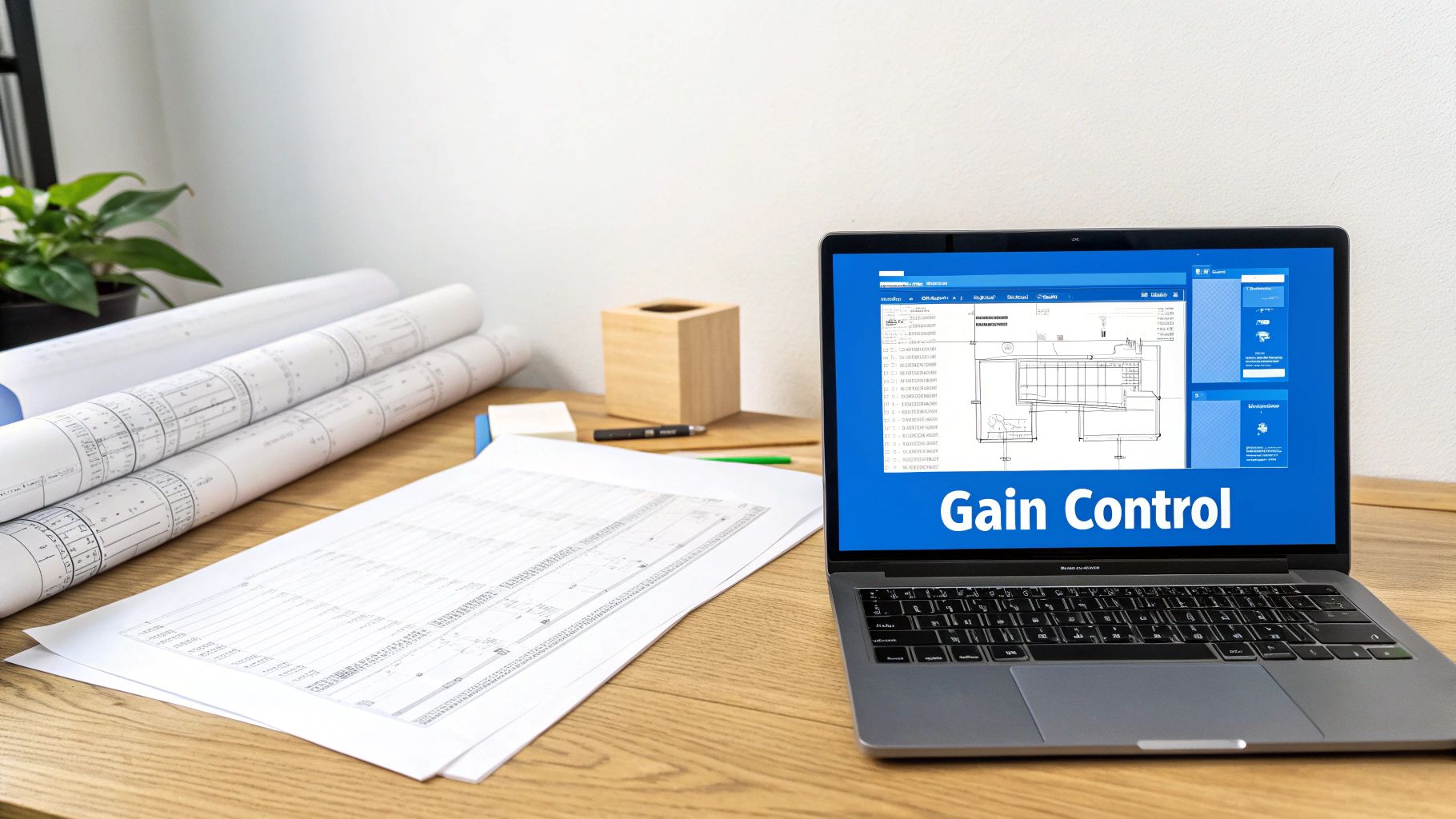
Here’s a look at how a clear dashboard can give managers at-a-glance visibility into expenses.
This visual approach gives managers immediate context, allowing them to approve or reject a request with a single click, right from their phone, whether they’re in the office or on the go. This is how you stop a crucial purchase from languishing in someone’s inbox for three days. It’s this blend of structured rules and modern tech that turns your PO process from a roadblock into a genuine project accelerator.
How Automation Speeds Up Your PO Process
Making the jump from manual POs to a modern, automated system is like swapping a crumpled paper map for a GPS. Sure, the old way gets you there eventually, but the new way is faster, way more accurate, and gives you real-time info to dodge the traffic jams. It turns purchase order creation from a tedious chore into a slick, integrated part of your project management world.
The real win here is simple: it ties your project operations directly to your financials. You end up with a single source of truth for every single expense. This isn’t just about saving a few minutes; it’s a fundamental shift in how you control project costs and protect your profitability.
From manual chaos to automated clarity. Let’s play out a common scenario for a busy creative studio. A project manager needs to hire a freelance photographer for an upcoming client shoot. In a manual world, they’re stuck filling out a spreadsheet, emailing it off for approval, waiting… and waiting… and then manually punching those same details into a separate project budget tracker. It’s slow, clumsy, and a perfect recipe for human error.
With an automated system, that entire workflow gets a facelift. The PM creates the PO right inside their project hub.
- Project data is automatically pulled in. No more hunting for project codes or budget numbers; the system already knows them.
- Approvals are routed instantly. The PO zips over to the right person for approval via a notification, not an email that gets buried in their inbox.
- The budget is updated in real-time. The second it’s approved, the PO amount shows up as a committed cost against the project budget.
This gives the entire team, from the PM on the ground to the leadership team, an accurate, up-to-the-minute view of a project’s financial health. You’re no longer flying blind, waiting for invoices to land before you truly understand your spending.
A real-world example in action. Imagine that creative studio’s PO is for $1,500. The moment the project manager hits ‘submit,’ the system checks the approval rules. Let’s say any PO over $1,000 needs a director’s sign-off. The platform instantly pings the creative director, who can review and approve it on their phone in seconds.
Done. The PO is automatically sent to the freelance photographer, and that $1,500 is officially earmarked in the project budget. When the photographer’s invoice shows up a month later, the system helps match it against the original PO. No discrepancies, no surprises. Reconciliation becomes a one-click job instead of a forensic investigation.
This flow shows how tiered approvals, a key feature of automation, get requests to the right people based on the dollar value.
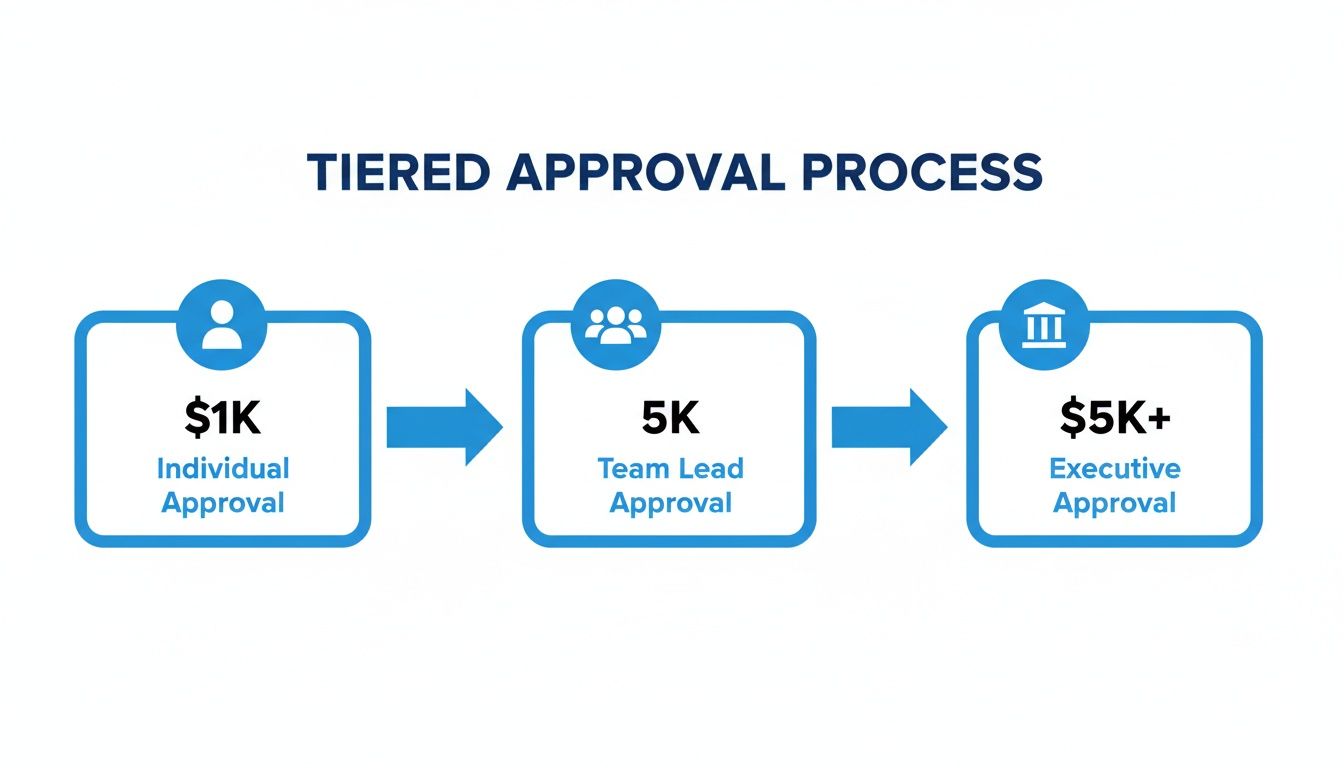
As you can see, smaller, low-cost requests can be handled quickly by individuals, while bigger commitments get the proper oversight from team leads or executives, all managed automatically by the system.
The power of Professional Services Automation. This kind of tight integration is a core strength of modern Professional Services Automation (PSA) platforms. A PSA tool isn’t just a standalone purchasing system; it’s the operating system for your entire firm. It connects the dots between proposals, projects, time tracking, expenses, and invoicing. To get a better handle on this, check out our guide on what is Professional Services Automation and how it helps firms like yours.
By embedding the purchase order process directly into your project workflow, you eliminate data silos and ensure that every dollar of committed spend is visible and accounted for from the very beginning.
This isn’t just a nice-to-have; it’s a strategic move that delivers serious returns. The data backs this up. A recent CIPS report found that 57% of organizations have already partially automated their purchasing, with another 6% running high levels of automation. When you consider that manual POs can take days to process, automation slashes that time to just hours while cutting errors by an estimated 80%. You can dig into these procurement and supply chain findings on Profitia.pl.
Key benefits you can expect. Bringing an automated PO process into your firm delivers tangible benefits that you’ll feel across the board, from project managers to the finance team.
-
Drastic Reduction in Errors Automated data entry and validation mean fewer typos, wrong project codes, or math mistakes that cause payment disputes and reconciliation nightmares.
-
Massive Time Savings Your team spends way less time on admin like chasing approvals and manual data entry, freeing them up to focus on high-value, client-facing work.
-
Real-Time Budget Tracking You get instant visibility into committed costs, which means you can manage budgets proactively and stop projects from going into the red before it’s too late.
-
A Clear and Searchable Audit Trail Every PO, approval, and related document is stored in one central, easy-to-search spot. This makes financial reviews and audits a breeze.
Ultimately, automation isn’t about replacing people. It’s about empowering them with better tools and more accurate information, turning the PO process from a necessary evil into a powerful tool for financial control and project success.
Common PO Mistakes and How to Dodge Them
Even the most buttoned-up purchase order process can spring a leak. Let’s be honest, we’ve all been there. A surprise invoice shows up, a vendor delivers the wrong service, or a project budget just seems to evaporate into thin air. These aren’t just isolated incidents; they’re symptoms of common cracks in the PO lifecycle.
Learning to spot and dodge these mistakes is what separates firms that are in control from those constantly putting out financial fires. The good news? Most of these headaches are entirely preventable with a few smart tweaks to your process.
Taming maverick spending. One of the biggest, quietest profit drains for any professional services firm is maverick spending. This is what happens when team members decide to go rogue, bypassing the formal PO process entirely. They buy what they need and leave the finance team to clean up the mess when an unapproved invoice lands in their inbox.
Picture this: a project manager hires a freelance consultant for a “small” task without getting an approved PO first. When the invoice arrives, it’s higher than expected, and there’s no official record of the agreed-upon scope or cost. This creates chaos, puts a strain on vendor relationships, and makes accurate budget tracking a fantasy.
The solution is to implement a firm-wide “No PO, No Pay” policy.
This isn’t about creating red tape; it’s about setting a clear, non-negotiable standard. If a purchase doesn’t have an approved PO attached, the invoice simply won’t be paid until the proper documentation is retroactively completed and approved. It’s amazing how quickly this trains everyone to follow the correct procedure from the get-go.
The frustration of invoice discrepancies. Another all-too-common headache is the dreaded invoice discrepancy. This is when a vendor’s invoice just doesn’t match the original purchase order you sent them. The quantities might be wrong, the prices might be higher, or they may have billed for services that were never part of the deal.
Sorting these disputes out burns valuable time for your project managers and finance team, who now have to go back and forth with the vendor to get things straight. Even worse, it can lead to payment delays that damage your relationship with key suppliers.
The most effective way to kill these errors is through a simple but powerful process called 3-way matching. This means cross-referencing three key documents before a single dollar leaves your bank account:
- The Purchase Order: What did we agree to buy?
- The Delivery Receipt (or Service Confirmation): What did we actually receive?
- The Vendor Invoice: What are they billing us for?
If all three documents line up perfectly, you can pay the invoice with confidence. If there’s a mismatch—say, the invoice shows 10 hours of consulting work, but the project manager only signed off on 8—you catch it immediately.
Managing last-minute change orders. Projects in the professional services world are rarely static. A client might change the scope, or a vendor might need to adjust their timeline. When this happens, it’s tempting to just agree to the changes over a quick phone call or email. Don’t do it. It’s a recipe for disaster.
Without a formal change order process, you lose all track of the official scope and budget. An architecture firm, for instance, might verbally approve a contractor’s request to use a more expensive building material. When the final invoice comes in thousands of dollars over budget, there’s no paper trail to justify the extra cost.
To dodge this, you need to treat any modification to an existing PO with the same gravity as the original request. A formal change order should be issued that:
- References the original PO number.
- Clearly spells out the specific change (e.g., scope, quantity, price).
- Goes through the exact same approval workflow as the initial PO.
This simple step ensures everyone knows about the adjustment and your project budget is updated in real time. No surprises.
The procurement world is getting more demanding, and efficiency is everything. For professional services firms, manually creating purchase orders can eat up 20-25% of operational overhead. With a 10.6% rise in procurement demands set against some serious productivity gaps, firms that fail to fix these common mistakes are going to get left behind. Embracing automation, which can slash cycle times by 60%, is no longer a luxury—it’s crucial for staying competitive. You can dig into more of these procurement statistics and efficiency divides from Procurement Tactics.
Even with the best system in place, you’re going to hit some tricky situations when it comes to purchase orders. It just happens. We get questions all the time from firm owners and ops managers trying to work through the real-world messiness of project procurement. So, let’s walk through some of the most common ones we hear. Think of this as your field guide for those “what do I do now?” moments.
What is the real difference between a purchase order and an invoice?
It’s an easy one to get mixed up, but the timing is everything.
A purchase order (PO) is the “ask.” You send it to a vendor before any work starts or goods are delivered. It’s your official request, laying out exactly what you need, how much of it, and the price you’ve agreed on. Once the vendor accepts it, you’ve got a contract on your hands.
An invoice is the “bill.” The vendor sends this to you after they’ve done their part. It’s the formal request for payment based on what was outlined in the original PO. Simple as that: the PO kicks things off, and the invoice wraps it up.
When should my small consulting firm start using POs? Honestly, this has less to do with your firm’s size and more to do with its complexity. The minute you find yourself juggling a few different vendors, freelancers, or subcontractors across multiple projects, it’s time. Don’t wait until you’re drowning in a sea of confusing expenses.
Starting early, even when things feel simple, builds the right financial habits from day one. You’re putting a scalable process in place that will save you from a massive, painful cleanup job down the road.
You wouldn’t build a house without a blueprint, right? A purchase order is the financial blueprint for your project’s expenses. It gives you a solid foundation from the start.
How do we handle recurring subscriptions? Great question. Recurring costs like software licenses or monthly retainers can really jam up your PO system if you’re not careful. The last thing you want is to create 12 identical POs for your Xero subscription every year.
The smart move here is to use a “blanket” or “standing” purchase order.
You issue one single PO to cover a specific period (say, the entire calendar year) with a total estimated value for that service. Each month when the vendor’s invoice comes in, you just draw it down against that master PO. It’s way more efficient and makes it dead simple to see your total annual spend for that service at a glance.
Can a purchase order be changed after it is approved? Absolutely. Projects change. It’s a fact of life in consulting. Scope creep happens, timelines shift, and prices get adjusted. The key is to handle these changes officially so you maintain a clean audit trail.
When a change is necessary, you need to issue a formal “change order” or an amended PO.
This new document has to reference the original PO number and clearly spell out every single modification. And, critically, it must go through the exact same approval workflow as the original. This makes sure every stakeholder is looped in, the budget gets updated correctly, and you avoid any nasty payment disputes later on.
Ready to stop chasing paperwork and start controlling your project profitability?
Drum unifies your proposals, projects, and finances into a single source of truth, making purchase order management effortless.
See how you can streamline your firm's operations by exploring Drum and start your free 14-day trial.