
 Pipeline & Proposals
 Project Management
 Resource Planning
 Time & Costs
 WIP & Invoicing
 Commercial Reporting
 Consulting Engineers
 Architects
 Town Planners
 Building Designers
Best Project Management Software for Consultants in 2026 (Compared)

Ben Walker
Written for Drum

In This Article
Best Project Management Software for Consultants
If you’re a consultant trying to juggle multiple clients with a generic to-do list, you know the feeling. It’s like being a master chef trying to run a five-star kitchen with nothing but a single notepad. It’s a recipe for chaos!
While basic tools are fine for simple task tracking, they completely miss the mark for the financial and operational reality of a client services business. That’s where specialized project management software for consultants comes in, and it changes everything.
Why Generic Tools Don’t Work for Consultants
Standard project management tools are built with one goal in mind: getting the project done. They’re great at organizing tasks, hitting deadlines, and tracking progress from A to B.
But for a consultant, finishing the project is only half the story. You also have to run a profitable business while you’re at it.
This is where generic platforms fall flat. They just don’t have the financial smarts to connect your project work directly to your bottom line. You’re left trying to stitch together spreadsheets, time trackers, and invoicing apps. It’s a messy, inefficient workflow that’s just begging for errors.
The Profitability Blind Spot. The biggest headache with generic software? A total lack of visibility into project profitability. Sure, you might know a project is on schedule, but do you know if it’s actually making you money?
Answering that simple question means connecting billable hours, expenses, and project budgets in real time. Your standard task manager simply can’t do that.
Let’s imagine a marketing consultant, we’ll call her Maya, who is using a generic tool to manage a client’s campaign. She can see the social media ads are scheduled, which is great. But she has no easy way of knowing if the hours her graphic designer and copywriter have poured into the creative have already blown past the budget. Without that insight, she’s flying blind, and the entire project’s profitability is at risk.
A consultant’s success isn’t just measured by completed deliverables, but by the financial health of each client engagement. Without the right tools, you’re unable to make informed decisions that protect your margins.
To get a quick sense of how these challenges map to software solutions, here’s a simple breakdown:
Consulting Challenges and Software Solutions
| Consultant’s Challenge | Key Software Feature Solution |
|---|---|
| Can’t see if projects are profitable in real-time. | Integrated budget tracking and profitability dashboards. |
| Time tracking is disconnected from project tasks. | Built-in time tracking against specific tasks and deliverables. |
| Invoicing is a manual, error-prone process. | Automated invoicing based on tracked time and project milestones. |
| Spreading team resources too thin across projects. | Resource allocation and utilization forecasting tools. |
| Juggling multiple apps for time, tasks, and billing. | A single, unified platform for all project operations. |
As you can see, the right software isn’t just a “nice-to-have”; it directly solves the most pressing financial and operational hurdles consultants face every day.
The Disconnect in Client and Resource Management. Beyond just the money, consulting work has its own unique operational rhythm. You’re constantly managing client expectations, trying to allocate team members across multiple projects without burning them out, and making sure every single billable minute is captured.
Generic tools treat all tasks as equal, but in consulting, a non-billable hour has a profoundly different impact than a billable one.
This is where specialized platforms, often called Professional Services Automation (PSA) software, really shine. To get a better handle on this software category, you can check out our guide on what PSA software is and how it’s built specifically for firms like yours.
The demand for these integrated solutions is skyrocketing. The project management software market hit $7.46 billion in 2024 and is on a steep upward climb, driven by the need for smarter workflow automation. In fact, Ruddr’s 2026 PSA software analysis projects the broader PSA market will grow from $15.2 billion in 2025 to over $26 billion by 2030, reflecting just how essential these tools have become for services firms.
Essential Features Your Software Must Have
Not all project management tools are created equal, and this is especially true when you’re in the consulting game. To really move the needle for your business, the right platform needs to be way more than a glorified to-do list. Think of it as the central nervous system for your entire client operation.
Making the right choice is a big deal, particularly in a market that’s absolutely booming. The global project management software market hit a valuation of around $9.65 billion in 2024 and is projected to nearly double to almost $19 billion by 2035 according to Market Research Future. This isn’t just random growth; it’s a direct reflection of the surging demand for tools that can handle remote teams and flexible project styles, which is the daily reality for consultants.
Time Tracking and Invoicing. For a consultant, time is literally money. So, the most critical feature you can ask for is the ability to track every single billable minute against the right task, client, and deliverable. But just tracking it isn’t enough. That data needs to flow directly into your invoicing system, ending the soul-crushing, error-prone process of manually building invoices from spreadsheets and memory.
For example, an IT consultant working on a fixed-bid server migration can track time directly in the software. This allows them to see if the team is getting dangerously close to the budgeted hours for a certain phase, letting them pivot before the project’s profitability takes a nosedive. When a milestone is hit, the software can generate a perfectly accurate invoice based on the logged hours, ensuring they get paid correctly and on time.
Resource Allocation and Management. Juggling multiple clients means you’re constantly playing Tetris with your most valuable asset: your team’s time. A solid project management software for consultants has to include powerful resource allocation tools. These give you a bird’s-eye view of who’s working on what, who’s completely swamped, and who actually has the bandwidth for that new project you’re about to land.
This is how you prevent burnout and stop yourself from making promises to new clients that your team can’t possibly keep.
Effective resource management is the key to sustainable growth. It allows you to confidently scale your client base without sacrificing the quality of your work or overwhelming your team.
A marketing agency, for instance, could use resource forecasting to see their lead designer is booked at 110% capacity for the next two weeks. That single piece of data allows the operations manager to either renegotiate a deadline or pull in a trusted freelancer. The project stays on track, and the designer doesn’t have to pull an all-nighter. It’s a win-win.
The screenshot below gives you a sense of a typical project dashboard, where teams can see tasks, deadlines, and progress all in one spot.
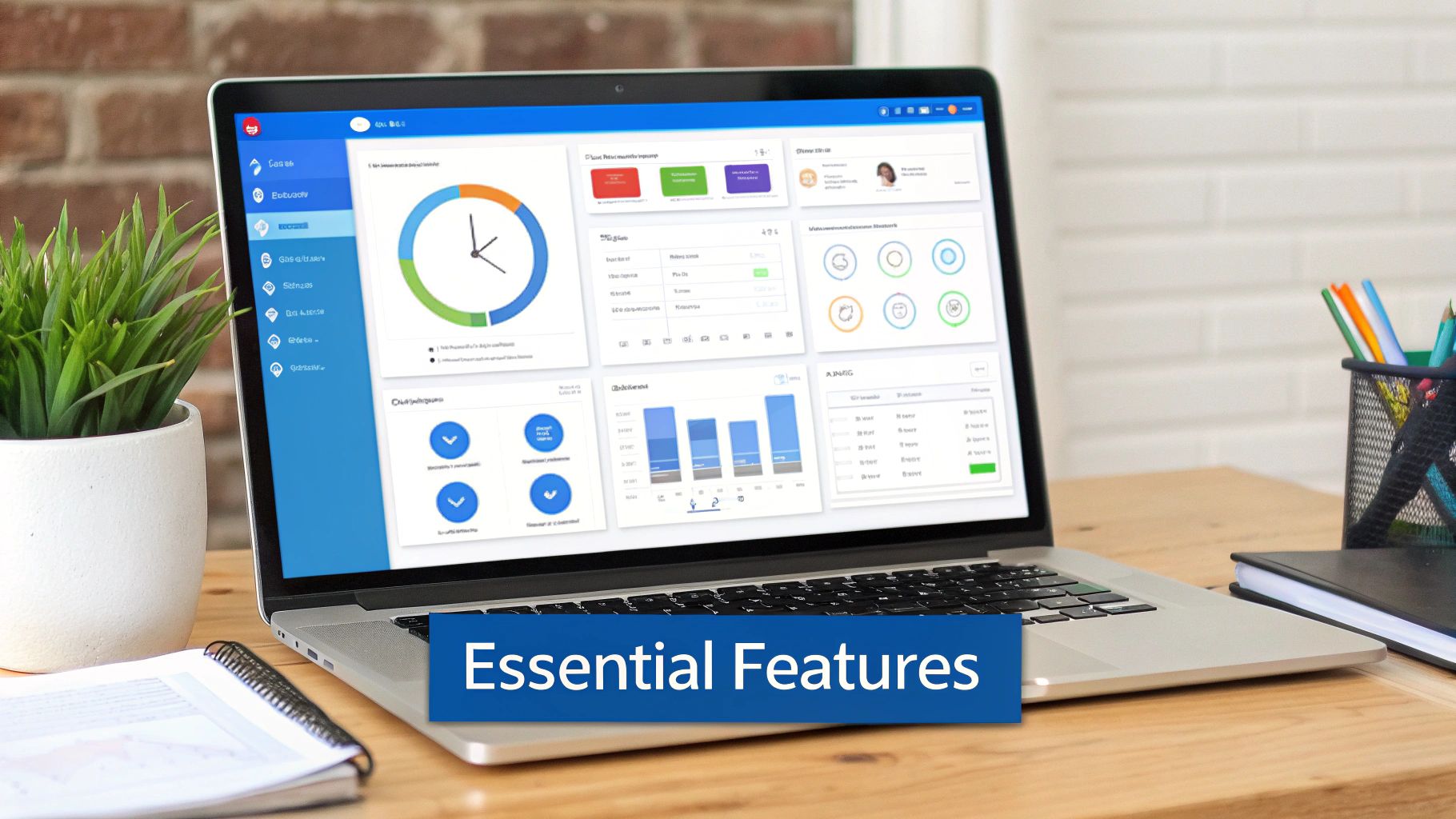
This kind of visual clarity is vital for consultants who need to get a quick pulse on a project’s status without having to dig through a mountain of emails and spreadsheets.
Client Portals and Communication. Let’s be honest: endless email chains and feedback scattered across ten different documents are massive time-sucks. A secure client portal puts an end to that chaos by creating a single, centralized place for all client communication and approvals.
This is where you can share progress updates, upload deliverables for review, and get feedback directly on the work itself. It creates a transparent and professional experience for your clients while building a crystal-clear record of every decision made. Features like these are a core part of effective consulting project management tools and are what really separate the purpose-built platforms from the generic ones.
How Real Consultants Use These Tools

Feature lists are one thing, but the true test of any software is how it holds up in the day-to-day grind of consulting. The real test comes when you see how your peers are using these platforms to handle the beautiful chaos of client work.
So, let’s step away from the theory and look at a couple of real-world scenarios. You’ll quickly see how the right tool can make a massive difference.
These stories show that project management software for consultants gives you real control over the entire project lifecycle, from that first kickoff meeting right through to sending the final invoice.
The Marketing Strategist Juggling Multiple Campaigns. Let’s talk about Sarah. She’s a marketing consultant running brand launches for three different e-commerce clients at the same time. Each launch is its own beast, with dozens of moving parts: ad copy approvals, social media schedules, influencer outreach, all with non-negotiable deadlines. Before, her inbox was a war zone of conflicting feedback and lost attachments.
Now, she uses her project management software to create a dedicated, walled-off workspace for each client.
- No More Email Tag for Creative Approvals: Designers upload ad mockups directly into a task. The client gets a ping, logs in, and leaves feedback right on the image. It’s a clean, version-controlled paper trail.
- A Clear View of the Timeline: Sarah uses a shared Gantt chart to give clients a bird’s-eye view of every phase, from content creation to the ad launch. This transparency sets expectations from day one and puts a stop to those nervous “just checking in” emails.
- Tracking Time Where It Matters: Every team member logs hours against specific campaign tasks. As we cover in our guide to the best time tracking software for consultants, this is absolutely crucial. Sarah can instantly see which activities are eating up the budget and pivot her strategy on the fly.
This simple, structured approach shifts her workflow from reactive to proactive. Campaigns launch on time, and clients are happy.
The IT Specialist Managing Complex Implementations. Next up is David, an IT consultant leading a complex CRM system implementation for a mid-sized company. His biggest headache? Managing all the technical dependencies. One team can’t start building integrations until another team finalizes the data migration scripts. A single delay can trigger a costly domino effect.
For David, his project management platform is the command center for working through these technical minefields.
By visualizing dependencies and automating status updates, consultants can spot potential bottlenecks weeks in advance, turning a potential crisis into a simple scheduling adjustment.
Here’s how he uses the software:
- Mapping Out Dependencies: He links tasks together. If the “Data Migration” task gets delayed, the “Integration Build” task automatically shifts its start date, and everyone involved gets a notification. No surprises.
- A Single Source of Truth for Documents: All technical specs, API keys, and testing scripts live inside the relevant project tasks. No more digging through shared drives for the latest version of a document.
- Keeping Stakeholders in the Loop: He sets up a high-level dashboard for the client’s leadership team. It shows the overall project health without dragging them down into the weeds of the technical details.
This level of organization gives him the clarity he needs to guide a highly technical, high-stakes project to a successful launch.
Comparing the Top Tools for Consultants
Picking the right platform can feel like trying to have a quiet conversation in the middle of a rock concert. With so many options out there, each shouting about its features, it’s easy to get analysis paralysis. We’re going to cut through that noise and give you a straight-up comparison of the project management tools that are actually making a difference for consulting firms today.
We won’t just be listing off features from a brochure. Instead, we’ll look at these tools through a consultant’s eyes, focusing on what genuinely impacts your client work and your bottom line. That means digging into the platforms known for their rock-solid financial tracking, others celebrated for their client portals, and a few that just nail resource management.
The idea here is to map out the unique strengths of each, so you can build a shortlist based on how your consulting practice actually operates.
The Major Players and Their Strengths. The market for these tools is huge and getting bigger every day. In the United States alone, the collaboration and project management software industry is on track to hit around $2.9 billion in revenue in 2025, according to IBISWorld’s industry analysis. That intense competition is good for you because it fuels constant innovation and gives you more powerful options to pick from. Meanwhile, Gartner’s Peer Insights reviews provide real-world user feedback that can help you cut through marketing noise when evaluating platforms.
As you start looking, you’ll notice a few common “personalities” emerge:
- The All-in-One Powerhouse: These platforms want to be the single source of truth for your entire operation. They roll project management, CRM, invoicing, and heavy-duty financial reporting into one package. They’re a great fit for firms looking to simplify their tech stack and have everything under one roof.
- The Collaboration King: For these tools, it’s all about client interaction and team communication. Think polished, integrated client portals, intuitive feedback tools, and deep connections with apps like Slack and Microsoft Teams. If client happiness is your north star, these are for you.
- The Lean and Mean Specialist: This group focuses on doing one or two things exceptionally well, like time tracking or resource planning. They’re perfect for firms that have a solid workflow but just need to plug a specific gap in their process without buying a whole new system.
The best tool isn’t the one with the longest feature list. It’s the one that fits how your firm already works and solves your biggest operational headaches, whether that’s nailing profitability, improving client communication, or just figuring out who has the bandwidth for the next project.
Feature Comparison of Leading Consultant PM Software. To make this more concrete, let’s put some popular options side-by-side and see how they stack up on the features consultants care about most. This isn’t an exhaustive list, but it gives you a clear picture of where each platform really shines in a client-service business.
| Software Tool | Best For | Key Consulting Feature 1 | Key Consulting Feature 2 | Pricing Model |
|---|---|---|---|---|
| Tool A (e.g., Drum) | Firms wanting a unified business OS | Integrated Profitability Reporting | Connected Proposal-to-Invoice Workflow | Per User/Month |
| Tool B (e.g., Asana) | Highly collaborative, task-driven teams | Advanced Workflow Automation Rules | Extensive Third-Party Integrations | Tiered (Free to Enterprise) |
| Tool C (e.g., Kantata) | Large firms needing deep resource planning | Granular Resource Forecasting | Advanced Business Intelligence (BI) | Custom/Quote-Based |
| Tool D (e.g., Harvest) | Solopreneurs and small teams needing simplicity | Simple Time Tracking and Invoicing | Integration with Accounting Software | Per User/Month |
Think of this table as a starting point. A large management consulting firm might lean toward Tool C for its powerful resource insights, while a fast-moving creative agency could get more value from Tool B’s collaborative DNA. The trick is to map these strengths back to your own firm’s unique challenges and where you want to go next.
Making the Right Choice for Your Firm
You’ve seen the options out there, and now it’s time to land on a decision. Choosing the right project management software for consultants isn’t just another subscription to manage; it’s a real investment in your firm’s future efficiency and, ultimately, its profitability. Here’s a practical way to pick and implement the perfect platform for your firm.
The first step is a simple but crucial one: a self-assessment. Seriously, before you look at another glossy feature list, take a moment to understand your firm’s DNA. This internal clarity will be your compass, guiding you toward a tool that genuinely solves your problems instead of just adding to your monthly expenses.
Assess Your Firm’s Unique Needs. Start by asking a few pointed questions about how your team actually works day-to-day. Be brutally honest here, because this foundation will stop you from getting distracted by shiny new features you’ll never end up using.
- Workflow Reality: How do projects really get from the proposal stage to the final invoice? Map it out. Pinpoint the biggest bottlenecks. Is it chasing down chaotic client feedback, dealing with messy time tracking, or a painful, multi-step invoicing process?
- Client Volume and Complexity: Are you juggling a high volume of smaller, similar projects, or are you deep in the trenches with a few large, complex engagements? The answer here will tell you if you need a simple, repeatable template system or a more flexible platform with lots of custom fields.
- Budget and Scalability: What’s a realistic monthly budget per team member? Just as important, does the software’s pricing let you grow? You don’t want to face a massive price hike just for adding a few new team members down the line.
This decision tree gives you a great visual of how your primary goal (whether it’s boosting profitability, improving collaboration, or getting a better handle on your resources) points toward different software priorities.
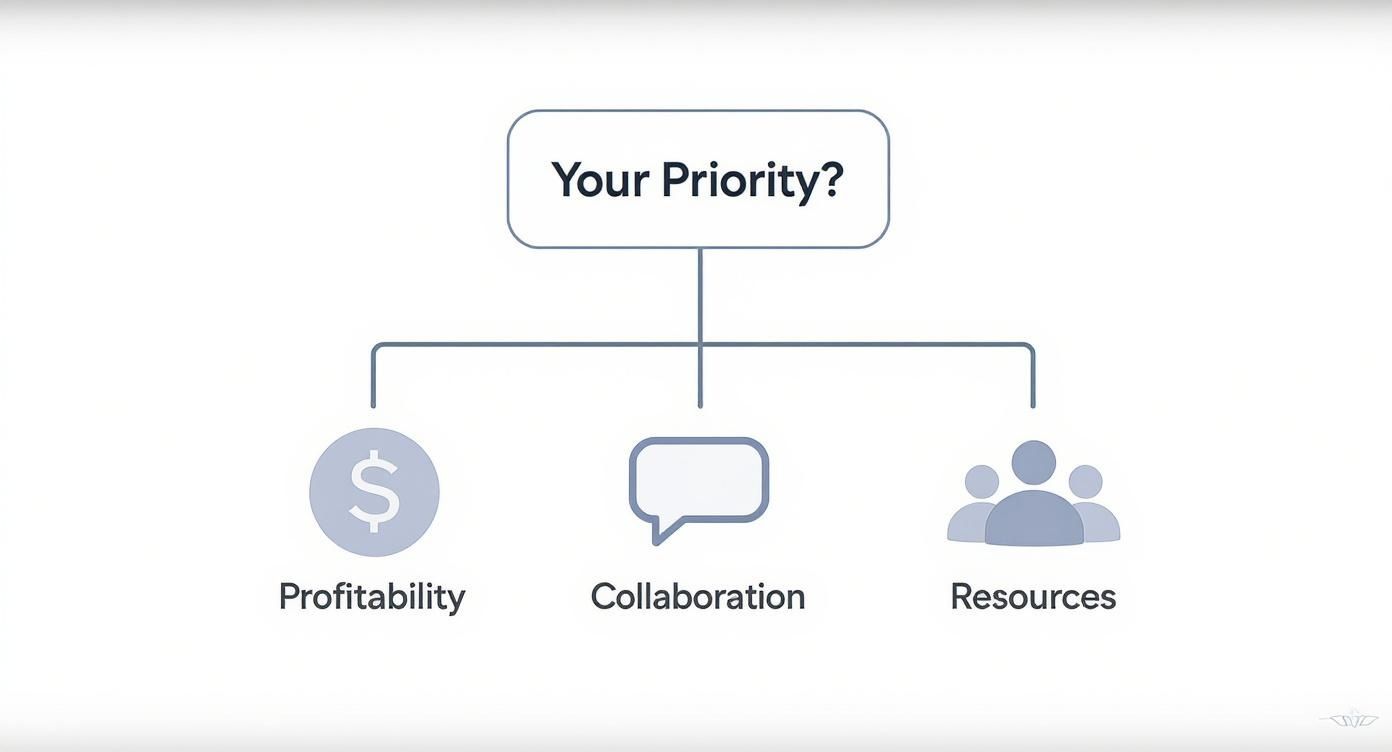
The key takeaway is that the “best” software is completely relative. A tool that’s amazing for tracking profitability might be missing the deep collaborative features another firm desperately needs.
Test Drive With a Clear Checklist. Never, ever commit to a platform without taking it for a thorough test drive. Free trials are your best friend, but only if you use them strategically. Don’t just poke around. Go in with a clear evaluation checklist to make a truly objective comparison.
A software demo shows you the best-case scenario. A free trial shows you the reality of how the tool fits (or doesn’t fit) into your actual workflow.
During your trial, zero in on these core areas:
- Ease of Use: Can your team figure out the basics without needing a week of training videos? If the interface feels clunky or confusing from the start, getting everyone on board will be a painful, uphill battle.
- Integration Power: Does it play nicely with the tools you already rely on? Think about your accounting software (QuickBooks, Xero) or your CRM. Manual data entry between systems completely defeats the purpose of getting a new tool.
- Support Quality: Actually test their customer support. Send them a question and see how quickly and how helpfully they respond. Good support is an absolute lifeline when you’re staring down a deadline and something isn’t working right.
Jumping into the world of project management software can bring up a lot of questions. Let’s run through some of the most common ones we hear from consulting firms to clear things up and help you feel confident about your next move.
Think of this as your final gut-check before you commit, making sure the platform you pick is the right fit for how your firm actually works.
What’s the Real Difference Between General PM Tools and Software for Consultants? You’ve probably used general project management tools like Trello or Basecamp. They’re fantastic for straightforward task management, but they hit a wall when it comes to the business side of consulting.
Software built for consultants comes packed with integrated professional services automation (PSA) features. These are the tools that connect the dots between the work you do and the money you make.
For instance, a general tool can tell you when a task is done. A consultant-focused tool can tell you how many billable hours that task took, how it chipped away at the project’s budget, and then pull that data straight into a client invoice. It’s the difference between a simple to-do list and a full-blown business operations platform.
The core distinction is business context. Software for consultants connects project execution directly to financial outcomes like profitability and resource utilization, which is a blind spot for most generic tools.
How Much Should I Budget for This? The cost can swing quite a bit, mostly depending on your team’s size and how deep you need the features to go. For the most part, pricing falls into a couple of predictable buckets.
- Simple, focused tools usually start around $10-$15 per user, per month. These are perfect for smaller teams or solo consultants who just need solid time tracking and invoicing without all the bells and whistles.
- Comprehensive platforms with advanced features like resource planning, profitability reporting, and CRM integrations typically land in the $25 to $50+ per user, per month range.
Most providers use tiered pricing, which is great because it lets you start small without overcommitting. You can get your feet wet with a basic plan and then scale up as your client list and team expand. And always, always take advantage of the free trials. It’s the only way to know for sure if it’s worth the investment.
Can This Software Play Nicely With the Other Tools I Already Use? Yes, and it absolutely has to. For any modern PM platform, smooth integration isn’t a “nice-to-have.” It’s a deal-breaker, especially for consultants. Before you sign on the dotted line, you have to confirm that the software connects smoothly with the rest of your tech stack.
For a consulting business, a few integrations are completely non-negotiable. Make sure it connects with:
- Accounting Software: Direct links to platforms like QuickBooks or Xero are vital. This is how you simplify everything from tracking expenses to sending the final invoice.
- CRM Systems: Connecting to your CRM (think Salesforce or HubSpot) creates a single, unified story for each client, all the way from their first inquiry to project wrap-up.
- Communication Tools: Integrations with Slack or Microsoft Teams are key for keeping project chatter in one place, so critical conversations don’t get buried in a dozen different email chains.
Getting these connections right means no more mind-numbing manual data entry, fewer mistakes, and one reliable source of truth for your entire operation.
Ready to stop juggling spreadsheets and start running your firm on a single, intuitive platform? See how **Drum** unifies your proposals, projects, and profitability.
Start your free 14-day trial and see how it works.