
 Pipeline & Proposals
 Project Management
 Resource Planning
 Time & Costs
 WIP & Invoicing
 Commercial Reporting
 Consulting Engineers
 Architects
 Town Planners
 Building Designers
Xero Projects Review: Pricing, Limits and the Best Alternatives

Ben Walker
Written for Drum
In This Article
The short Xero Projects review: it’s good for a small team billing simple jobs, and it runs out of road for a 10+ person consultancy. How much does Xero Projects cost? It only comes with Xero’s Ultimate 10 plan, $143 a month including GST for 10 Projects users, then $7 for each extra user.
So, are Xero Projects any good? Yes, if your work is a handful of jobs with a quote, some hours and a few expenses. No, if you run architecture, engineering, surveying or town planning projects with fee stages, monthly progress claims and a WIP number your directors actually look at.
Search for a Xero Projects review today and you mostly find forum threads and vendor pages. This Xero Projects review is for directors, office managers and finance managers at Australian built environment firms with 10 to 80 staff. It covers what the Xero Projects app does well, where it stops, what it really costs once your whole team logs time, and which alternatives deserve a look.
Full disclosure: we build Drum, one of the alternatives below. We’ll be specific about where Xero Projects is the right call, too.
Xero Projects review at a glance
| Xero Projects | Drum | Projectworks | |
|---|---|---|---|
| Price (AUD) | Included in Ultimate 10 at $143/month incl. GST (10 Projects users), +$7 per extra user | $225/month for your first 5 seats, +$45 per extra seat, Drum Complete | $39 to $55 per user per month (Build, Scale, Unleash) |
| Phases or stages | No. Tasks only, no stage budgets | Yes, stages with budgets | Milestones |
| WIP reporting | No firm-wide WIP view | Yes, real time | Yes |
| Progress claims | Deposits and simple progress invoices, no claim schedule by stage | Month-end progress claim run | Percent-complete billing |
| Fee proposals | Quotes only | Fee proposals with Word export, plus sales pipeline | CRM and proposals module |
| Resourcing | Chargeable vs non-chargeable hours report | Yes | Yes |
| Xero sync | Native (it is Xero) | Two-way: invoices, contacts, payments, credit notes, tax rates, tracking categories, account codes | Invoices sync to Xero |
Every price in this Xero Projects review was checked in October 2026. Always confirm on each vendor’s own pricing page before you budget.
What the Xero Projects app does well, and where it stops
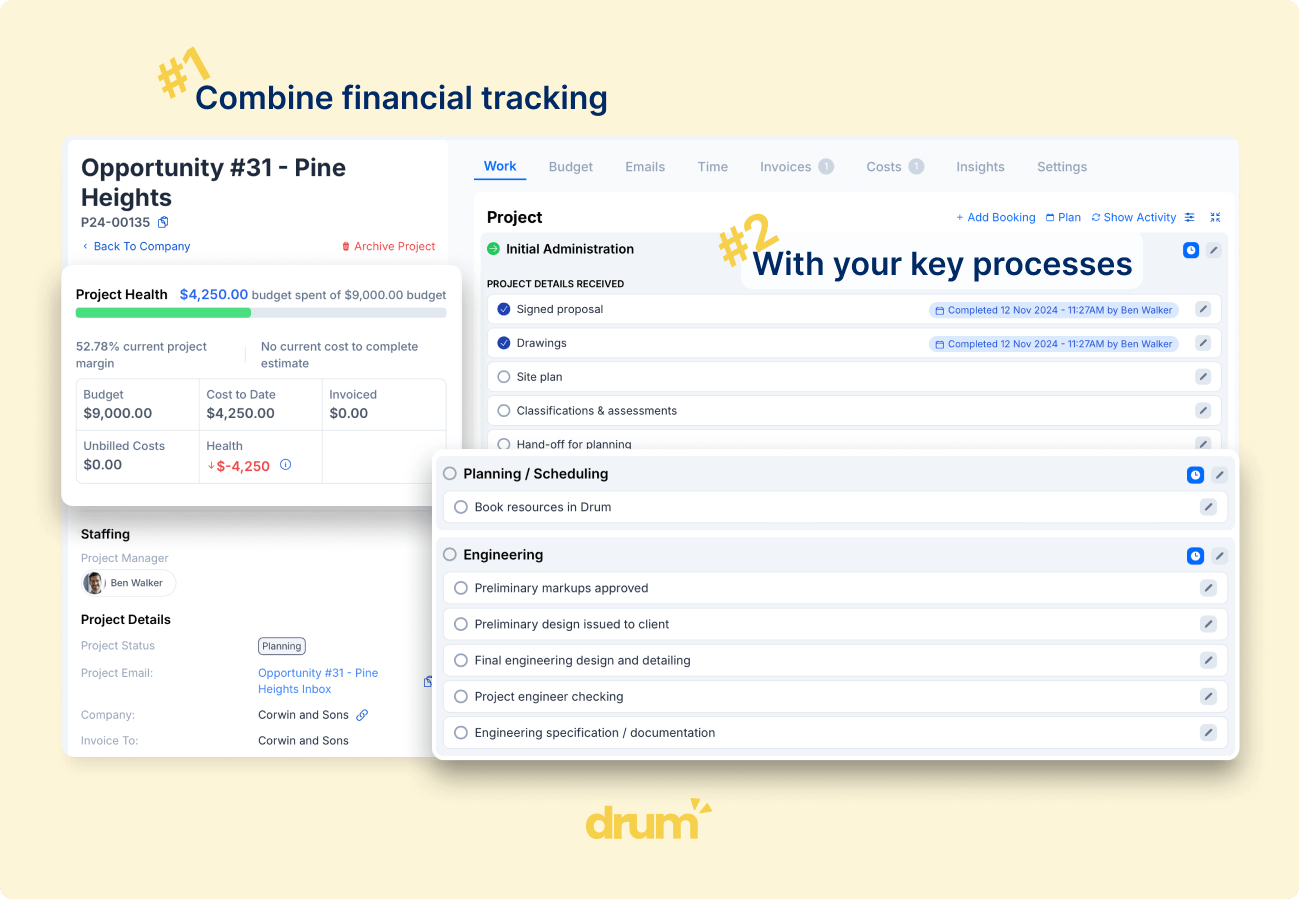
Ever tried to work out whether a job made money by flicking between a timesheet export, a bills list and a half-finished spreadsheet? That’s the problem Xero Projects was built to solve, and for simple work it does solve it.
The good bits are real. According to Xero’s own Projects page, you can run a start-stop timer, assign bills and expense claims to a project, build a quote before work starts, add estimated tasks and costs, and watch a profitability dashboard compare costs with budget. You can then raise a fixed-price or time-and-materials invoice straight from tracked time, including deposits and progress payments. Because it lives inside Xero, there’s no sync to break. For a sole practitioner or a three-person studio, that’s a tidy, cheap setup.
The trouble starts when your firm stops looking like a three-person studio, and the root cause is who Xero Projects is built for. It is a broad, horizontal tool. The same feature set has to serve a plumber, a cafe running catering jobs, a marketing agency and a structural engineer. To work for all of them, it can’t go deep for any of them. The workflows a consultancy runs on every week (fee stages, progress claims against those stages, variations, WIP by project) are exactly the parts a generic tool leaves out.
Xero itself has no concept of project allocation by default. Time logged through Xero Me or payroll timesheets doesn’t land against a project unless you’re using Xero Projects, and Xero Projects has limits of its own.
Users say the cracks show quickly. The Xero Projects listing on the Xero App Store carries 48 reviews, and the recent ones repeat the same themes. One reviewer calls time capture “clunky at best”. Another says you “cannot run reports on Projects” and end up keeping “a manual list of costs”. Others want purchase orders and bills linked to projects without double entry. This is everyday admin, not an enterprise edge case.
So what does that mean for a consultancy? The gaps line up almost perfectly with how built environment firms make money. Before choosing any project tool for Xero, look hard at how you already invoice. Most Australian consultancies bill in one of two ways. You either claim a percentage of each project stage as it progresses, or you invoice all unbilled time and costs at the end of each month. Your project tool has to be the source of truth for those billable concepts, with Xero as the final home for the invoice.
There are no stages, only tasks. An architecture project moves through concept, schematic design, design development, DA and documentation. An engineering commission might split into feasibility, detailed design and construction phase services, each with its own fee. In Xero Projects, tasks are labour buckets rather than stage budgets, so you can’t see that the DA stage is 80% spent and 50% done. On the Xero Product Ideas forum, “progressive billing for fixed-price tasks” has 72 votes, and a request for sub-projects (the closest thing to phases) received the reply that Xero has no plans for it at present.
Progress claims happen outside the system. You can raise a deposit or a progress invoice, but there’s no claim schedule showing fee, percentage complete, amount claimed to date and remaining balance by stage. So the claim gets built in a spreadsheet.
That pattern isn’t unique to Xero Projects. Before moving to Drum, a 45-person civil engineering firm kept its project budgets, progress claims and variations in spreadsheets, sitting beside an older job system. At the end of every month, project managers emailed their claims to the finance manager, who processed them by hand. Month-end billing rested on one person, and nobody could see budgets, WIP and invoices in one place. Swap in Xero Projects and the story reads the same.
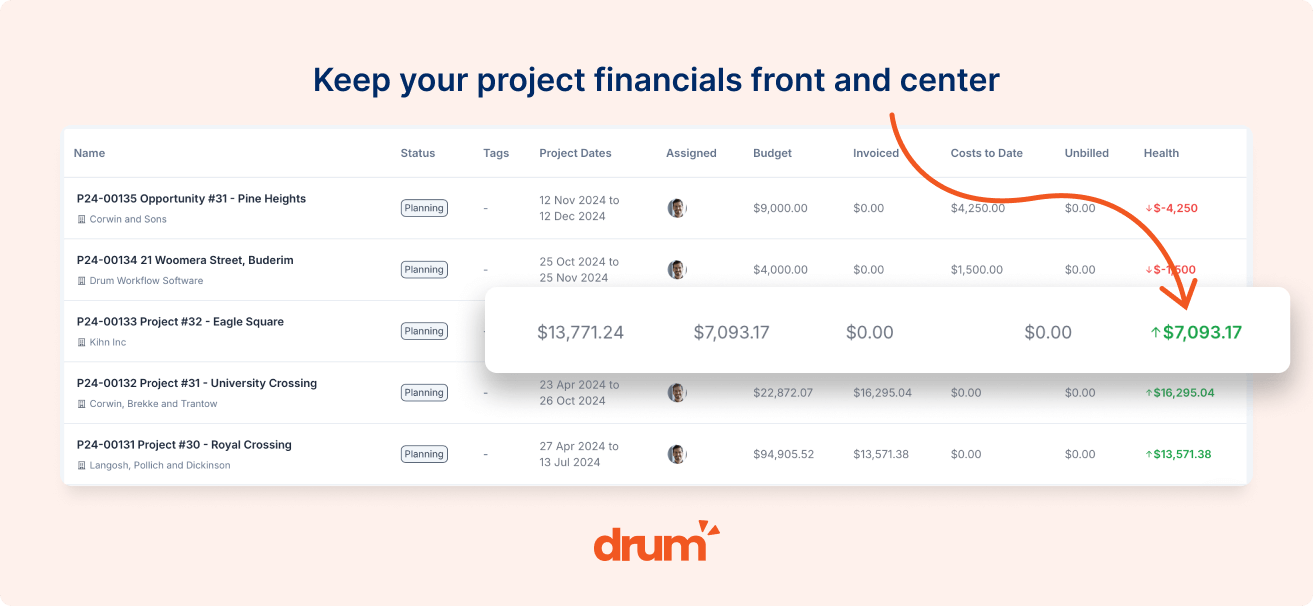
WIP and reporting stay in Excel. Xero Projects shows you uninvoiced time and expenses on each project, but there’s no firm-wide WIP view that compares unbilled work against fee by stage. Tracking categories don’t rescue you either. One of the most-voted ideas on that same Xero forum, with 258 votes, asks Xero to lift the limit on active tracking categories. When your directors want WIP by project, by stage and by office, two categories with 100 options each run out fast.
So the work still happens. It just happens in a spreadsheet, at month end, by the one person who understands it.
Xero Projects pricing in Australia: what you’ll really pay
Xero has reworked its Australian plans in recent years and lifted prices again from 1 July 2026, moving Ultimate 10 to $143 a month. Here’s how Xero Projects pricing works today, according to Xero’s AU pricing page.
Only Ultimate includes Projects. Grow ($78) and Comprehensive ($107) exclude project tracking entirely. Ultimate 10 ($143, including GST) includes “track projects for 10 users”, and each additional Projects user is $7 a month. Xero’s pricing page doesn’t spell out Projects allowances for the larger Ultimate 20, 50 and 100 payroll tiers, so check with Xero if you’re on one of those.
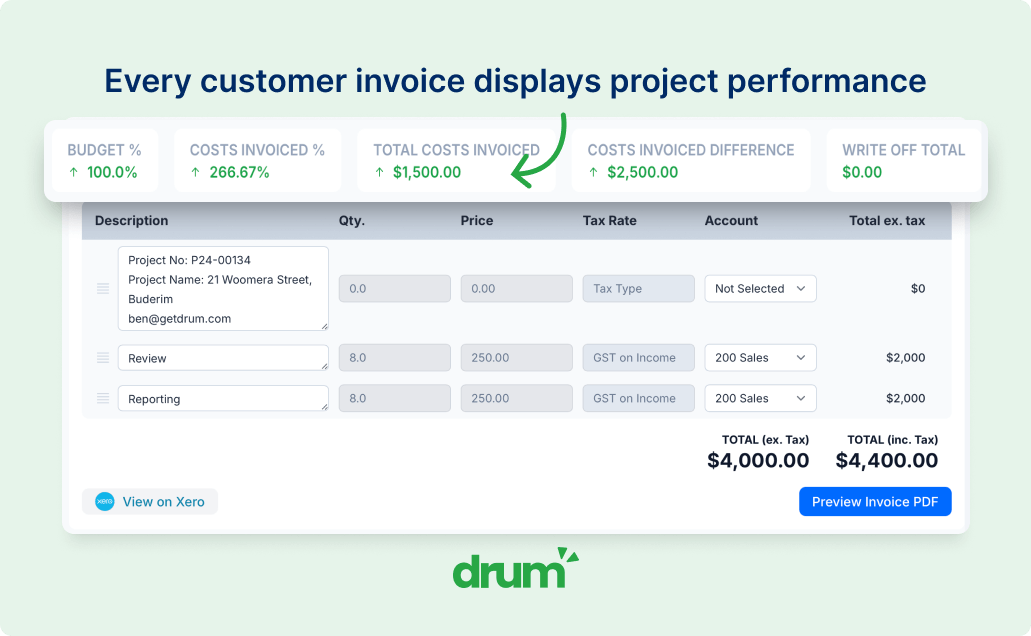
The per-user maths matters more than the plan price. Everyone who logs time needs to be a Projects user. Take a 25-person engineering consultancy where every engineer and drafter tracks hours: that’s Ultimate 10 at $143 plus 15 extra users at $7, or about $248 a month. Compared with staying on Comprehensive, Projects adds roughly $140 a month. That’s genuinely cheap.
The subscription isn’t the expensive part. A 15-person engineering consultancy we worked with used to spend the better part of a week each month pulling time out of a spreadsheet, matching it to projects and rebuilding invoices in Xero by hand. Once time flowed straight through to Xero, that week became an afternoon, and the directors caught two projects drifting over fee while there was still time to have the conversation. The licence fee was never the real cost.
SPI Research has found that firms with real-time project financial visibility recover 5 to 15% of previously unbilled revenue. On a firm billing $4 million a year, even the low end is $200,000. That’s the number to weigh against a $7 user fee.
The best Xero Projects alternatives for Australian firms
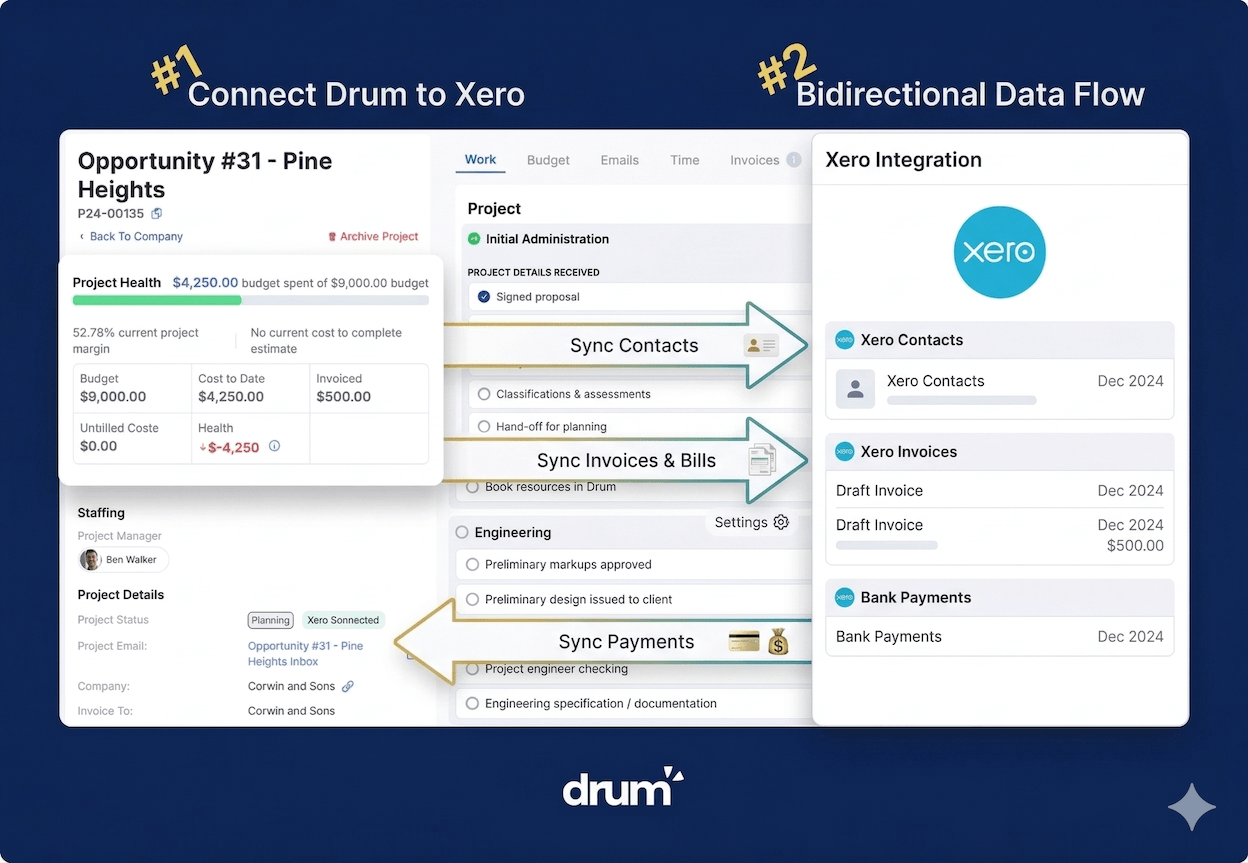
If you’ve outgrown the Xero Projects app, you don’t leave Xero. You keep Xero as the source of truth for accounting, BAS and payroll, and add a Professional Services Automation (PSA) platform above it to own everything before the invoice. The key test is integration depth. A light layer where you push invoices one way, or click through a multi-step sync, recreates the double handling you’re trying to escape. Our guide to Xero project management software unpacks what a deep, two-way sync looks like.
Drum. Drum is Australian-built practice management software for consulting engineers, architects, surveyors and town planners, hosted in Sydney with support from Queensland. You run the full lifecycle in one place: sales pipeline, fee proposals with Word export, projects with stages and budgets, time tracking, live WIP, revenue projections and a month-end progress claim run. The Xero sync is two-way across invoices, contacts, payments, credit notes, tax rates, tracking categories and account codes. When an invoice is ready, you change its Xero status and it syncs. When Xero marks it sent or paid, that flows back, so your project team can see whether a repeat client has paid their last three invoices before you take on the next job. Pricing is $225 a month for your first 5 seats, then $45 per extra seat on Drum Complete, excluding GST and onboarding. If you’re weighing this up, booking a demo lets you see your own billing workflow run end to end before you start a trial.
Projectworks. NZ-built and aimed at architecture, engineering and consulting firms, Projectworks leans hard into utilisation, margin, forecasting and WIP, with percent-complete billing and invoices that sync to Xero. Plans run $39 to $55 AUD per user per month. Worth a look if utilisation reporting is your main gap.
WorkflowMax by BlueRock. The original WorkflowMax sat inside the Xero family until Xero retired it in 2024 and BlueRock took over the brand. It now runs per-user plans from $12.22 to $37.78 AUD per user per month (WorkflowMax pricing has the full breakdown). It suits simpler job workflows; our breakdown of Australian WorkflowMax alternatives covers its trade-offs in detail.
WorkGuru. An Australian job management tool at $30 AUD per user per month with a 5-user minimum. It’s strongest with stock, purchasing and field jobs, so it suits construction-adjacent firms more than design consultancies.
Synergy (formerly Total Synergy). A long-standing AEC platform with deep project accounting. Expect a heavier implementation and pricing on application; it tends to suit larger practices with a dedicated systems owner.
You could also bolt a standalone timesheet tool such as Harvest or Toggl (usually $10 to $20 per user per month) onto Xero. It’s quick, but your time data still has to leave the tool to become an invoice. Our guide to the best timesheet app for Xero compares standalone trackers against integrated platforms, which typically run $25 to $60 per user per month.
Should you stay on Xero Projects?
Here’s where this Xero Projects review lands. On Xero Projects pricing alone, it’s hard to beat. It’s a decent, low-cost tool for small teams that quote a job, track some hours and invoice it. It isn’t a project financial system for a consultancy that bills by stage, runs progress claims and needs WIP before month end.
Stay on it if you’re under about five people, bill simply, and nobody keeps a parallel spreadsheet. Move when the spreadsheets start multiplying, when month-end billing depends on one person, or when your directors only learn a project is over budget after it’s too late to fix.
When you do move, pick a platform that matches how you already invoice in Xero and treats your tax rates, account codes and tracking categories as core data, so invoices land in Xero correctly the first time. That’s the real conclusion of this Xero Projects review: keep Xero for accounting, and give your projects a system built for how your firm actually earns its fees.
Frequently Asked Questions
How much does Xero Projects cost in Australia?
Xero Projects is only included in Xero’s Ultimate 10 plan, which costs $143 a month including GST and covers 10 Projects users. Each extra Projects user is $7 a month. A 25-person firm where everyone tracks time pays about $248 a month. For comparison, standalone timesheet tools that feed Xero run about $10 to $20 per user per month, integrated platforms typically run $25 to $60 per user per month, and Drum is $225 a month for your first 5 seats plus $45 per extra seat on Drum Complete, excluding GST and onboarding.
Are Xero Projects any good for architects and consulting engineers?
For very small teams with simple jobs, yes. For firms of 10 or more, Xero Projects has no project stages, no claim schedule for progress claims, no firm-wide WIP reporting and limited tracking categories, so most consultancies end up running budgets and claims in spreadsheets beside it.
Should I use Xero Projects or a dedicated platform alongside Xero?
Count the systems your team touches to get from a fee proposal to a paid invoice. If it’s Xero plus one or more spreadsheets, a dedicated PSA platform with a two-way Xero sync will usually save more time than it costs. Keep Xero as your accounting source of truth either way.
Outgrown Xero Projects? Keep Xero, fix the projects.
Drum gives Australian consultancies fee proposals, project stages, WIP and progress claims in one place, with a two-way Xero sync that keeps your accounts exactly where they are.
Start your free 14-day trial of Drum today.